
Open-source alternatives to Google Maps Timeline

Dawarich is a free, open-source Google Maps Timeline alternative that keeps your location history on a map and a day-by-day timeline in your browser, and imports your Google Timeline data. Google removed Timeline from the web and now keeps it on the phone only, with limited retention; self-hosted Dawarich keeps your whole history on your own server, sent from a tracking app on your phone.

3 alternatives Free apps Our pick: Dawarich

At a glance

App Good for Code Import from Google Maps Timeline Ease of use
Dawarich People and families who want a private, lasting record of where they have been, outside Google Code Open source Import from Google Maps Timeline Yes Some setup
OwnTracks Recorder People and families who use the OwnTracks phone app and want a light, private live map and location history Code Open source Import from Google Maps Timeline No Some setup
Reitti People and families keeping a private Google Timeline-style history Code Open source Import from Google Maps Timeline Yes Some setup

Why look for an alternative to Google Maps Timeline?

Google Maps Timeline records where you go with your phone and shows it as a map and a daily list of places and trips. It was long known as Google Location History.

People look for an alternative because Google removed Timeline from the web browser and now keeps it on the phone only, with limited retention. Many also want years of their movements kept somewhere other than a Google account. A self-hosted Dawarich keeps your whole history on your own server, in any browser, for as long as you want it. Reitti does the same, with a timeline built around visits and trips and live location sharing through links.

The alternatives, compared

Dawarich

Our pick

Your own location history and timeline, on a private map.

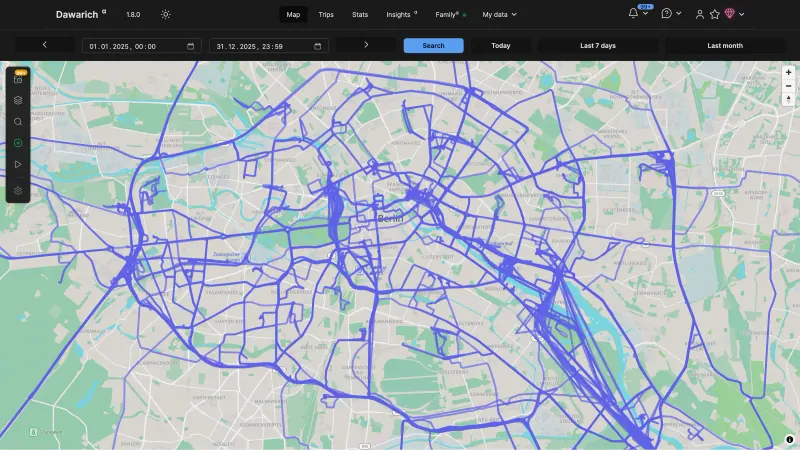
Shows where you have been on an interactive map and a day-by-day timeline of visits and journeys, with trips, places, yearly statistics and days spent in each country, and family members can share their live location. It imports your Google Timeline data. Unlike Google, it does not record on its own: you install a tracking app on each phone and point it at your server.

What you gain
  • Your whole history in a web browser again, with no time limit on how long it is kept
  • Your location data stays on your own server, not with an ad company
  • Trips, yearly stats and a days-in-country count that Google Timeline never had
What is different
  • Nothing records on its own; each phone needs a tracking app pointed at your server
  • Dawarich changes quickly, so keep your original export files as a backup
  • A large Google history takes a while to import and needs a server with enough memory
Some setup Open source

The self-hosted server for the OwnTracks app, with a live map.

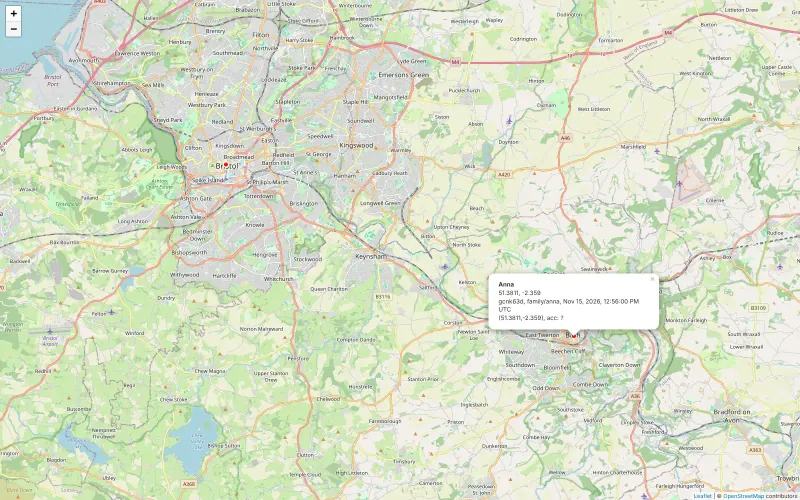
The lightest option: it stores the location history the free OwnTracks app sends from each phone and shows it as points and tracks on a map, with a live map of where each phone is now. It has no day-by-day timeline, visits, trips or stats, it cannot import your Google Timeline, and everyone shares one sign-in.

What you gain
  • Your location history stays on your own server, not with an app company
  • Each phone's position on a live map in any web browser
  • No subscription and no limit on how long your history is kept
What is different
  • No day-by-day timeline, visited places, trips or yearly stats
  • It cannot import your Google Timeline history
  • No place alerts, crash detection or SOS, and in this setup family members see each other on the web map, not inside the phone app
Some setup Open source

Turn your phone's location into a private diary of visits and trips.

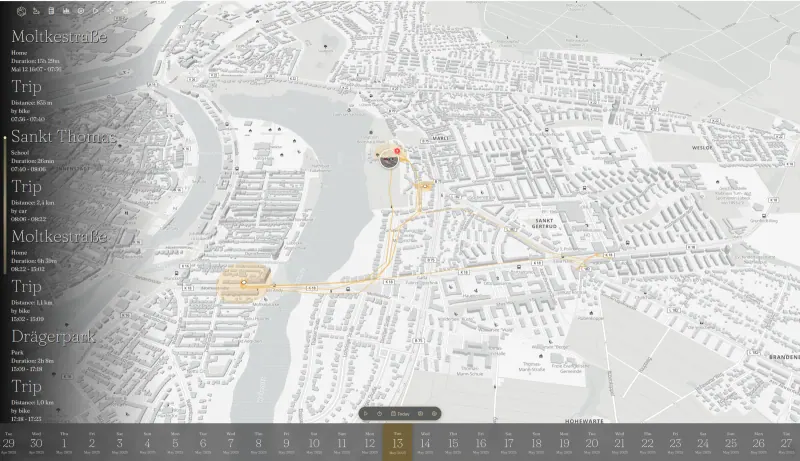
Turns your phone's location points into a daily timeline of visits and trips on a map, with walking, cycling or driving detected, places you go often, and detailed monthly and yearly statistics. It imports Google Takeout and the newer phone timeline exports, shares live locations with family or through links you can revoke, and shows Immich photos where they were taken. It has no phone app of its own, so you use one such as OwnTracks.

What you gain
  • Your whole location history stays on your server, not your phone or Google's
  • Several people can use one Reitti, each with private data
  • Statistics and live sharing are included at no cost
What is different
  • Reitti has no phone app of its own; you install a free tracking app such as OwnTracks or GPSLogger
  • Place names are looked up through an online address service unless you run your own
  • Importing many years of history takes a while to process
Some setup Open source

Moving from Google Maps Timeline

Get your Google Timeline data first: export it from Google Takeout (Records.json and Semantic Location History), or export it from the Timeline settings on your phone (location-history.json). In Dawarich, import the files under My data; large histories take a while. Keep the original files, as Dawarich's makers advise. Then install the Dawarich app, or another tracking app such as OwnTracks, on each phone and connect it to your Dawarich address with its API key, so new places keep being recorded.

OwnTracks Recorder cannot import Google Timeline data, so it starts from the day you connect your phones; keep your Google export as your record of the past. Install the free OwnTracks app on each phone, choose HTTP mode in its connection settings, and enter your Recorder's address ending in /pub with the username and password Cloudgate shows you.

Reitti works like Dawarich: import the same Google files from its import page, then connect OwnTracks, GPSLogger or Overland on each phone.

Questions

What is the best open-source alternative to Google Maps Timeline?

Start with Dawarich. All 3 are free and open source.

Should I choose Dawarich or OwnTracks Recorder?

Choose Dawarich if you want a Google-style timeline of visits and trips, yearly stats and your Google history imported. Choose OwnTracks Recorder if you only want the OwnTracks app's history and a live map on a very small server, with no import.

Can I import my Google Maps Timeline history?

Into Dawarich, yes; OwnTracks Recorder has no import. Dawarich imports Google Takeout files (Records.json and Semantic Location History) and the newer location-history.json export from your phone.

Does Dawarich record my location automatically?

Yes, once you install a tracking app on your phone. The Dawarich app for iOS and Android, OwnTracks, Overland and GPSLogger can send your location to your server.

Can my family share locations in Dawarich?

Yes. Family members can share their live location with each other, and each person can turn sharing on or off.

Should I choose Dawarich or Reitti?

Choose Dawarich for its own phone app, privacy zones and wider statistics. Choose Reitti for a timeline focused on visits and trips, detailed routine statistics, and live location sharing through links. Both are open source and import your Google Timeline data.

Are these Google Maps Timeline alternatives really free?

Yes, Dawarich, OwnTracks Recorder and Reitti are free. To run them you need Cloudgate and a server. Use hosted Cloudgate, which can also provide the server, or install Cloudgate on a server of your own for free. Cloudgate's plans and prices are at cloudgate.octabyte.io/pricing. One server can run several apps.

Do I need a developer to replace Google Maps Timeline?

No. Cloudgate installs the app you choose on your server and gives it a secure web address, and you use it in your browser instead of Google Maps Timeline.