
D

Open-source alternative to Dext

TaxHacker is a free, open-source Dext alternative that reads your receipts, invoices and PDFs with the AI model you choose and turns them into a searchable list of transactions to export for your accountant. Dext is a subscription service built for bookkeepers and their clients; self-hosted TaxHacker keeps your documents on your own server, though it has one user, no bank feeds and no link to Xero or QuickBooks.

Free app Code: Open source Import from Dext: No Some setup

Why look for an alternative to Dext?

Dext, formerly Receipt Bank, captures receipts, invoices and bills from photos, email and uploads, reads the details out of them and sends the results into accounting software such as Xero and QuickBooks. It is used by businesses and by the bookkeepers and accountants who look after their clients' books.

Freelancers and small business owners look for an alternative when they only need the capture part: a tidy, searchable record of their receipts and invoices to hand to an accountant at tax time, without a subscription built for accounting practices. Others want those documents on their own server. A self-hosted TaxHacker reads each document with the AI model you choose and keeps the records with you, while you pay your AI provider directly for what you scan.

How TaxHacker compares

AI bookkeeping that reads your receipts and invoices.

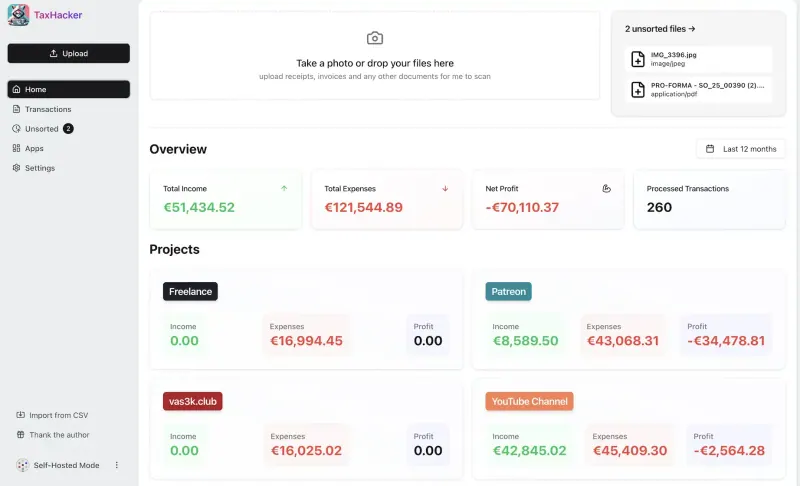
Does Dext's capture job for one person: upload a photo or PDF of a receipt or invoice and an AI model you choose reads the merchant, date, total, VAT, category and line items into a searchable table you can export as CSV with the files. It has no bank feeds, no client or practice features for bookkeepers, and no publishing to Xero or QuickBooks, and it needs your own AI provider key.

What you gain
  • No monthly subscription; you pay only the AI provider for what you scan
  • Your receipts and invoices stay on your own server
  • You choose the AI, including a model that runs on your own computer
What is different
  • One user only, with no team accounts, approvals or reimbursements
  • No bank feeds and no direct link to Xero or QuickBooks
  • No phone app; you upload from the phone's browser instead
Some setup Open source

Moving from Dext

There is no import from Dext, so start TaxHacker with the documents you still need to process. Export your past items from Dext as a CSV file and bring them in through TaxHacker's CSV import if you want them in one list; the receipt images do not come across that way, so keep Dext's archive or download the files you must keep. Before you upload anything, choose your AI provider and paste its API key, set your main currency, and create the categories and projects you use. If receipts arrive by email, connect that mailbox in TaxHacker's Email Monitoring app so attachments come in on their own.

Questions

What is the best open-source alternative to Dext?

TaxHacker is the free, open-source alternative to Dext for capturing receipts and invoices for bookkeeping in the catalogue today. Does Dext's capture job for one person: upload a photo or PDF of a receipt or invoice and an AI model you choose reads the merchant, date, total, VAT, category and line items into a searchable table you can export as CSV with the files. It has no bank feeds, no client or practice features for bookkeepers, and no publishing to Xero or QuickBooks, and it needs your own AI provider key.

Can TaxHacker send receipts to Xero or QuickBooks like Dext?

No. TaxHacker has no link to Xero or QuickBooks. You export the transactions as a CSV file, with the documents attached, and give that to your accountant or import it into your accounting software.

Is TaxHacker for accountants with many clients?

No. The self-hosted TaxHacker has a single user and no client accounts, so it suits a freelancer or one-person business keeping their own receipts, not a bookkeeping practice.

Where are my receipts sent?

Your receipts and transactions are stored on your own server. To read a document, TaxHacker sends it to the AI provider you picked, such as OpenAI, Google Gemini or Mistral, unless you use a model you run yourself.

Is TaxHacker really free compared with Dext?

TaxHacker is free and open source under the MIT licence, with no paid features in the self-hosted version. Reading documents uses an AI provider you choose, such as OpenAI, Google Gemini or Mistral, which charges you by how much you scan, unless you run a model yourself. To run TaxHacker you need Cloudgate and a server: use hosted Cloudgate, which can also provide the server, or install Cloudgate on a server of your own for free. Cloudgate's plans and prices are at cloudgate.octabyte.io/pricing.

Do I need a developer to replace Dext?

No. Cloudgate installs TaxHacker on your server and gives it a secure web address, and you use it in your browser instead of Dext.