
C

Open-source alternatives to ComiXology

Kavita is a free, open-source ComiXology alternative for reading the DRM-free comics, manga and webtoons you own, with series grouping, reading lists and a web reader made for comic pages. ComiXology is Amazon’s comics store, with copy-protected purchases read in Amazon’s apps; Kavita has no store and can’t open those purchases, but keeps your own files on your server.

3 alternatives Free apps Our pick: Kavita

At a glance

App Good for Code Import from ComiXology Ease of use
Kavita Households, clubs and small libraries reading their own comics, manga and e-books Code Open source Import from ComiXology Partly Some setup
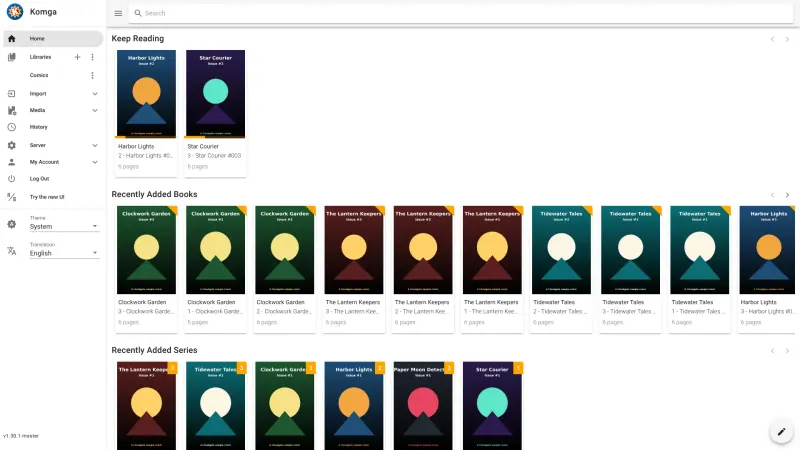
Komga Comic and manga readers who want their own DRM-free collection sorted by series and readable on any device Code Open source Import from ComiXology No Some setup
Stump Comic and manga readers who want a modern home for their DRM-free books and don't mind software that is still in beta Code Open source Import from ComiXology No Some setup

Why look for an alternative to ComiXology?

ComiXology was Amazon's digital comics store and reading app. In December 2023 Amazon closed the ComiXology app and moved its comics, purchases and reading into the Kindle app, where the comics and manga you buy are copy-protected.

Readers look for an alternative when their comics come from many places and they want one library they control. ComiXology purchases are copy-protected and live in Amazon's apps, while DRM-free comics, manga and webtoons from other shops end up scattered across folders and devices. A self-hosted Kavita, Komga or Stump brings those files into one private library that everyone in the household can read in the browser, though none of them has a store or can open ComiXology purchases.

The alternatives, compared

Kavita

Our pick

A self-hosted reading server for your e-books, comics and manga.

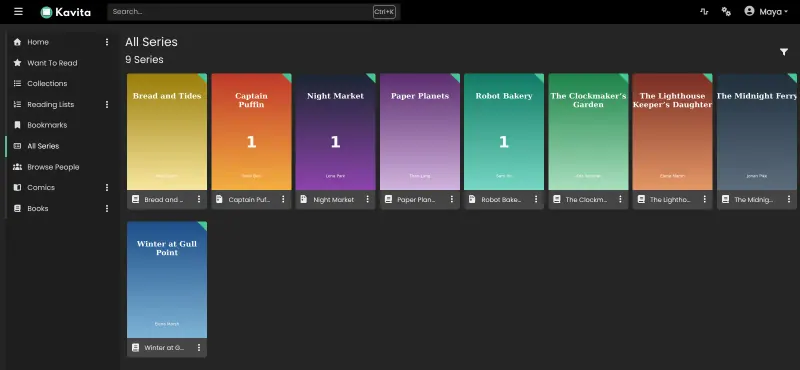
A private reading server for the comics, manga and webtoons you own as files: it groups CBZ, CBR, CB7, PDF and image archives into series with covers, and reads them in the browser in single-page, double-page or webtoon mode, with reading lists, collections and progress for each person. It also reads EPUB books. It has no store, and ComiXology purchases are copy-protected, so only DRM-free files can be added.
Some setup Open source

A self-hosted comic and manga server to read your own collection.

A private comic and manga library for the DRM-free files you own: it sorts CBZ, CBR, PDF and EPUB files into series, reads right to left or as a scrolling webtoon in the browser, and works with the Mihon app on Android and OPDS reader apps. Each reader gets an account and their own reading progress. It is not a store, and comics bought on ComiXology can't be moved over.

What you gain
  • Your DRM-free comics from any shop or scan in one library, with no store account
  • Files stay on your server as ordinary files you can download at any time
  • The whole family or a group of friends gets accounts, each with their own progress
What is different
  • There is no store; you bring your own DRM-free comics, and ComiXology or Kindle purchases can't be moved over
  • Files must be uploaded to your server, and storage is limited by its disk
  • E-books come second; there is no send-to-Kindle, and prose readers may prefer an e-book library
Some setup Open source

A self-hosted comic, manga and e-book server for the books you own.

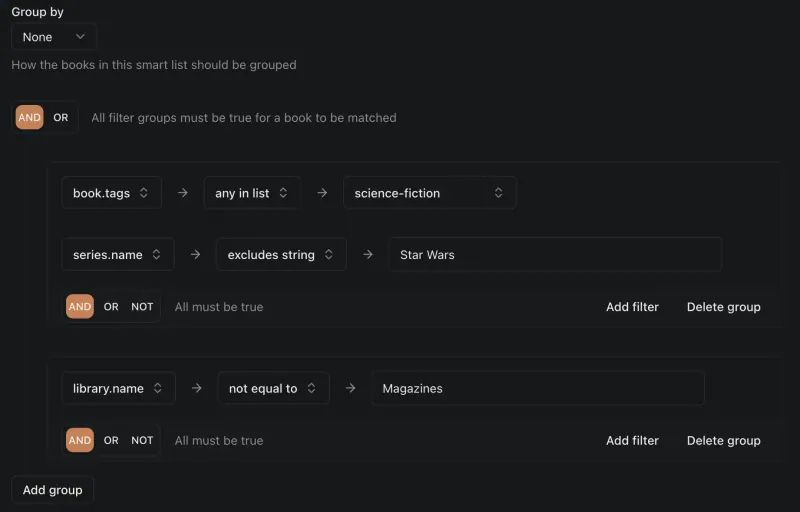
A newer, MIT-licensed comic and manga server, still beta software before its 1.0 release: it reads CBZ, CBR, PDF and EPUB files in the browser, page by page or as a continuous scroll, with smart lists, reading lists, accounts with age and library restrictions, OPDS catalogues for reader apps, and Kobo and KOReader sync. Like Kavita and Komga it has no store and can't open ComiXology purchases, and one maintainer builds it in spare time.

What you gain
  • Your DRM-free comics and e-books from any shop in one library, with no store account
  • Files stay on your server, where you can download them at any time
  • Family or friends get their own accounts and reading progress
What is different
  • There is no store, and ComiXology or Kindle purchases can't be moved over
  • Stump is still beta software from a single developer, before its 1.0 release
  • Books have to be uploaded to your server, and its disk sets the limit
Some setup Open source

Moving from ComiXology

Comics bought on ComiXology stay in your Amazon account, because they are copy-protected. Gather the comics you do have as DRM-free files, such as CBZ, CBR or PDF downloads from shops and publishers that sell them without copy protection. Put each series in its own folder and name the files by series and issue number, since Kavita reads names and ComicInfo.xml to group them. Upload the folders through the file manager address this template adds, then create a library in Kavita and let it scan. Import your reading order as a CBL reading list if you keep one.

For Komga, upload the same files at the File Browser address Cloudgate gives it, ideally one folder per series, then add a library in Komga pointing at that folder and scan it. Komga reads the details stored in the files, such as series and issue numbers, and you can edit the rest in bulk.

For Stump, open its address right after setup to create the owner account, then add a library and upload single books, or a whole series as one .zip file, from the browser. Connect an OPDS reader app, a Kobo or KOReader if you read away from the browser.

Questions

What is the best open-source alternative to ComiXology?

Start with Kavita. All 3 are free and open source.

Can I move my ComiXology comics to Kavita, Komga or Stump?

Not the ones bought on ComiXology. They are copy-protected and stay in Amazon's apps, which since December 2023 means the Kindle app. Kavita, Komga and Stump read DRM-free comic files you own, such as CBZ, CBR and PDF.

Should I choose Kavita, Komga or Stump?

Kavita and Komga both group your comics into series and read them in the browser, with webtoon and double-page modes. Choose Kavita if you also want reading lists, collections and CBL reading-list import. Choose Komga if you read manga right to left on Android, since Mihon has an official Komga extension. Stump is the newest: it adds smart lists, OPDS 2.0 and Kobo and KOReader sync, but it is still beta software.

Is Kavita good for manga and webtoons?

Yes. Its image reader has single-page, double-page and webtoon modes with continuous reading, and it groups volumes and chapters into series.

Can I read these comics in a phone app?

Through the browser or a third-party app. Both web readers work on phones and tablets. Kavita's OPDS feed and API connect to reading apps such as Panels, Chunky, Mihon and Paperback, and Komga works with Mihon on Android and OPDS reader apps. Stump works with OPDS apps and syncs with Kobo and KOReader; its own phone app is in beta and planned as a one-time purchase. Kavita and Komga have no official phone app.

Can I buy comics in Kavita, Komga or Stump?

No, none of them has a store. You buy DRM-free comics from shops and publishers that sell them, or use your own scans, and add the files to your library.

Are these ComiXology alternatives really free?

Yes, Kavita, Komga and Stump are free. To run them you need Cloudgate and a server. Use hosted Cloudgate, which can also provide the server, or install Cloudgate on a server of your own for free. Cloudgate's plans and prices are at cloudgate.octabyte.io/pricing. One server can run several apps.

Do I need a developer to replace ComiXology?

No. Cloudgate installs the app you choose on your server and gives it a secure web address, and you use it in your browser instead of ComiXology.