
Stoat
Discord-style community chat with servers and channels you own.
No server needed to start: Cloudgate can provide one. What happens when you click Deploy
What is Stoat?
Self-hosted Stoat, formerly Revolt: open-source, Discord-style community chat with servers, channels, roles, direct messages and bots on your own server.
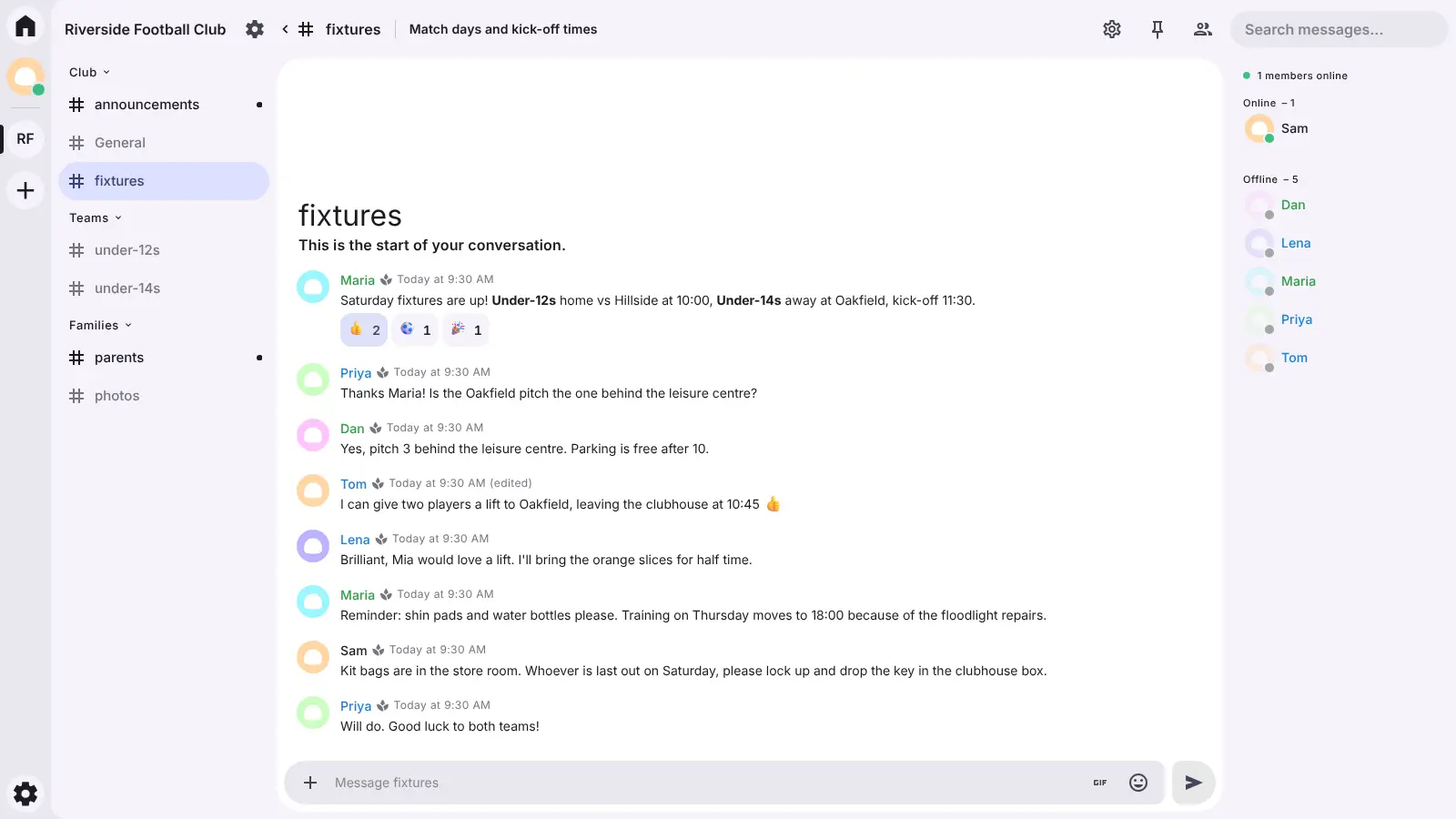
Stoat, formerly called Revolt, is free, open-source group chat that works like Discord: you create a server for your community, split it into text channels, give members roles and talk in direct and group messages. Self-hosted Stoat keeps all of it on your own server, with no ads and no subscription for extras such as custom emoji, animated avatars and profile banners.
A local football club could run one Stoat server with channels for each team, a parents' channel and an announcements channel only the coaches can post in, and send new families a single invite link. Roles decide who sees and manages what, and moderation tools and bots help keep things friendly.
Stoat works in any web browser and can be added to a phone's home screen like an app; the official desktop app can connect to your server too, but the official phone apps mostly can't yet. This template is text chat only, without voice or video calls. Cloudgate installs Stoat on a server Cloudgate provides or one you connect and gives it a secure web address; the first person creates an account and a server, then invites everyone else. This is the open-source Stoat software running on your own server; it is not run by, or associated with, the Stoat team or stoat.chat.
What you can do with Stoat
- Run your own community server Create servers with text channels and categories, for a small group of friends or a community of thousands.
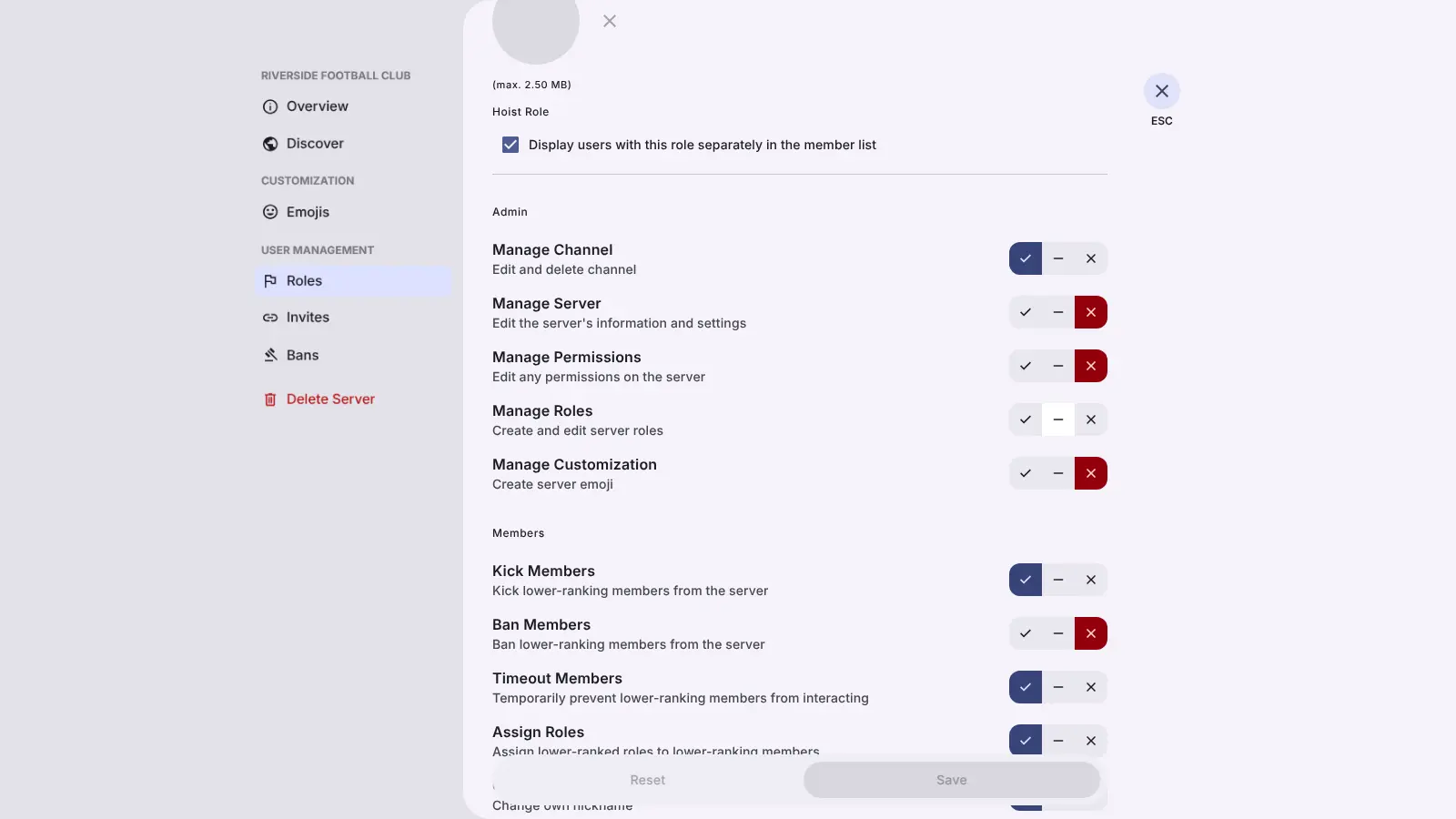
- Set roles and permissions Give members roles that decide who can see, post in and manage each channel, and use the moderation tools to keep order.
- Talk in direct and group messages Message anyone privately, or start a group chat with several people at once.
- Share files and links Send pictures and files, format messages with Markdown, and see previews of the links people post.
- Make it feel like yours Add custom emoji, server profile pictures, animated avatars, profile banners and themes, with no subscription.
- Bring in bots Add moderation and fun bots, or build your own on the same public API the official apps use.
Replaces Discord
Stoat does the same job as Discord. Here is what changes when you switch.
- Custom emoji, animated avatars and profile banners with no paid subscription
- No ads, and your messages and members stay on your server
- You set the rules for who can join and what is allowed
- Open source, so you choose when to update and can keep it running as long as you like
- No voice or video calls in this template, only text chat
- Phone apps mostly can't connect to your own server; members use the web app instead
- Far fewer ready-made bots than Discord, and no link to Discord's friends network
- Members need an account on your server; it does not connect to stoat.chat or other servers
What happens when you click Deploy?
You do not need a server or any technical knowledge. Four steps, and Stoat is running at its own web address.
- Step 1 Click Deploy and create your account
Deploy takes you to Cloudgate. Create an account, or log in if you have one. Stoat itself is free.
- Step 2 Choose a server
No server? Get one from Cloudgate: pick a size and a country, and Cloudgate gets it ready. Already have one? Connect it instead.
- Step 3 Cloudgate sets up Stoat
It prepares the server, makes the passwords the app needs and starts it. There is nothing to install and nothing to write down.
- Step 4 Open your app and sign in
Your app gets a free web address to start, without https. Add your own domain, like app.yourshop.com, and Cloudgate secures it with https for you.
New to Cloudgate? See what Cloudgate is
Run Cloudgate yourself? Deploy from your own console
In your Cloudgate console, open Templates and choose Stoat.
Questions
Is Stoat the same as Revolt?
Yes, Stoat is the new name of Revolt, the open-source chat app, since October 2025. Only the name and branding changed, so guides and settings that still say Revolt describe the same software.
Is Stoat free?
Yes, Stoat is free and open source under the AGPL-3.0 licence, with no paid edition. You pay only for your server, and perks such as custom emoji and animated avatars need no subscription.
Is Stoat a good alternative to Discord?
Yes, for text communities. Stoat has the same shape as Discord, with servers, channels, roles, direct messages and bots, and it keeps your community on your own server. This template has no voice or video calls, and there are far fewer ready-made bots than on Discord.
Does this Stoat include voice chat?
No, this template is text chat only. Stoat's voice and video calls need extra network openings on the server that a Cloudgate template can't set up.
How do I sign in to Stoat the first time?
There is no default admin account. Open your Stoat's web address, create an account with your email and a password, create a server and send people an invite link. Anyone who can reach the address can sign up, so share it with the people you want.
Can I move my Discord server to Stoat?
No, Stoat has no built-in import from Discord. You set up your channels and roles again and invite your members to the new server.
Is there a Stoat phone app?
Yes, but the official Stoat phone apps mostly don't connect to your own server yet. Members use the web app in their phone's browser, which can be added to the home screen, and the desktop app can connect to your server.
Do I need technical skills to run Stoat?
No. Click Deploy, create your Cloudgate account and choose a server, and Cloudgate sets up Stoat and gives it a web address. You use it in your browser like any other online tool.
Do I need my own server for Stoat?
No. When you deploy Stoat, hosted Cloudgate can provide a server. If you already rent one, you can connect it instead.
Related apps

Discord-style community chat with no paid tier.

Light, private self-hosted chat for teams and communities.

Simple self-hosted team chat from the makers of Basecamp.

A self-hosted messenger like WhatsApp, with web and phone apps.