
Chatto
Light, private self-hosted chat for teams and communities.
No server needed to start: Cloudgate can provide one. What happens when you click Deploy

What is Chatto?
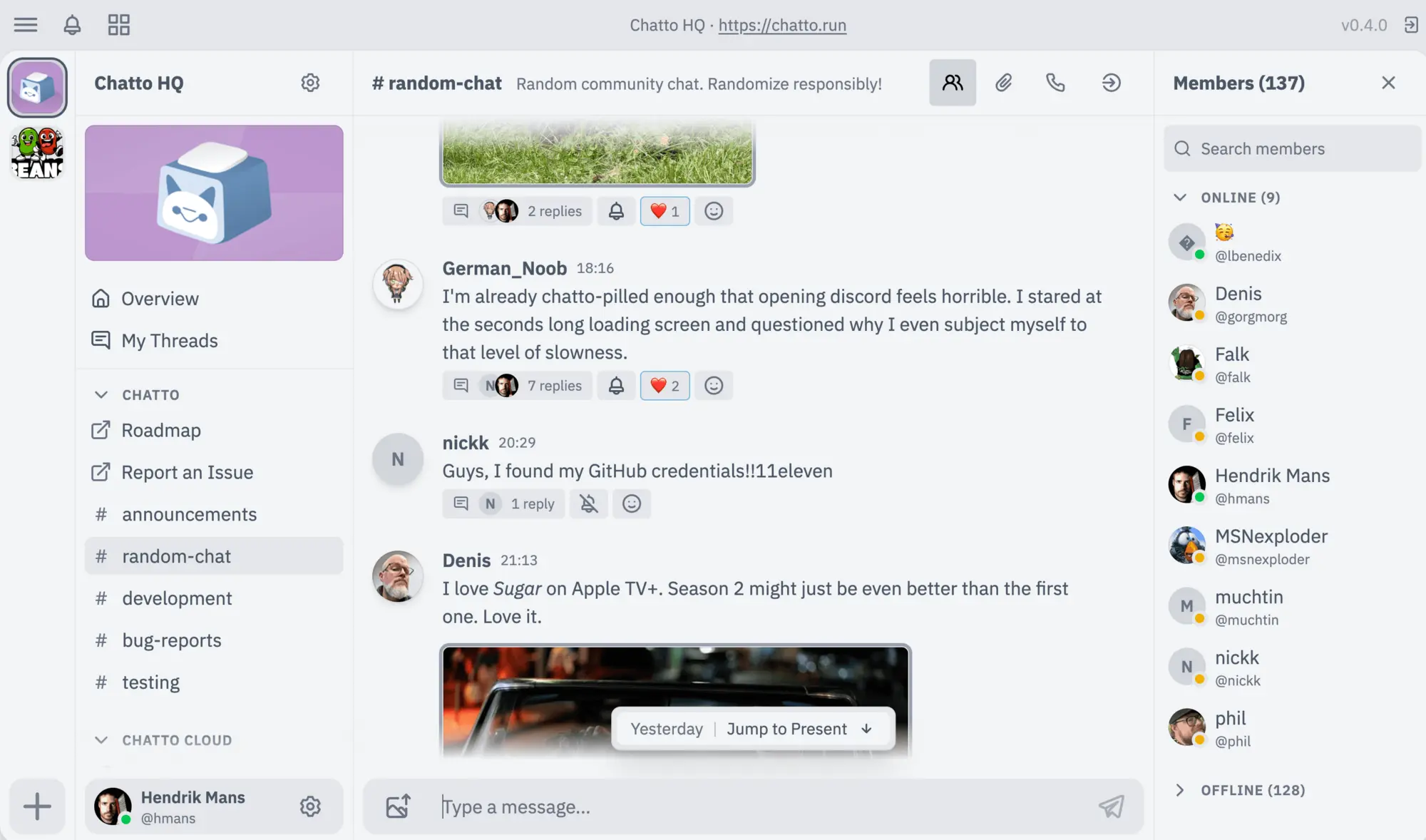
Self-hosted Chatto: open-source team and community chat with rooms, threads, direct messages and search, with your messages kept private on your own server.
Chatto is a free, open-source, self-hosted team chat app: a lighter alternative to Slack or Discord, with rooms, threads and direct messages on your own server. Each Chatto server is one private community: your messages, files and member accounts stay there, message text is stored encrypted, and there is no price per person.
A design studio with a dozen people could open a room for each client, keep feedback in threads under the right message, and make the server invite-only so only staff and invited clients get in. A hobby club could run it the same way as a members' community.
Chatto is young. It is at version 0.5, so expect missing features and frequent updates. It has no import from Slack, and voice and video calls need a separate call server that this setup doesn't include. People use it in a web browser, can add it to their phone's home screen with notifications, or try the experimental desktop app. Webhooks and bots can post updates into rooms.
Cloudgate installs Chatto on a server Cloudgate provides or one you connect and gives it a secure web address. The first person to open it sets up the server and becomes the owner.
What you can do with Chatto
- Talk in rooms Give each team, project or topic its own room, and sort rooms into groups that each have their own access rules.
- Reply in threads Keep side conversations under the message they belong to, and choose per room how much threading it uses.
- Message one to one Send direct messages with files, images, videos and emoji reactions.
- Search your history Find old messages in one room, across the whole server, or across every Chatto server you belong to.
- Decide who gets in Make the server invite-only with invitation codes, set roles and permissions, and let people sign in with your company login (single sign-on).
- Connect bots and alerts Post alerts into rooms with webhooks, build bots with the public API, or connect an AI assistant.
- Keep messages private Message text is stored encrypted with a key for each person, and Chatto sends no usage data to its makers.
Replaces Slack, Discord and Microsoft Teams
Chatto does the same job as Slack, Discord and Microsoft Teams. Here is what changes when you switch.
- No price per person, and no paid tier holding back features
- Messages, files and accounts stay on your own server
- Your whole message history stays with you
- One app can join several Chatto communities at once
- Chatto is young (version 0.5); expect missing features and frequent updates
- Voice and video calls need a separate call server, which this setup does not include
- No import from Slack or Discord, and far fewer ready-made integrations
- Phone apps are installed from the browser, not from an app store
What happens when you click Deploy?
You do not need a server or any technical knowledge. Four steps, and Chatto is running at its own web address.
- Step 1 Click Deploy and create your account
Deploy takes you to Cloudgate. Create an account, or log in if you have one. Chatto itself is free.
- Step 2 Choose a server
No server? Get one from Cloudgate: pick a size and a country, and Cloudgate gets it ready. Already have one? Connect it instead.
- Step 3 Cloudgate sets up Chatto
It prepares the server, makes the passwords the app needs and starts it. There is nothing to install and nothing to write down.
- Step 4 Open your app and sign in
Your app gets a free web address to start, without https. Add your own domain, like app.yourshop.com, and Cloudgate secures it with https for you.
New to Cloudgate? See what Cloudgate is
Run Cloudgate yourself? Deploy from your own console
In your Cloudgate console, open Templates and choose Chatto.
Questions
Is Chatto free?
Yes. Chatto is open source under the AGPL-3.0-or-later licence and free to self-host with every feature included, so you pay only for your server. Its makers, ChattoCorp, plan a paid hosting service called Chatto Cloud but say they have no paid feature tiers.
Is Chatto a good alternative to Slack?
Yes, for small teams that want Slack-style rooms, threads and direct messages without a monthly price per person. Chatto is still a young app at version 0.5, so expect bugs, missing features and frequent updates, and it has far fewer integrations than Slack. Teams that need a mature tool today may prefer Mattermost.
Can I run a community like a Discord server on Chatto?
Yes. Each Chatto server is one community with its own rooms, roles and members, and you can make it invite-only with invitation codes. Members can join several Chatto communities from one app, but servers don't share data with each other.
How do I sign in to Chatto the first time?
Through a setup page at your Chatto web address, right after installing it. It asks for a server name and the owner's username, display name and password; the first person to complete it becomes the owner. To invite others, connect an email service so Chatto can send them sign-up codes.
Can I import my Slack history into Chatto?
No. Chatto's import tool reads only Chatto's own archive format and does not accept a Slack export, so you start with fresh rooms.
Does Chatto have phone and desktop apps?
Yes. On iPhone and Android you install Chatto from the browser to your home screen, with push notifications. A Chatto desktop app for Mac, Windows and Linux is available but still experimental.
Is Chatto end-to-end encrypted?
No. Apart from voice and video calls, Chatto is not end-to-end encrypted. It stores message text encrypted with a key for each person, deletes those keys when an account is deleted, and sends no usage data to ChattoCorp.
Do I need technical skills to run Chatto?
No. Click Deploy, create your Cloudgate account and choose a server, and Cloudgate sets up Chatto and gives it a web address. You use it in your browser like any other online tool.
Do I need my own server for Chatto?
No. When you deploy Chatto, hosted Cloudgate can provide a server. If you already rent one, you can connect it instead.
Related apps

Simple self-hosted team chat from the makers of Basecamp.

A self-hosted Matrix server for private, encrypted team chat.

Team chat where every conversation has its own topic.

Team chat like Slack, with your full history kept.