
Tinode
A self-hosted messenger like WhatsApp, with web and phone apps.
No server needed to start: Cloudgate can provide one. What happens when you click Deploy

What is Tinode?
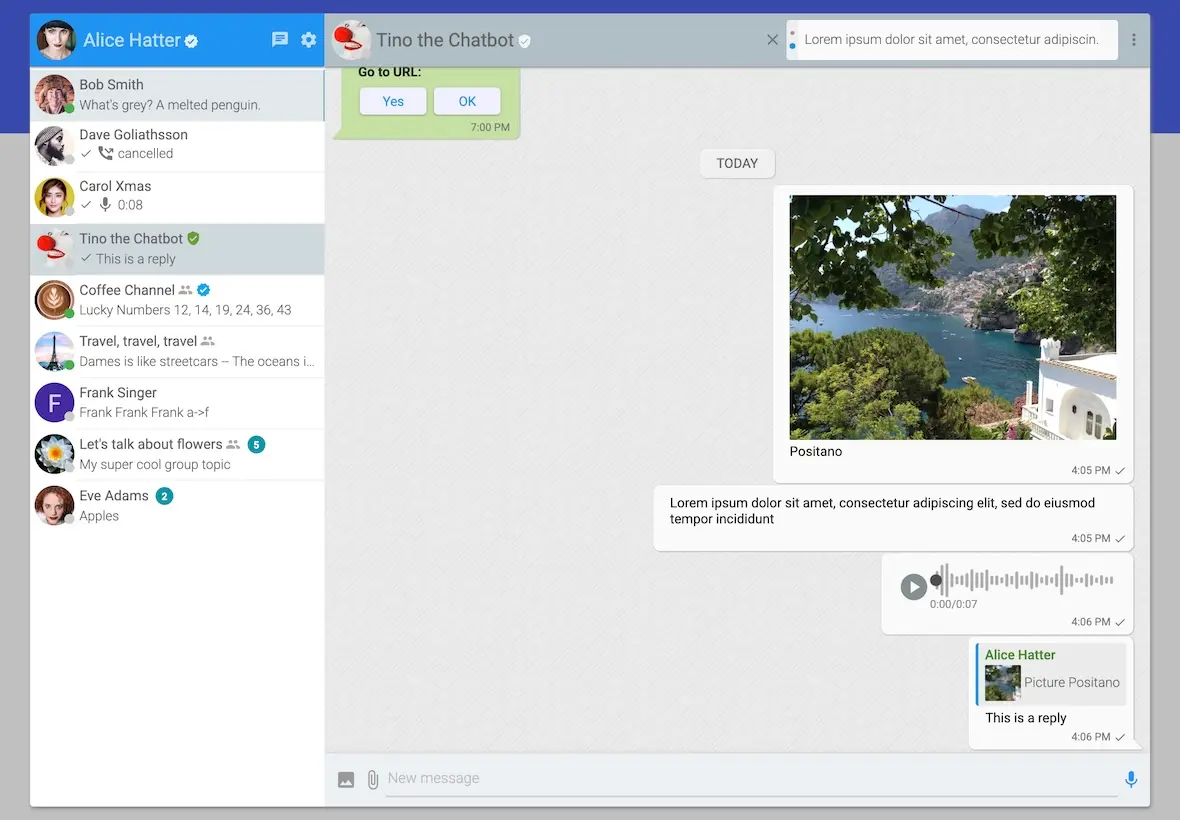
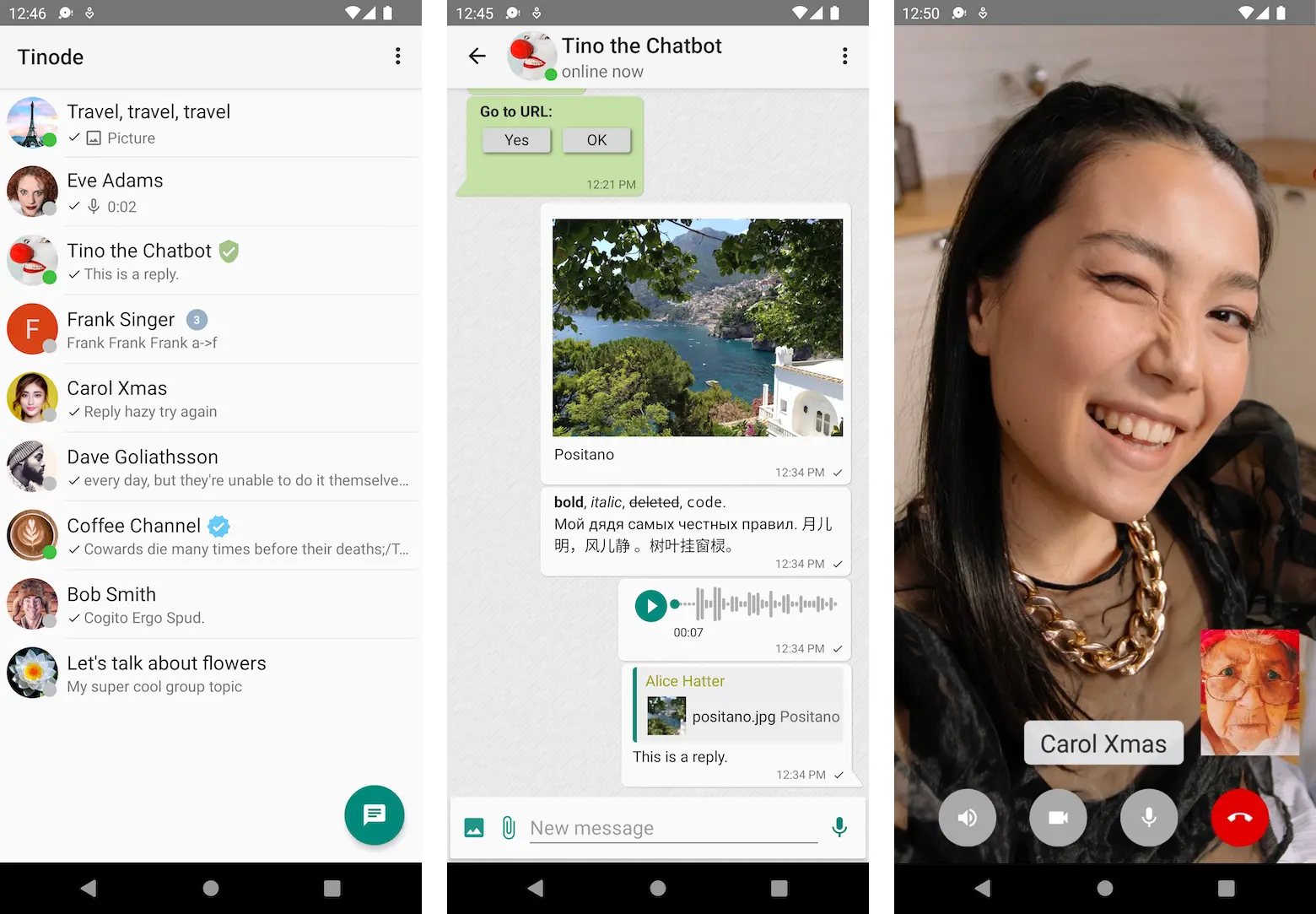
Self-hosted Tinode is a private messenger for chats, groups, channels and one-to-one calls, with web, Android and iOS apps.
Tinode is a free, open-source instant messenger you can self-host as a private alternative to WhatsApp or Telegram. People chat one to one or in groups, follow broadcast channels, share photos, files and voice messages, and make one-to-one voice and video calls, from a web app or the Android and iOS apps.
Accounts use a username and password instead of a phone number, and every message and file stays on your server. A small charity, for example, could give its volunteers one place to chat, keep a channel for weekly rota updates, and stop asking everyone to share their phone numbers in a WhatsApp group.
Be aware of the trade-offs: Tinode chats are not end-to-end encrypted, calls are one to one only, and phone apps show new messages only while open until push notifications are set up. The project describes itself as beta software that is stable and feature-complete.
Cloudgate installs self-hosted Tinode on a server Cloudgate provides or one you connect, together with the database it needs, and gives it a secure web address. Open it, sign up for your own account, and send the address to the people you want to chat with.
What you can do with Tinode
- Chat one to one and in groups Message anyone on your server, or start a group and invite, remove or promote its members.
- Broadcast to a channel Post news to a channel that any number of people can follow without being able to reply.
- Share photos, files and voice messages Send pictures, videos, documents and voice notes, and reply to, forward, edit or pin messages.
- Call one to one Start a voice or video call with one person from the web or phone app.
- See who has read a message Ticks show when a message is delivered and read, and you can see who is online or typing.
- Use it on any device The web app and the Android and iOS apps stay in sync, so a chat started on a laptop continues on a phone.
- Pick a light or dark look Choose a light or dark theme and a chat background, in more than a dozen languages.
Replaces WhatsApp and Telegram
Tinode does the same job as WhatsApp and Telegram. Here is what changes when you switch.
- Chats and files stay on your own server, not on Meta's or Telegram's
- Accounts use a username and password, so nobody has to share a phone number
- No fee per person, however many people you add
- Free Android and iOS apps that connect to your own server
- Chats are not end-to-end encrypted, unlike WhatsApp
- Calls are one to one only, and people on different networks may need an extra relay service to connect
- Phone apps only notify you of new messages while they are open, until push notifications are set up
- Your old WhatsApp or Telegram chats do not move across
What happens when you click Deploy?
You do not need a server or any technical knowledge. Four steps, and Tinode is running at its own web address.
- Step 1 Click Deploy and create your account
Deploy takes you to Cloudgate. Create an account, or log in if you have one. Tinode itself is free.
- Step 2 Choose a server
No server? Get one from Cloudgate: pick a size and a country, and Cloudgate gets it ready. Already have one? Connect it instead.
- Step 3 Cloudgate sets up Tinode
It prepares the server, makes the passwords the app needs and starts it. There is nothing to install and nothing to write down.
- Step 4 Open your app and sign in
Your app gets a free web address to start, without https. Add your own domain, like app.yourshop.com, and Cloudgate secures it with https for you.
New to Cloudgate? See what Cloudgate is
Run Cloudgate yourself? Deploy from your own console
In your Cloudgate console, open Templates and choose Tinode.
Questions
Is Tinode free?
Yes, Tinode is free and open source. The server is under the GPL-3.0 licence and the web, Android and iOS apps are under Apache-2.0, so you pay only for your server, with no fee per user.
Is Tinode a good alternative to WhatsApp?
Yes, if you want a private WhatsApp-style messenger for a team, club or family on your own server. It has groups, channels, voice messages, file sharing and one-to-one calls, but Tinode chats are not end-to-end encrypted and there are no group calls.
How do I sign in to Tinode the first time?
Open your Tinode web address and choose Sign up to create your account with a username and password. There is no email check until you set up email, so anyone who can reach the address can sign up; share it only with the people you want.
Does Tinode have phone apps?
Yes, Tinode has free apps for Android and iOS in the app stores, and you point them at your own server's address. Without push notifications set up, the apps show new messages only while they are open.
Does Tinode have voice and video calls?
Yes, Tinode has one-to-one voice and video calls, but no group calls yet. Calls between people on different networks may need an extra relay service, which this setup does not include.
Are Tinode chats end-to-end encrypted?
No, Tinode chats travel over an encrypted connection but are stored readable on your server. End-to-end encryption is on the project's plans, not in the current version.
Can I move my WhatsApp or Telegram chats to Tinode?
No, Tinode cannot import chats from WhatsApp or Telegram. Start fresh, and keep the old app until everyone has moved across.
Do I need technical skills to run Tinode?
No. Click Deploy, create your Cloudgate account and choose a server, and Cloudgate sets up Tinode and gives it a web address. You use it in your browser like any other online tool.
Do I need my own server for Tinode?
No. When you deploy Tinode, hosted Cloudgate can provide a server. If you already rent one, you can connect it instead.
Related apps

A self-hosted Matrix server for private, encrypted team chat.

Simple self-hosted team chat from the makers of Basecamp.

Light, private self-hosted chat for teams and communities.

Discord-style community chat with no paid tier.