
Seerr
Media requests for Jellyfin, Plex or Emby.
No server needed to start: Cloudgate can provide one. What happens when you click Deploy
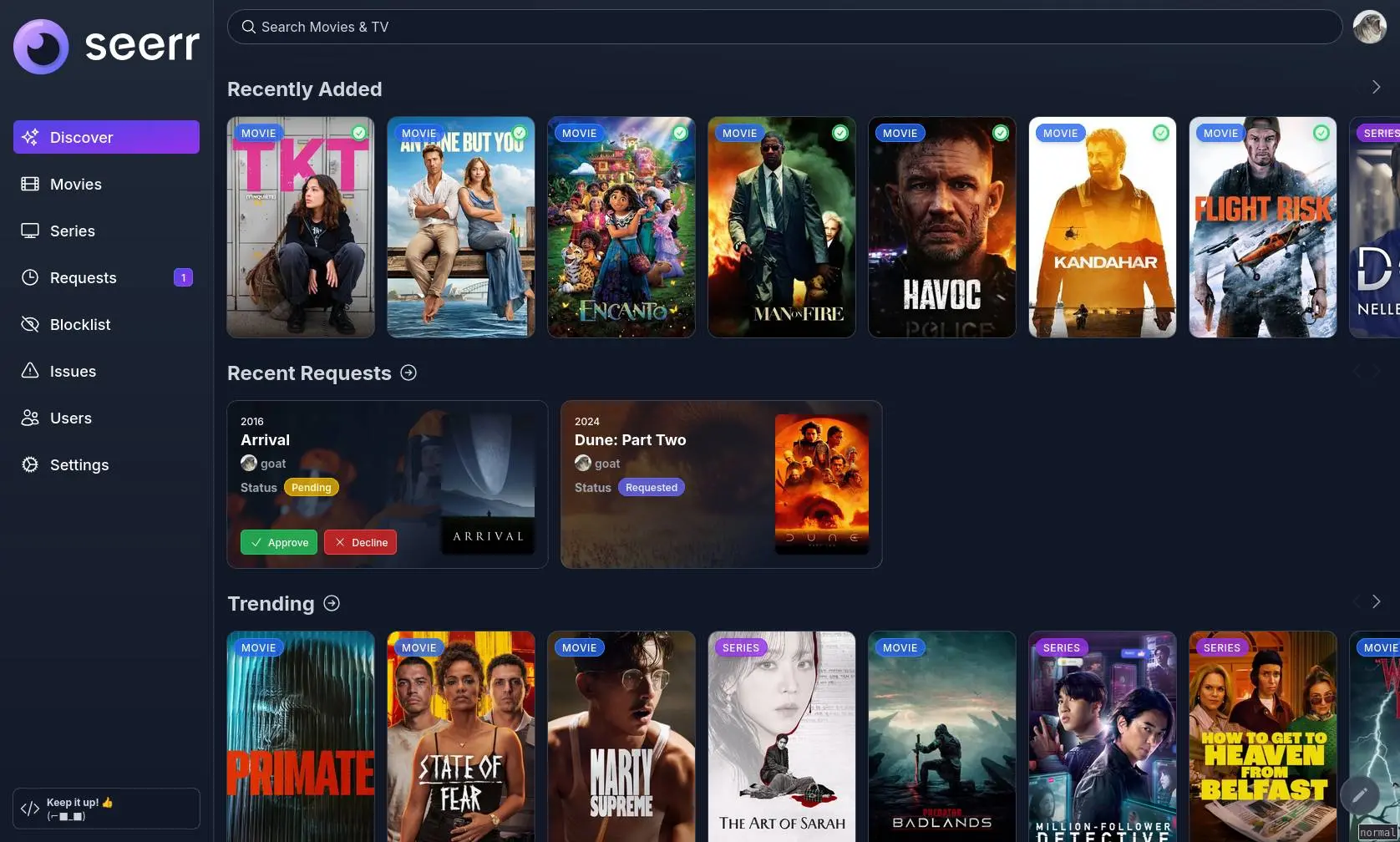
What is Seerr?
Self-hosted Seerr lets your household request films and series for Jellyfin, Plex or Emby, and lets you approve them in one list.
Seerr is a free, open-source, self-hosted media request app for Jellyfin, Plex and Emby: family members browse films and series, see what is already in your library, and ask for what they'd like to watch. It is the successor to Overseerr and Jellyseerr, and replaces requests scattered across texts and chats with one list.
Each person signs in with their media server account, searches or browses trending titles, and requests a film or the seasons they want. Seerr checks your libraries on a schedule, so a title that's already there shows as available instead of being asked for twice. A family, for example, could let the children ask for a film for Friday night; a parent approves it on their phone, adds the film from the family's own collection, and everyone gets a message when it's ready to watch.
Seerr doesn't store or play videos, so it needs a media server, such as Jellyfin. It works on phones in the browser and sends notifications by email, Discord, Telegram and more.
Cloudgate installs Seerr on a server Cloudgate provides or one you connect and gives it a secure web address. Open it after setup and sign in with your media server's admin account.
What you can do with Seerr
- Ask for a film or a series Everyone searches or browses films and series and requests a film, a whole series or just the seasons they want.
- See what's already in the library Seerr checks your Jellyfin, Plex or Emby libraries on a schedule and marks each title that is already there to watch.
- Approve requests in one list The admin sees every request with its status and approves or declines it with one click.
- Sign in with the media server account Family members sign in with their existing Jellyfin, Plex or Emby account, and you can also create accounts with an email and password.
- Permissions and request limits Choose what each person may do, and limit how many films or seasons someone can request in a set period.
- Discover what to watch Trending titles, recommendations and pages with cast, crew, ratings and where a title streams help everyone choose.
- Notifications when things change Seerr tells people when a request is approved or available, by email, Discord, Telegram, Slack, ntfy, web push and other services.
- Report a problem with a title Anyone can report an issue, such as missing subtitles or a broken file, so the admin can fix it.
Compare Seerr
What happens when you click Deploy?
You do not need a server or any technical knowledge. Four steps, and Seerr is running at its own web address.
- Step 1 Click Deploy and create your account
Deploy takes you to Cloudgate. Create an account, or log in if you have one. Seerr itself is free.
- Step 2 Choose a server
No server? Get one from Cloudgate: pick a size and a country, and Cloudgate gets it ready. Already have one? Connect it instead.
- Step 3 Cloudgate sets up Seerr
It prepares the server, makes the passwords the app needs and starts it. There is nothing to install and nothing to write down.
- Step 4 Open your app and sign in
Your app gets a free web address to start, without https. Add your own domain, like app.yourshop.com, and Cloudgate secures it with https for you.
New to Cloudgate? See what Cloudgate is
Run Cloudgate yourself? Deploy from your own console
In your Cloudgate console, open Templates and choose Seerr.
Questions
Is Seerr free?
Yes. Seerr is free, open-source software under the MIT licence, with no paid tier and no paid features. You pay only for your server.
What is the difference between Seerr, Jellyseerr and Overseerr?
Seerr is the successor to both. In February 2026 the Overseerr and Jellyseerr teams merged into one Seerr team and one app, which keeps Overseerr's Plex features and Jellyseerr's Jellyfin and Emby support.
Do I need Jellyfin, Plex or Emby to use Seerr?
Yes. Seerr doesn't store or play videos; it works next to one Jellyfin, Plex or Emby server, which holds your films and plays them. Cloudgate's Jellyfin template is a good partner, and Seerr connects to it through its web address.
How do I sign in to Seerr the first time?
There is no default password. Open Seerr's web address, choose your media server and sign in with an admin account of that server; that account becomes Seerr's owner. Then pick the libraries Seerr should check, and family members sign in with their own media server accounts.
Does approving a request download the film?
No, not on its own. Approving a request marks it approved; you add the film or series to your media library yourself, and Seerr shows it as available after its next library check.
Is there a Seerr app for phones?
No, there is no app in the app stores. Seerr's website is designed for phones, and you can add it to your home screen so it opens like an app.
Can I move from Overseerr or Jellyseerr to Seerr?
Yes. The Seerr team says an existing Overseerr or Jellyseerr install moves its settings, users and requests over automatically when it first starts as Seerr. A new Seerr on Cloudgate starts empty, and people sign in again with their media server accounts.
Do I need technical skills to run Seerr?
No. Click Deploy, create your Cloudgate account and choose a server, and Cloudgate sets up Seerr and gives it a web address. You use it in your browser like any other online tool.
Do I need my own server for Seerr?
No. When you deploy Seerr, hosted Cloudgate can provide a server. If you already rent one, you can connect it instead.
Related apps

Podcast hosting with your own feed, website and stats.

Share your game clips and videos with a link, from your own server.

A self-hosted media server for your family's films and home videos.

Watch history and statistics for your Jellyfin media server.