
Redash
SQL queries, charts, dashboards and alerts.
No server needed to start: Cloudgate can provide one. What happens when you click Deploy
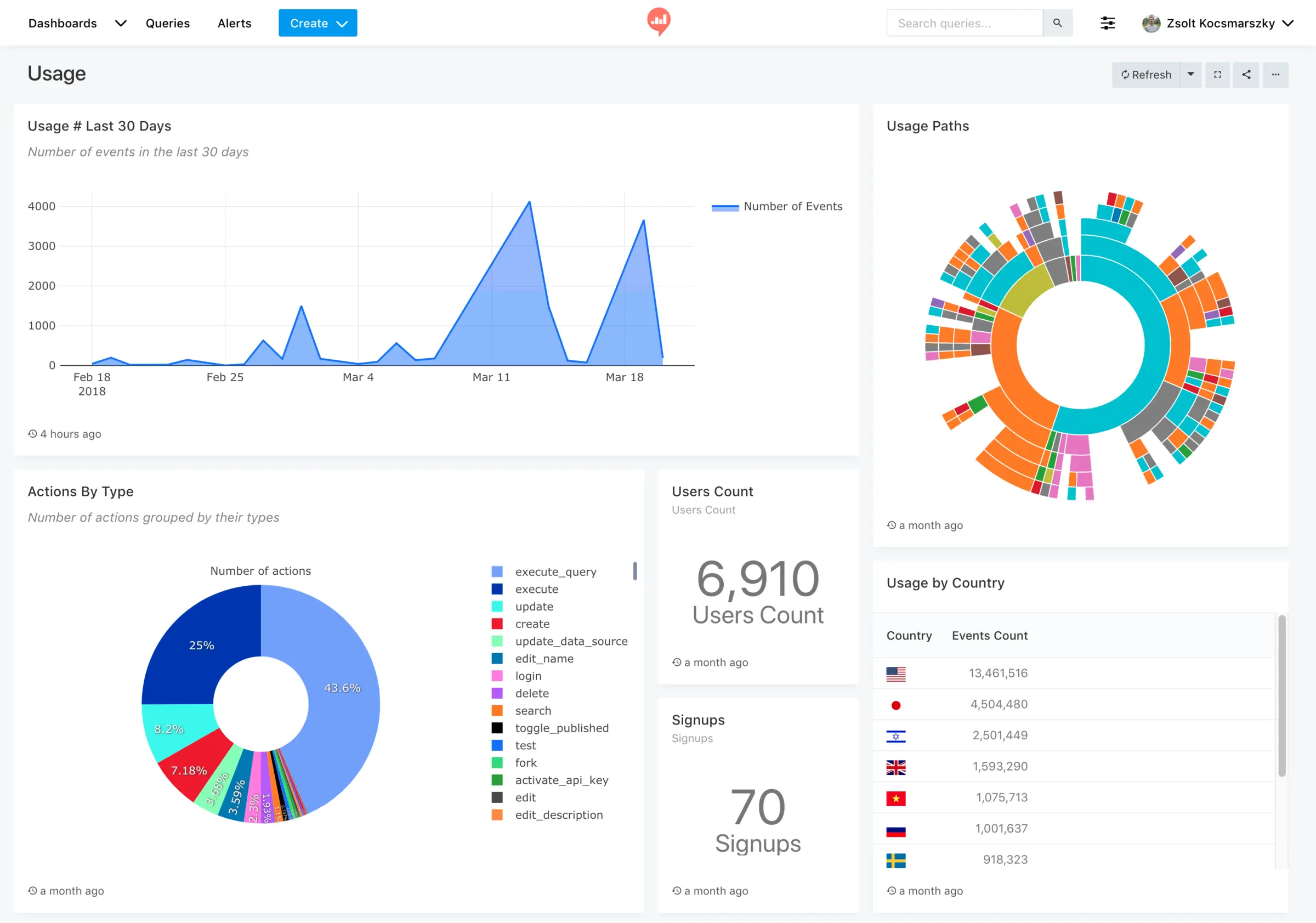

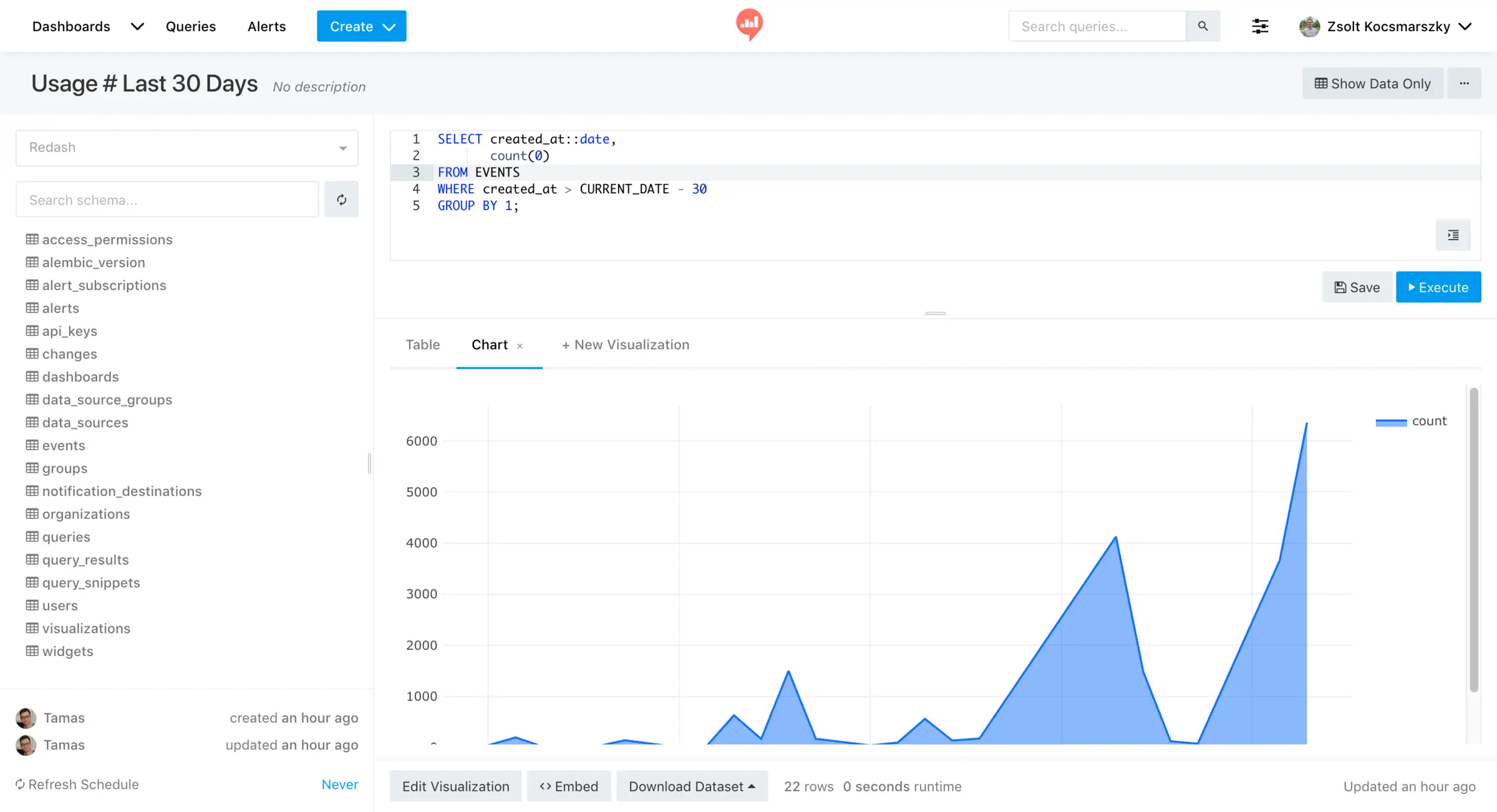

What is Redash?
Self-hosted Redash: write SQL queries on your own databases, turn the results into shared dashboards and get alerts in Slack or Teams.
Self-hosted Redash is a free, open-source tool for writing SQL queries against your own databases and turning the results into charts, dashboards and alerts, and it can replace paid tools such as Looker, Tableau or Power BI for teams that know SQL. It reads your data where it lives, with no licence per viewer.
Someone who knows SQL writes a query, picks a chart and adds it to a dashboard; the rest of the team opens the dashboard, changes its filters and gets alerts. An online shop could have one query for daily orders and another for low stock, refresh both every hour, and post a message in Slack when any product drops below 20 units.
Redash connects to more than 35 data sources, from PostgreSQL and MySQL to BigQuery, Snowflake and Google Sheets, and sends alerts to Slack, Microsoft Teams, Discord and other tools. It works in the browser; there is no phone app. The hosted Redash service closed in 2021, and the open-source project carries on. If nobody on your team writes SQL, Metabase is easier to start with.
Cloudgate installs Redash on a server Cloudgate provides or one you connect, with the database it needs, and gives it a secure web address. The first person to open it becomes the admin.
What you can do with Redash
- Write queries in the browser A SQL editor with a list of your tables and auto-complete, so you can explore data and save each query for the team.
- Turn results into charts Show any result as a line, bar, pie or scatter chart, a pivot table, a map, a funnel, a cohort table or one big number.
- Build shared dashboards Put charts from many queries on one page, with filters and dropdowns anyone can change.
- Keep numbers up to date Re-run queries on a schedule you set, so dashboards show fresh figures without anyone pressing a button.
- Get alerts when numbers change Set a condition on a query, such as stock below 20, and get a message in Slack, Microsoft Teams, Discord, PagerDuty or a webhook.
- Connect 35+ data sources Query PostgreSQL, MySQL, SQL Server, BigQuery, Snowflake, Google Sheets, CSV files and many more from one place.
- Share and embed Share a query or chart by link, embed a chart in another site, or download the results as a file.
Replaces Looker and Power BI
Redash does the same job as Looker and Power BI. Here is what changes when you switch.
- No licence per viewer, so everyone can see the dashboards
- Every feature, including SAML and LDAP sign-in, is in the one free release
- Alerts on any query, sent to Slack, Teams or other chat tools
- Your queries, dashboards and connection details stay on your own server
- Every chart starts as a SQL query; there is no point-and-click question builder
- Fewer chart types and much less design control than Tableau or Power BI
- No modelling layer like Looker's LookML or Power BI's Power Query
- Existing Looker, Tableau or Power BI dashboards can't be imported; you rebuild them
What happens when you click Deploy?
You do not need a server or any technical knowledge. Four steps, and Redash is running at its own web address.
- Step 1 Click Deploy and create your account
Deploy takes you to Cloudgate. Create an account, or log in if you have one. Redash itself is free.
- Step 2 Choose a server
No server? Get one from Cloudgate: pick a size and a country, and Cloudgate gets it ready. Already have one? Connect it instead.
- Step 3 Cloudgate sets up Redash
It prepares the server, makes the passwords the app needs and starts it. There is nothing to install and nothing to write down.
- Step 4 Open your app and sign in
Your app gets a free web address to start, without https. Add your own domain, like app.yourshop.com, and Cloudgate secures it with https for you.
New to Cloudgate? See what Cloudgate is
Run Cloudgate yourself? Deploy from your own console
In your Cloudgate console, open Templates and choose Redash.
Questions
Is Redash free?
Yes, Redash is free and open source under the BSD 2-Clause licence, with no paid edition and no limit on users or dashboards. You pay only for your server. The hosted Redash service closed in November 2021, so self-hosting is now the way to use it.
Is Redash still maintained?
Yes, Redash is maintained by its open-source community on GitHub. Version 26.9.0 came out in September 2026 with security fixes and a new data source.
Is Redash a good alternative to Looker or Tableau?
Yes, for teams that know SQL and mainly need shared dashboards, scheduled refreshes and alerts, Redash covers that at no licence cost. Looker offers a central data model and Tableau far more design control, which large data teams may still want.
Should I choose Redash, Metabase or Apache Superset?
Choose Redash if your team writes SQL and wants a simple editor, dashboards and alerts to chat tools. Choose Metabase if people without SQL will build their own charts, and Apache Superset if you want more chart types and a no-code chart builder.
Do I need to know SQL to use Redash?
Yes, someone needs to know SQL to write the Redash queries behind each chart. Everyone else can use the dashboards, change their filters and get alerts without writing any code.
Which data can Redash read?
Redash connects to more than 35 data sources, including PostgreSQL, MySQL, MariaDB, SQL Server, Oracle, BigQuery, Snowflake, Redshift, ClickHouse, MongoDB, Elasticsearch, Google Sheets, Excel and CSV files. It queries the data where it lives rather than copying it in.
How do I sign in to Redash the first time?
The first person to open Redash's web address fills in a short setup form with their name, email, a password and an organization name, and becomes the admin. There is no default password. The admin then adds a data source and invites the team. Email isn't set up, so invitations, password resets and email alerts aren't sent by email; alerts can go to Slack or a webhook instead.
Do I need technical skills to run Redash?
No. Click Deploy, create your Cloudgate account and choose a server, and Cloudgate sets up Redash and gives it a web address. You use it in your browser like any other online tool.
Do I need my own server for Redash?
No. When you deploy Redash, hosted Cloudgate can provide a server. If you already rent one, you can connect it instead.
Can I move my data from Looker to Redash?
Most people export from Looker and import into Redash. The official guides at redash.io walk through it.
Related apps

Dashboards and a SQL editor on your own databases.

Dashboards on your PostgreSQL or ClickHouse data.

Dashboards and wall screens, built by drag and drop.

Self-hosted BI on the metrics your dbt project defines once.