
ownCloud Infinite Scale
File sync and sharing, with shared Spaces for each team.
No server needed to start: Cloudgate can provide one. What happens when you click Deploy
What is ownCloud Infinite Scale?
ownCloud Infinite Scale is self-hosted file sync and sharing with team Spaces, share links and desktop and phone apps, replacing Dropbox or Box.
ownCloud Infinite Scale is a free, open-source file cloud that you self-host to store, sync and share your company's files, as you would with Dropbox, Box or Google Drive but with no fee per user. It comes from ownCloud, and Cloudgate installs it on your own server.
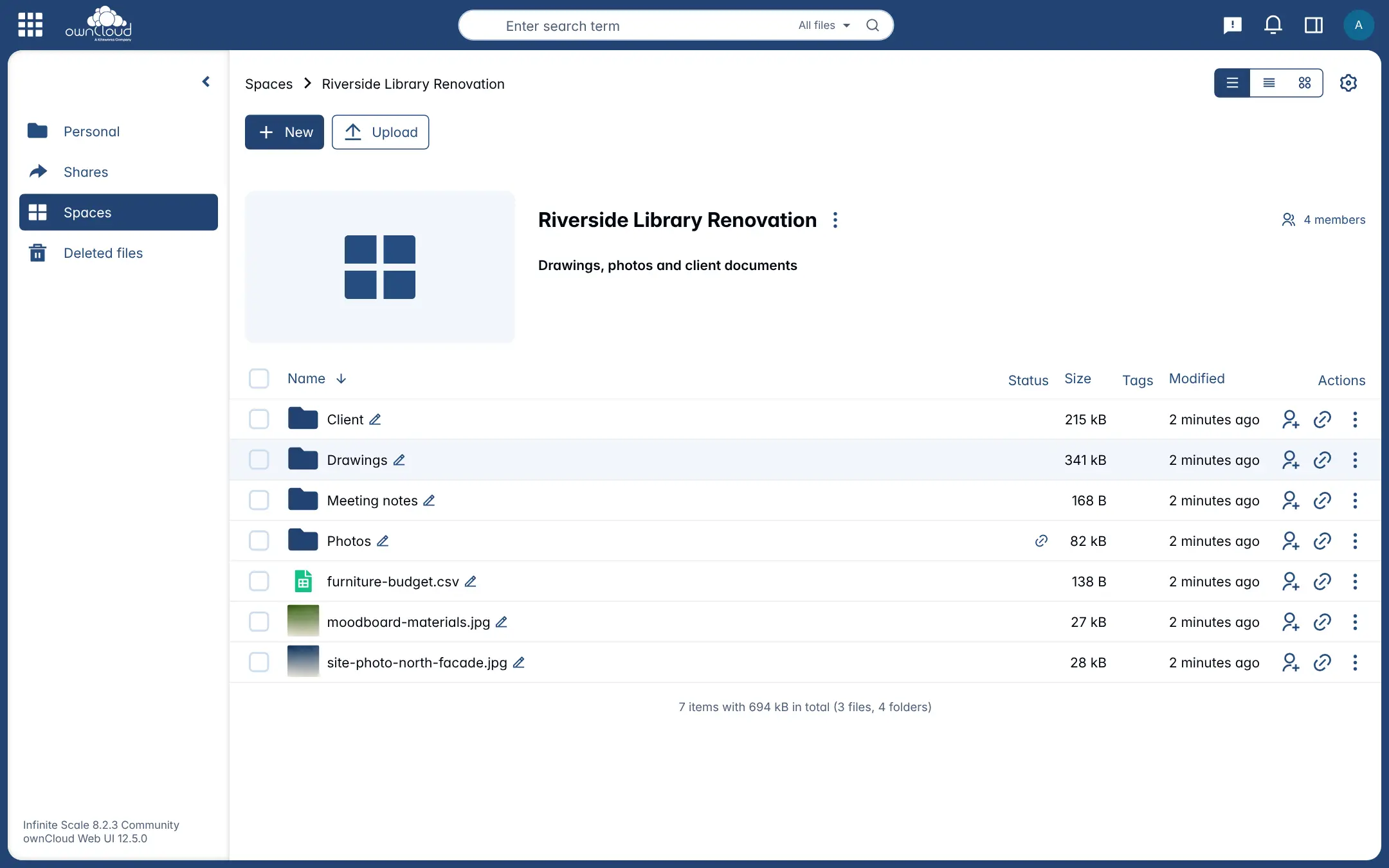
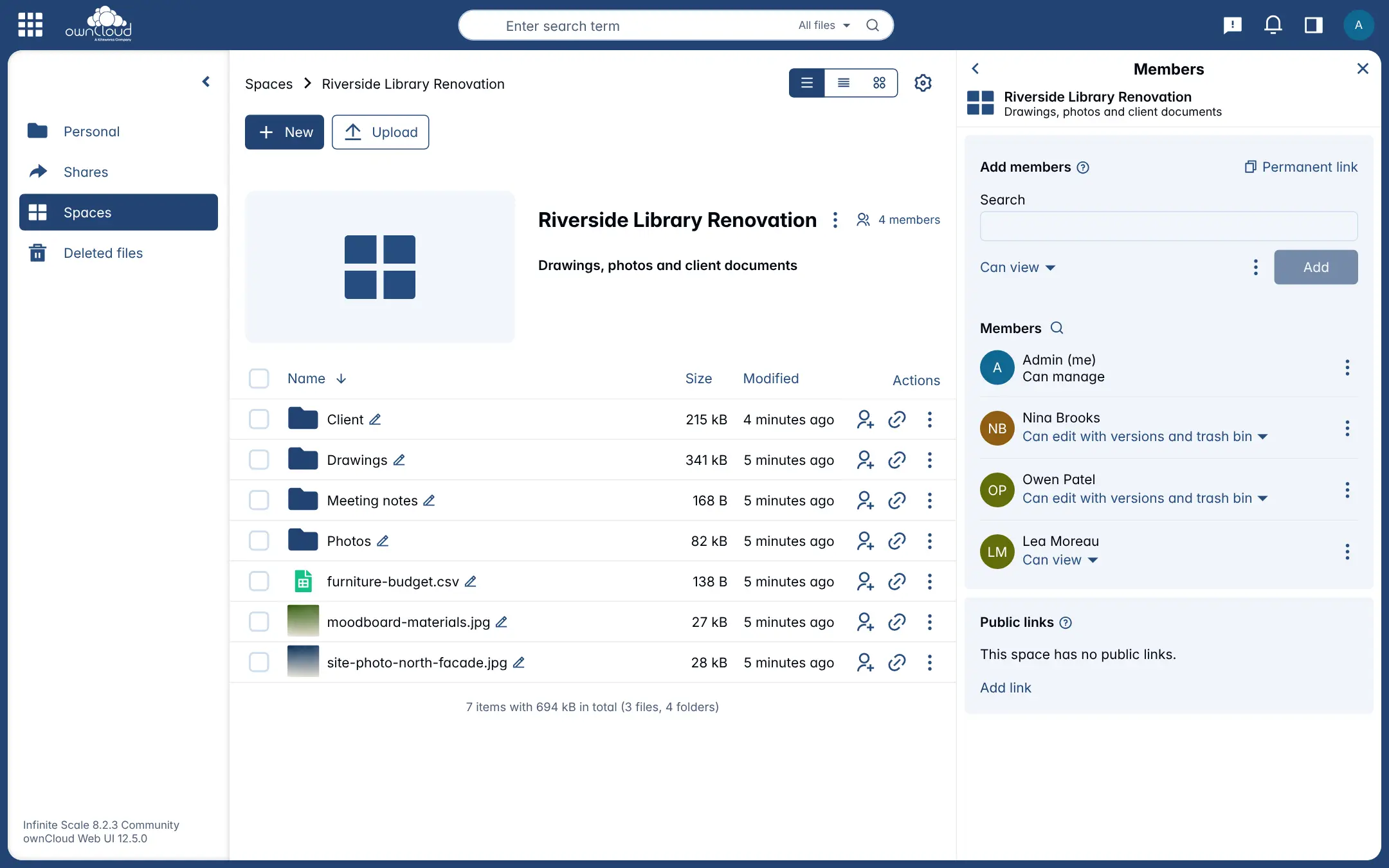
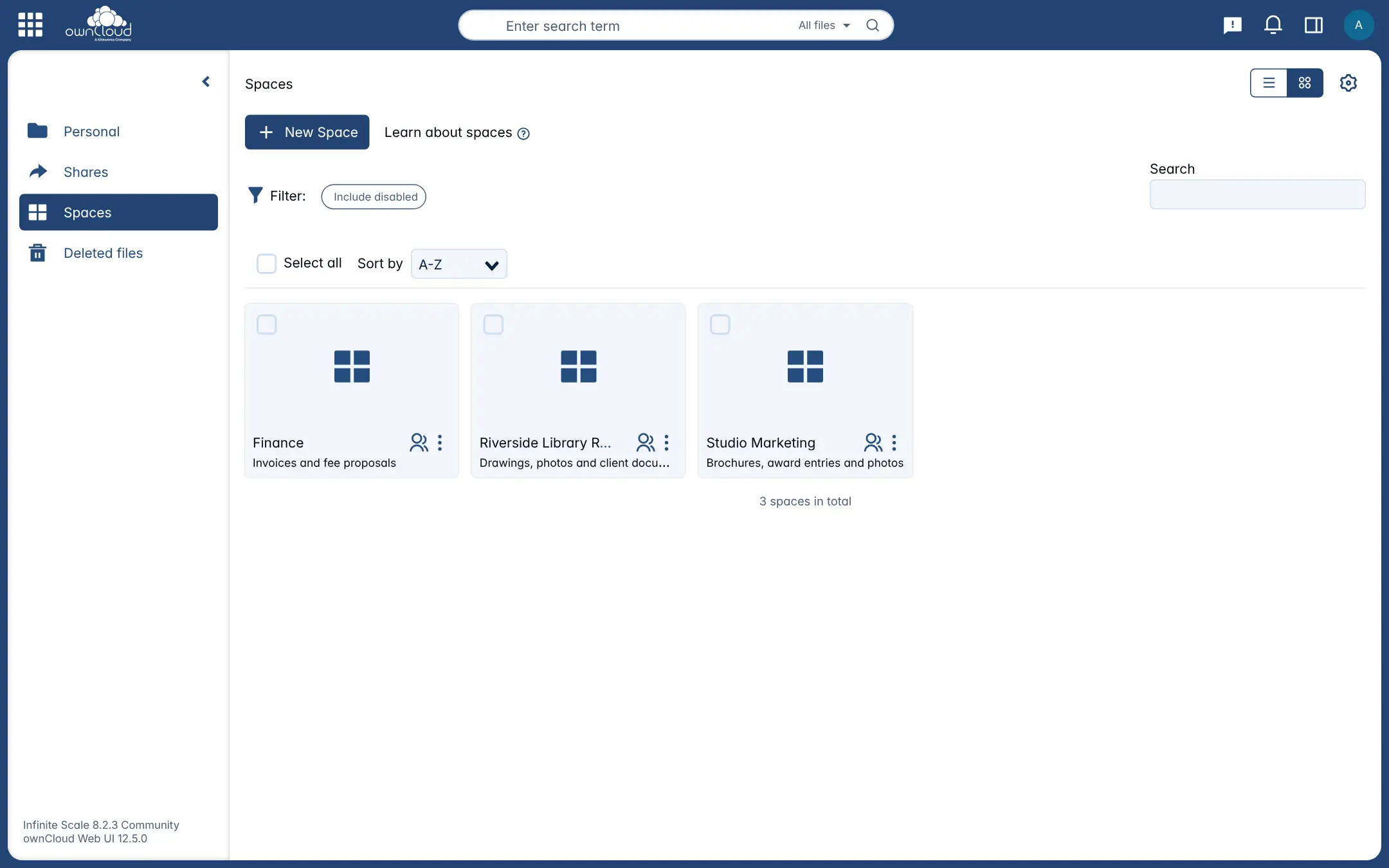
Each person gets their own files, and each team or project gets a Space: a shared drive with its own members, roles and storage limit, so the files stay with the team when someone leaves. You share folders with colleagues or send a client a link with a password, and earlier versions and deleted files can be brought back. A small architecture studio, for example, could keep one Space per building project, let the whole team edit drawings, give the client a view-only link to the site photos, and keep invoices in a Finance Space only the partners can open.
ownCloud has desktop sync apps for Windows, macOS and Linux and apps for Android and iPhone. Infinite Scale handles files only, without the calendars and extra apps of Nextcloud, and it needs no separate database. To edit documents in the browser you can connect Collabora Online or ONLYOFFICE.
Cloudgate sets up Infinite Scale with a secure web address. You sign in as admin with the password Cloudgate creates, then add your people and Spaces.
What you can do with ownCloud Infinite Scale
- Shared Spaces for every team Give each team or project its own drive with members and roles, so the files stay put when someone leaves.
- Choose who can do what Let each person view, edit, or edit with access to old versions and the trash bin, or manage the Space.
- Share by link Send a folder or file to a client as a link, with an optional password, or create an upload-only drop folder.
- Sync to every computer and phone ownCloud's desktop app for Windows, macOS and Linux and its Android and iPhone apps keep your files in step.
- Get back what changed Restore an earlier version of a file, or bring a deleted one back from the trash bin.
- Find and label files Search by file name across your files and Spaces, and add tags to group related files.
- Plug in an office suite Connect Collabora Online or ONLYOFFICE to edit documents together in the browser.
Replaces Dropbox, Box and Google Drive
ownCloud Infinite Scale does the same job as Dropbox, Box and Google Drive. Here is what changes when you switch.
- No fee per user, and storage limited only by your server's disk
- Your files stay on your own server
- Team Spaces with clear roles, much like shared drives in Dropbox or Box
- Open source under the Apache licence, with no features held back for a paid edition
- It handles files only; there are no calendars, contacts or extra apps as in Nextcloud
- Editing documents in the browser needs Collabora Online or ONLYOFFICE set up alongside it
- Searching inside documents needs an extra search service that is not included
- There is no importer, so you download from Dropbox, Box or Google Drive and upload or sync the files
What happens when you click Deploy?
You do not need a server or any technical knowledge. Four steps, and ownCloud Infinite Scale is running at its own web address.
- Step 1 Click Deploy and create your account
Deploy takes you to Cloudgate. Create an account, or log in if you have one. ownCloud Infinite Scale itself is free.
- Step 2 Choose a server
No server? Get one from Cloudgate: pick a size and a country, and Cloudgate gets it ready. Already have one? Connect it instead.
- Step 3 Cloudgate sets up ownCloud Infinite Scale
It prepares the server, makes the passwords the app needs and starts it. There is nothing to install and nothing to write down.
- Step 4 Open your app and sign in
Your app gets a free web address to start, without https. Add your own domain, like app.yourshop.com, and Cloudgate secures it with https for you.
New to Cloudgate? See what Cloudgate is
Run Cloudgate yourself? Deploy from your own console
In your Cloudgate console, open Templates and choose ownCloud Infinite Scale.
Questions
Is ownCloud Infinite Scale free?
Yes, ownCloud Infinite Scale is free, open-source software under the Apache 2.0 licence, and ownCloud says it has no features held back for paying customers. You pay only for your server; ownCloud also sells enterprise subscriptions with support.
Is ownCloud Infinite Scale a good alternative to Dropbox?
Yes. ownCloud Infinite Scale is a good alternative to Dropbox for storing, syncing and sharing files as a team. It has desktop and phone sync apps, share links, versions and a trash bin, and team Spaces like Dropbox's team folders, with no fee per user. It does not import from Dropbox, so you move your files across yourself.
How is ownCloud Infinite Scale different from ownCloud Server and Nextcloud?
ownCloud Infinite Scale is ownCloud's newer, rewritten file cloud; the older ownCloud Server (ownCloud 10) and Nextcloud, which split from it in 2016, are larger PHP apps with a database and many add-on apps. Infinite Scale is one program with no database that focuses on files and Spaces.
Who makes ownCloud Infinite Scale, and what is OpenCloud?
ownCloud makes Infinite Scale, and ownCloud has been part of the US company Kiteworks since 2023. OpenCloud is a separate file cloud that a group of former ownCloud developers started from Infinite Scale's code in 2025.
Are there desktop and phone apps for ownCloud Infinite Scale?
Yes. ownCloud's desktop app for Windows, macOS and Linux syncs folders to your computer, and its apps for Android and iPhone browse, upload and share files. They sign in with your Infinite Scale web address.
Can I edit Word and Excel files in ownCloud Infinite Scale?
Only with an office suite connected. ownCloud Infinite Scale works with Collabora Online, ONLYOFFICE Docs or Microsoft Office Online Server for editing in the browser; Cloudgate installs Infinite Scale on its own, so you add the office suite separately.
How do I sign in to ownCloud Infinite Scale the first time?
Sign in with the username admin and the password Cloudgate generated, shown on the app's variables page in Cloudgate. Then add your colleagues as users in the admin settings and create a Space for each team.
Do I need technical skills to run ownCloud Infinite Scale?
No. Click Deploy, create your Cloudgate account and choose a server, and Cloudgate sets up ownCloud Infinite Scale and gives it a web address. You use it in your browser like any other online tool.
Do I need my own server for ownCloud Infinite Scale?
No. When you deploy ownCloud Infinite Scale, hosted Cloudgate can provide a server. If you already rent one, you can connect it instead.
Can I move my data from Dropbox to ownCloud Infinite Scale?
Most people export from Dropbox and import into ownCloud Infinite Scale. The official guides at doc.owncloud.com walk through it.
Related apps

Fast, self-hosted file sync and sharing for your team.

File sharing and sync for your team's shared drive.

File sync and sharing, with shared drives for each team.

The classic ownCloud server for self-hosted file sharing and sync.