
OpenBudgeteer
A free bucket budget app, like YNAB, on your own server.
No server needed to start: Cloudgate can provide one. What happens when you click Deploy
What is OpenBudgeteer?
OpenBudgeteer is a self-hosted bucket budgeting app: give your money a job in buckets, import bank CSV files and see what's left to spend, like YNAB.
OpenBudgeteer is a free, open-source bucket budgeting app that you can self-host as an alternative to YNAB or Goodbudget. You put the money you have into buckets for groceries, bills and savings, import or type in what you spend, assign each payment to a bucket, and see at a glance what's left in each one.
A household could, for example, set up a bucket that saves a twelfth of the yearly car insurance every month, another for the monthly rent, and a standard bucket for groceries. After importing last month's bank statement, rules suggest a bucket for each payment, and the bucket page shows whether the grocery bucket ran into the red and needs topping up from another one.
OpenBudgeteer works in any web browser, including on a phone, and shows amounts in your own currency and date format. It reads CSV statements from your online banking; there is no automatic bank connection and no phone app.
Cloudgate installs OpenBudgeteer on a server Cloudgate provides or one you connect, and gives it a secure web address with a login, so your budget is yours alone.
What you can do with OpenBudgeteer
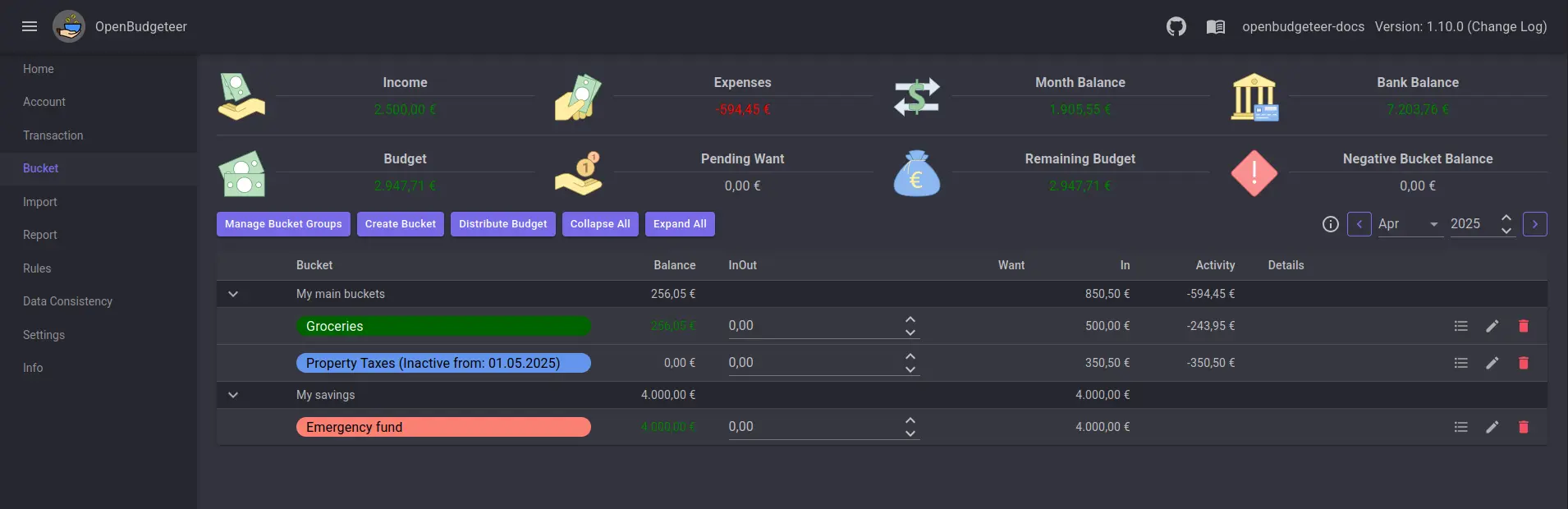
- Put your money into buckets Split the money you have into buckets such as groceries, rent or holidays, and see each one's balance, what it still wants and what you spent this month.
- Plan for yearly and quarterly bills A bucket can save a little each month towards a bill that comes every few months, or towards a target by a set date, with a progress bar.
- Fill buckets in one click Distribute Budget moves money into every bucket that wants some this month, and the top of the page shows your remaining budget and any overspent buckets.
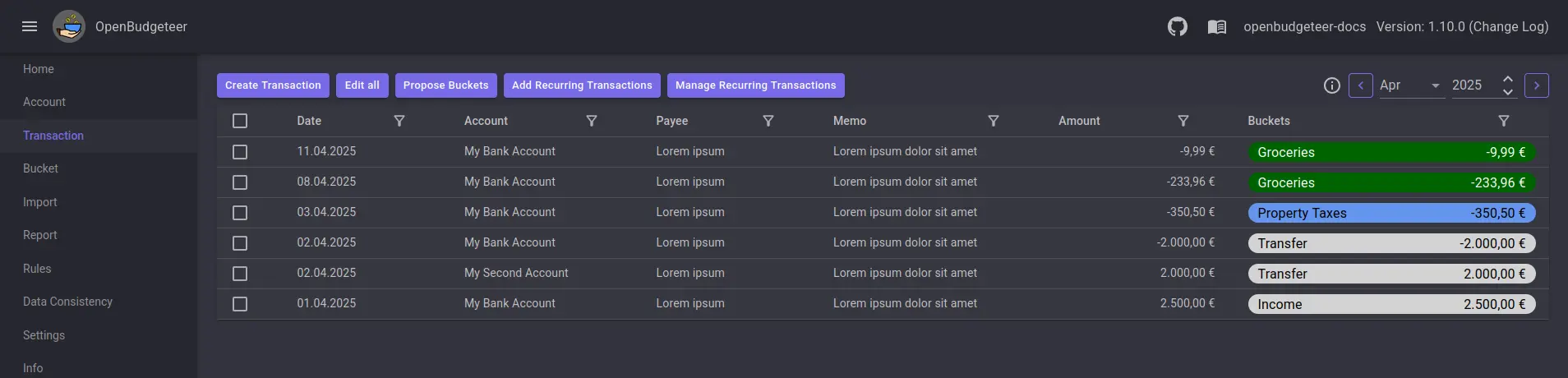
- Import your bank statements A step-by-step wizard reads your bank's CSV export, lets you check the columns and warns about duplicates before anything is saved.
- Let rules sort your spending Rules suggest the right bucket for each transaction, and you can split one payment across several buckets or set up recurring ones.
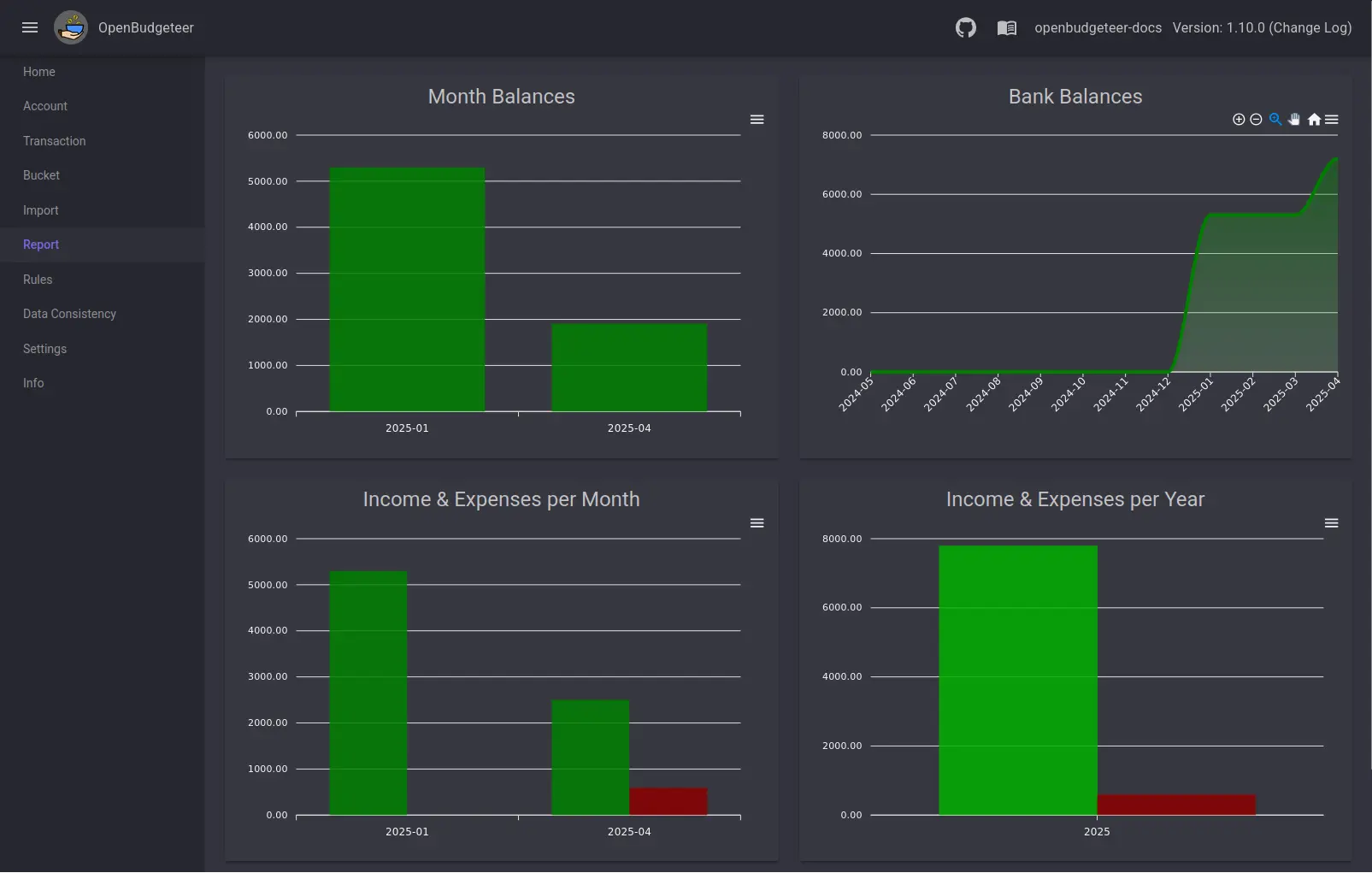
- See where your money goes Reports chart your monthly balance, bank balance, income and expenses by month and year, and spending per bucket.
Replaces YNAB and Goodbudget
OpenBudgeteer does the same job as YNAB and Goodbudget. Here is what changes when you switch.
- No subscription; the app is free and you pay only for your server
- Your budget stays on your own server, and no bank login is ever shared
- Bucket types that spread yearly bills and savings goals over the months for you
- There is no bank sync; you import CSV files from your bank or type transactions in
- There is no importer for a YNAB budget, so you set up your buckets again
- It's web only, with no phone or desktop app, though the pages fit small screens
- One login covers the whole app; there are no separate accounts for each person
What happens when you click Deploy?
You do not need a server or any technical knowledge. Four steps, and OpenBudgeteer is running at its own web address.
- Step 1 Click Deploy and create your account
Deploy takes you to Cloudgate. Create an account, or log in if you have one. OpenBudgeteer itself is free.
- Step 2 Choose a server
No server? Get one from Cloudgate: pick a size and a country, and Cloudgate gets it ready. Already have one? Connect it instead.
- Step 3 Cloudgate sets up OpenBudgeteer
It prepares the server, makes the passwords the app needs and starts it. There is nothing to install and nothing to write down.
- Step 4 Open your app and sign in
Your app gets a free web address to start, without https. Add your own domain, like app.yourshop.com, and Cloudgate secures it with https for you.
New to Cloudgate? See what Cloudgate is
Run Cloudgate yourself? Deploy from your own console
In your Cloudgate console, open Templates and choose OpenBudgeteer.
Questions
Is OpenBudgeteer free?
Yes. OpenBudgeteer is free, open-source software under the AGPL-3.0 licence, with no paid edition and no locked features. You pay only for the server it runs on.
Is OpenBudgeteer a good alternative to YNAB?
Yes, if you want YNAB's method without the subscription and don't need bank sync. OpenBudgeteer uses the same idea of giving your money a job in buckets, and unspent or overspent amounts carry into the next month. YNAB does more for you, with bank connections in North America and phone apps, while OpenBudgeteer relies on bank files you import.
What is bucket budgeting in OpenBudgeteer?
Bucket budgeting, also called envelope budgeting, means deciding in advance how much of the money you have goes to each purpose, such as groceries, insurance or savings, then taking each payment out of its bucket. You always know what is left to spend in each bucket, instead of only seeing afterwards where the money went. OpenBudgeteer is built around this method.
Can I import my bank transactions or my YNAB budget?
Partly. OpenBudgeteer imports CSV files from your online banking through a wizard where you match the columns, and it checks for duplicates. It has no importer for a YNAB budget, so you recreate your buckets and bring in past transactions as CSV files.
How do I sign in to OpenBudgeteer the first time?
Sign in to OpenBudgeteer with the username and password Cloudgate shows on the app's variables page. There is one login for the whole app and no setup wizard; you start by adding your bank account and its opening balance, then your buckets.
Is there an OpenBudgeteer phone app?
No. OpenBudgeteer is a web app with no phone or desktop app, but its pages are laid out to work on small screens, so you can use it in your phone's browser.
Is my financial data private with OpenBudgeteer?
Yes. Your budget and transactions are stored in your own database on your own server, and OpenBudgeteer never connects to your bank, so you never hand your bank login to anyone.
Do I need technical skills to run OpenBudgeteer?
No. Click Deploy, create your Cloudgate account and choose a server, and Cloudgate sets up OpenBudgeteer and gives it a web address. You use it in your browser like any other online tool.
Do I need my own server for OpenBudgeteer?
No. When you deploy OpenBudgeteer, hosted Cloudgate can provide a server. If you already rent one, you can connect it instead.
Related apps

A free envelope budget app, like YNAB, on your own server.

Track every account, budget and bill in one private money manager.

Personal finance: net worth, spending and budgets.

A self-hosted Mint alternative for budgets, spending and goals.