
Note Mark
Markdown notes you can share or publish on the web.
No server needed to start: Cloudgate can provide one. What happens when you click Deploy

What is Note Mark?
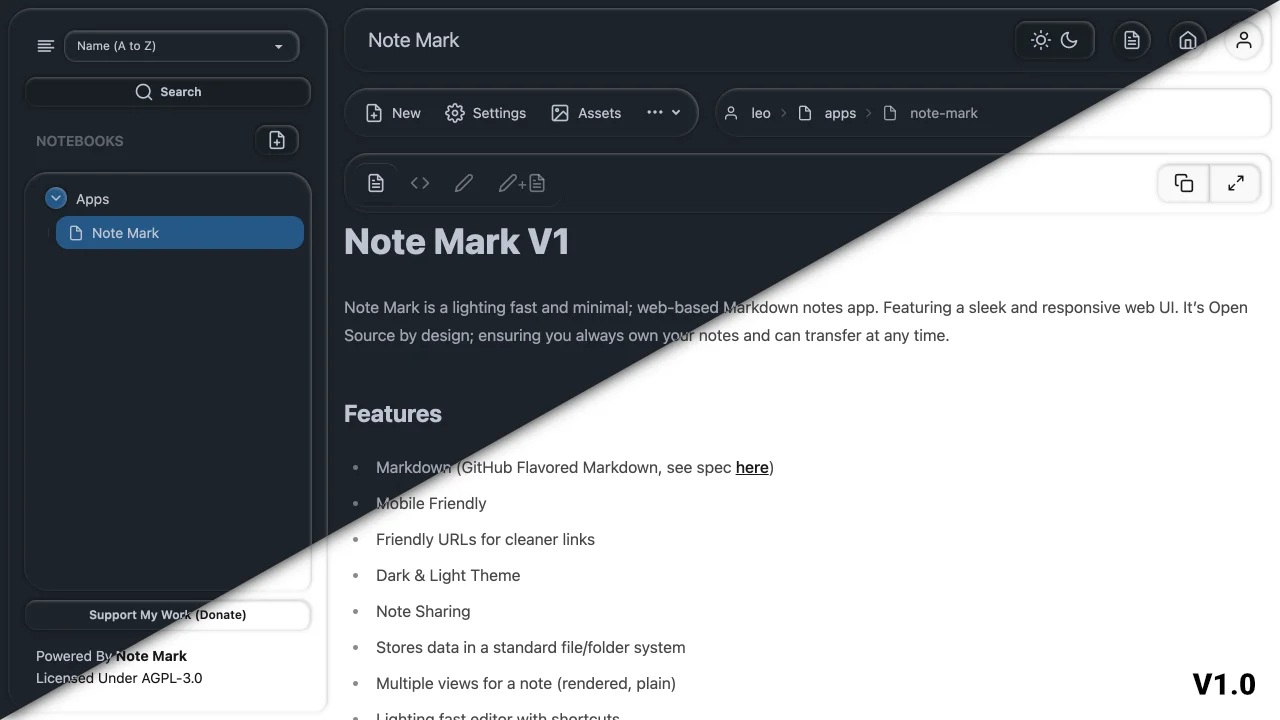
Note Mark is a self-hosted Markdown notes app: write in notebooks, share notes with people or publish them on the web, and keep every note as a plain file.
Self-hosted Note Mark is a free, open-source Markdown notes app that runs in your browser, and a simple alternative to Obsidian Publish for sharing notes on the web. You write notes in Markdown, keep them in notebooks with notes nested inside notes, and attach pictures and files.
Every note is private until you share it. You can give a colleague read-only or editing access, or make a note public so anyone with its link can read it. A small bakery, for example, could keep its recipes and supplier notes private, share the opening checklist with staff, and publish an allergen note for customers.
Note Mark stores each note as an ordinary Markdown file in a folder, so your notes stay readable outside the app and are easy to back up or move. It is deliberately small: there are no backlinks, plugins or databases, and search finds notes by their titles. The web app works on phones and can be added to your home screen, and you can sign in with single sign-on.
Cloudgate installs Note Mark on a server Cloudgate provides or one you connect, and gives it a secure web address. Open that address straight away and sign up to create your own account first.
What you can do with Note Mark
- Write in Markdown A fast editor with shortcuts and buttons for links, tables and pictures, then a clean, formatted view.
- Organise notebooks Keep notes in notebooks and nest notes inside notes, shown as a tree with tidy web addresses.
- Share with your team Give named people read-only or editing access to a note, while the rest stay private.
- Publish a note Make any note public so anyone with its link can read it, with no account needed.
- Attach files and images Upload pictures and documents to a note and show them inside it.
- Own plain files Every note is saved as an ordinary Markdown file in a folder on your server, easy to back up or move.
- Use it on your phone The web app works on phones and can be added to your home screen, with a scratch pad for quick jottings.
- Use single sign-on Let people sign in through your existing login service, such as Authentik or Authelia, instead of a separate password.
Replaces Obsidian
Note Mark does the same job as Obsidian. Here is what changes when you switch.
- Publishing notes on the web costs nothing, unlike Obsidian Publish
- Your notes open in any browser, from any computer, with no sync subscription
- Notes stay Markdown files in folders, much like an Obsidian vault
- Several people can each have an account and share notes with each other
- No backlinks, graph view or plugins
- No desktop or phone apps, so you need a connection to your server
- Search looks at note titles only, not the text inside notes
- There is no import, so notes come across by copy and paste
What happens when you click Deploy?
You do not need a server or any technical knowledge. Four steps, and Note Mark is running at its own web address.
- Step 1 Click Deploy and create your account
Deploy takes you to Cloudgate. Create an account, or log in if you have one. Note Mark itself is free.
- Step 2 Choose a server
No server? Get one from Cloudgate: pick a size and a country, and Cloudgate gets it ready. Already have one? Connect it instead.
- Step 3 Cloudgate sets up Note Mark
It prepares the server, makes the passwords the app needs and starts it. There is nothing to install and nothing to write down.
- Step 4 Open your app and sign in
Your app gets a free web address to start, without https. Add your own domain, like app.yourshop.com, and Cloudgate secures it with https for you.
New to Cloudgate? See what Cloudgate is
Run Cloudgate yourself? Deploy from your own console
In your Cloudgate console, open Templates and choose Note Mark.
Questions
Is Note Mark free?
Yes. Note Mark is free and open source under the AGPL-3.0 licence, with no paid edition. You pay only for the server it runs on.
Is Note Mark a good alternative to Obsidian?
Yes, if you mainly want Markdown notes in a browser and some notes published on the web, as with Obsidian Publish. Note Mark keeps notes as Markdown files in folders, but it has no backlinks, graph view, plugins or offline apps.
How do I sign in to Note Mark the first time?
There is no default login. Open Note Mark's web address right after setup and sign up to create your account. Anyone who reaches the address can sign up until you turn sign-up off in Cloudgate.
Can I share or publish notes with Note Mark?
Yes. Each note in Note Mark can be made public, so anyone with the link can read it, or shared with named people as read-only or editable. Anyone you give editing access can also change who sees that note, so give it only to people you trust.
Can I import my Obsidian vault or Notion pages into Note Mark?
No, Note Mark has no import tool. Because it uses plain Markdown, you can paste notes in one at a time and they keep their formatting.
Is there a Note Mark phone app?
No, there is no app in the app stores. Note Mark's web app is built for phones too, and you can add it to your home screen like an app.
Where does Note Mark keep my notes?
Note Mark keeps your notes on your own server, as ordinary Markdown files in folders, with a small database for accounts. Backing up that one data folder backs up everything.
Do I need technical skills to run Note Mark?
No. Click Deploy, create your Cloudgate account and choose a server, and Cloudgate sets up Note Mark and gives it a web address. You use it in your browser like any other online tool.
Do I need my own server for Note Mark?
No. When you deploy Note Mark, hosted Cloudgate can provide a server. If you already rent one, you can connect it instead.
Related apps

Markdown notes you find by search and tags, not folders.

Obsidian-style Markdown notes in your browser, on your own server.

A fast Markdown notebook with links, a graph and search.

Notes, tasks and a daily diary, saved as plain files.