
Movary
A self-hosted movie tracker with ratings, reviews and statistics.
No server needed to start: Cloudgate can provide one. What happens when you click Deploy

What is Movary?
Movary is a self-hosted movie tracker and film diary: log what you watch, rate and review it, see statistics and import from Letterboxd or Trakt.
Movary is a self-hosted movie tracker: a private film diary that keeps every film you watch, your ratings and your reviews on your own server, as an open-source alternative to Letterboxd and Trakt. You log a film with the date you saw it, give it a score from 1 to 10, write a few lines, and add the films you still want to see to a watchlist.
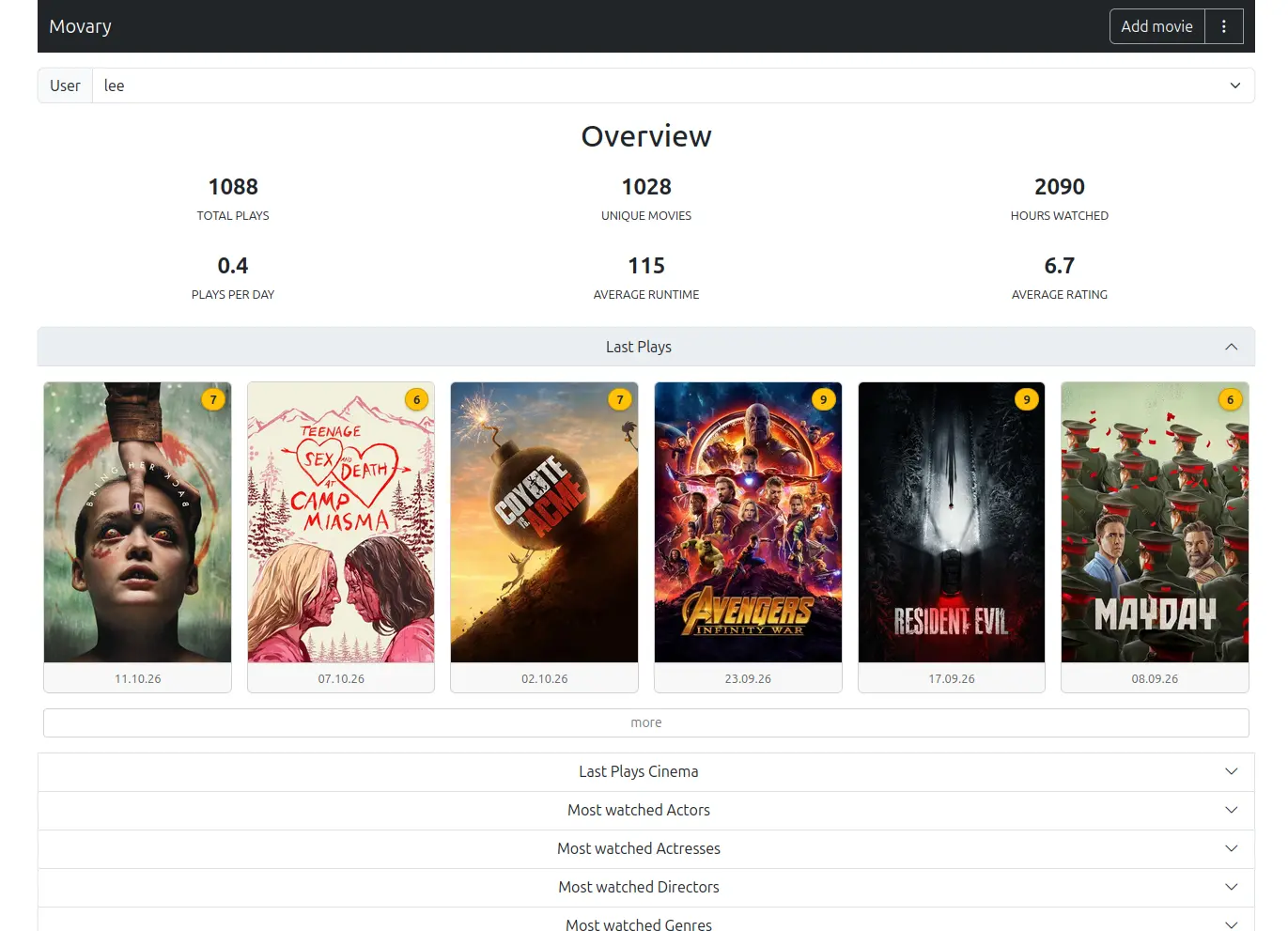
The dashboard turns your history into statistics: total plays and hours watched, your average rating, and the actors, directors, genres, languages and release years you watch most. A couple could each keep their own diary, mark which films they saw at the cinema, and look back at the end of the year to see whose favourite director won.
You can bring your history from Letterboxd, Trakt or Netflix, and export it back to Letterboxd. If you run Plex, Jellyfin, Emby or Kodi, finished films are added to your diary automatically, and Movary can post what you watch to Mastodon. Movary covers films only, not TV shows, and works in any browser, including on a phone.
Cloudgate installs Movary on your server with a secure web address. The first person to open it creates the admin account.
What you can do with Movary
- Log every film you watch Record each viewing with its date, rewatches included, and note where you saw it, such as at home or at the cinema.
- Rate and review Give each film a score from 1 to 10, write a review with an optional spoiler warning, and keep a watchlist.
- See your film statistics A dashboard counts your plays, films and hours watched, and shows your most-watched actors, directors, genres, languages and years.
- Bring your history with you Import your diary and ratings from Letterboxd or Trakt, or your viewing activity from Netflix.
- Log films as you watch Plex, Jellyfin, Emby and Kodi can add a play to your diary automatically when a film finishes.
- Share as much as you like Keep your diary private, show it to other people on your Movary, or make your pages public for anyone with the link.
- For you or the whole household Each person gets their own account, diary and statistics.
Replaces Letterboxd and Trakt
Movary does the same job as Letterboxd and Trakt. Here is what changes when you switch.
- Your movie diary, ratings and reviews stay on your own server
- Free and open source, with no paid tier, ads or tracking
- Detailed statistics on actors, directors, genres and years at no extra cost
- Export back to Letterboxd whenever you want
- Movies only; it does not track TV shows
- No public community, friends' feeds or reviews from strangers
- No app-store app; you install it on your phone from the browser
- Still before version 1.0, so updates can bring bigger changes
What happens when you click Deploy?
You do not need a server or any technical knowledge. Four steps, and Movary is running at its own web address.
- Step 1 Click Deploy and create your account
Deploy takes you to Cloudgate. Create an account, or log in if you have one. Movary itself is free.
- Step 2 Choose a server
No server? Get one from Cloudgate: pick a size and a country, and Cloudgate gets it ready. Already have one? Connect it instead.
- Step 3 Cloudgate sets up Movary
It prepares the server, makes the passwords the app needs and starts it. There is nothing to install and nothing to write down.
- Step 4 Open your app and sign in
Your app gets a free web address to start, without https. Add your own domain, like app.yourshop.com, and Cloudgate secures it with https for you.
New to Cloudgate? See what Cloudgate is
Run Cloudgate yourself? Deploy from your own console
In your Cloudgate console, open Templates and choose Movary.
Questions
Is Movary free?
Yes. Movary is free, open-source software under the MIT licence, with no paid tier, ads or tracking. You pay only for your server.
Is Movary a good alternative to Letterboxd?
Yes, if you want a private film diary rather than a social network. Movary keeps your watch dates, ratings, reviews and watchlist, adds detailed statistics, and imports your Letterboxd diary and ratings. It has no community, friends' activity or lists from other members.
Can I import my history from Letterboxd, Trakt or Netflix?
Yes. Movary imports the diary and ratings files from a Letterboxd data export, your Trakt history and ratings (your Trakt profile must be public during the import), and the films from a Netflix viewing-activity file. It can also create an export that Letterboxd can import.
Does Movary track TV shows?
No. Movary is made only for films. If you want to track TV shows and episodes as well, look at a tracker such as Watcharr or Yamtrack.
Does Movary work with Plex and Jellyfin?
Yes. Plex, Jellyfin, Emby and Kodi can add finished films to your Movary diary automatically. Plex can also send rating changes, though Plex's webhooks need a Plex Pass, and Jellyfin can import and export your watch history.
Is there a Movary phone app?
No, not in an app store. Movary can be installed on your phone's home screen from the browser, and it then opens like an app.
Who is the admin?
The first person to open Movary's web address creates the admin account, with a password of at least 15 characters. The admin then adds other people's accounts in the server settings.
Do I need technical skills to run Movary?
No. Click Deploy, create your Cloudgate account and choose a server, and Cloudgate sets up Movary and gives it a web address. You use it in your browser like any other online tool.
Do I need my own server for Movary?
No. When you deploy Movary, hosted Cloudgate can provide a server. If you already rent one, you can connect it instead.
Related apps

Keep track of every film and show you watch, on your own server.

Track the shows, books, games and workouts you love in one app.

A self-hosted media tracker for films, series, anime, games and books.

Podcast hosting with your own feed, website and stats.