
MeTube
Download videos to your own server from a simple web page.
No server needed to start: Cloudgate can provide one. What happens when you click Deploy

What is MeTube?
MeTube is a self-hosted video downloader: paste a link to save your own or permitted videos, playlists or audio to your server from any browser.
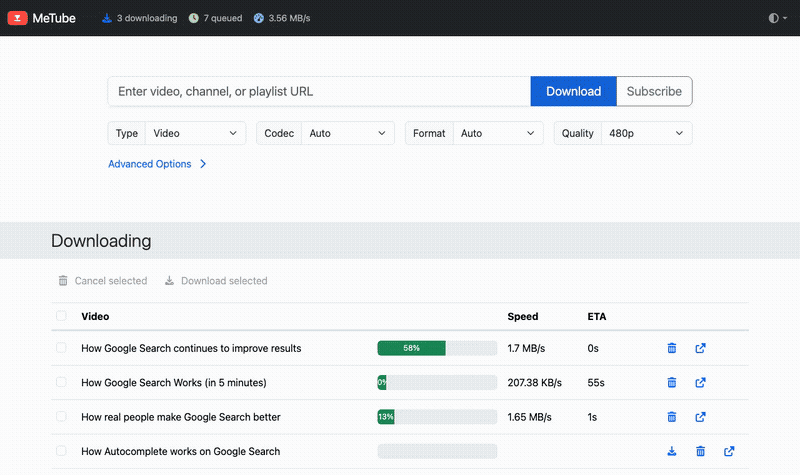
MeTube is a free, open-source, self-hosted video downloader: one web page on your own server that saves your own or permitted videos and audio, instead of a desktop app such as 4K Video Downloader. Paste the address of a video, a playlist or a whole channel from YouTube or hundreds of other sites, choose video or audio and the quality, and the files are saved to your server, ready to download to any computer or phone.
A dance school, for example, could subscribe to its own channel so every new class recording is kept on its server, save the audio of a teacher's talk, and clip the first minutes of a performance for its website, all from a browser, with the files in one place for the whole team.
Use it for videos you made or have permission to keep. Many sites, YouTube included, forbid downloading in their terms unless they offer it, and copyright applies to what you save; check before you download.
MeTube is a web page for yt-dlp, the widely used open-source download tool. Cloudgate installs MeTube on a server Cloudgate provides or one you connect, with a secure web address and a password in front of it, because MeTube has no accounts of its own. Plan enough disk space for what you save.
What you can do with MeTube
- Paste a link, get the file Paste the address of a video, a playlist or a whole channel, and MeTube saves it to your server, from YouTube or hundreds of other video sites.
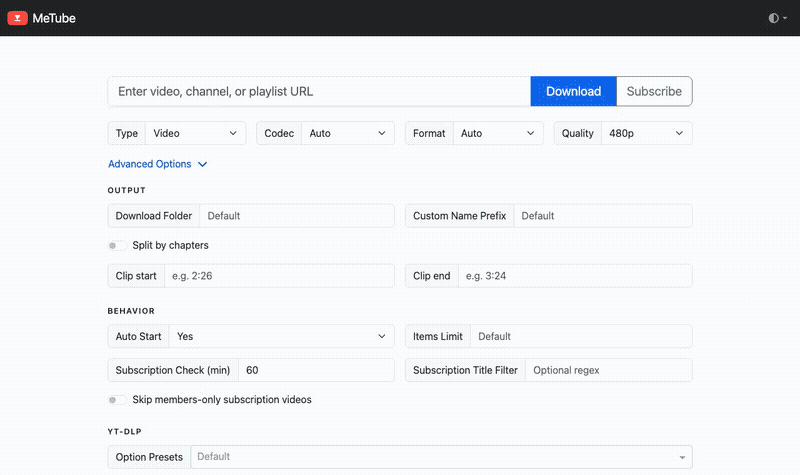
- Video or audio only Choose video or just the audio, and pick the quality and format for each download, with subtitles and thumbnails if you want them.
- Keep up with your own channel Subscribe to a channel or playlist and MeTube checks it on a schedule, usually every hour, and saves each new upload, with a title filter to pick only some.
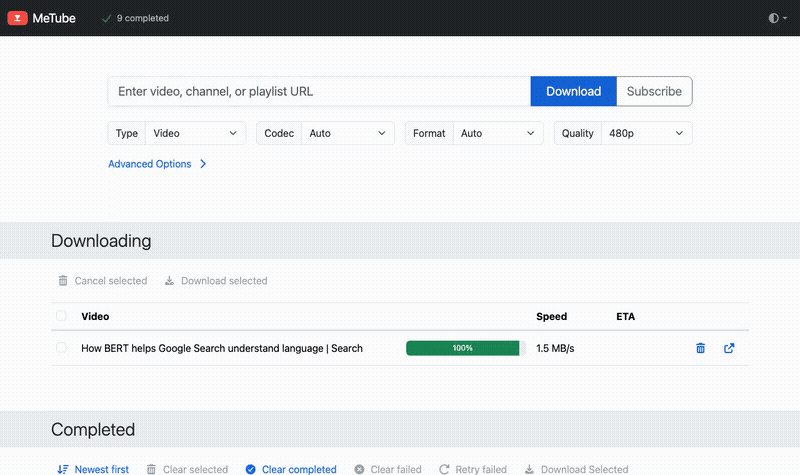
- A queue you can watch Downloads wait their turn in a queue that shows progress, speed and time left, and failed ones can be retried.
- Save just the part you need Set a start and end time to keep only a clip, split a long video by its chapters, or limit how many items of a playlist to fetch.
- Tidy folders and names Files keep the video's title and land in a folder per playlist or channel, or in a folder you choose for each download.
- Download to your computer Finished files appear in a Completed list with a link to download each one to your computer or phone.
Replaces 4K Video Downloader
MeTube does the same job as 4K Video Downloader. Here is what changes when you switch.
- One shared web page for the whole team, from any browser, instead of an app on each computer
- No plan limits or yearly licence; you pay only for your server
- Subscriptions save new uploads from your channel on their own
- Files stay on your own server until you remove them
- Files are saved on the server first; you download each one to your computer from the Completed list
- One shared password for everyone, with no separate user accounts or private download lists
- When a video site changes, downloads can stop working until a newer version of the template is installed
- It only downloads; there is no player, library or tag editor
What happens when you click Deploy?
You do not need a server or any technical knowledge. Four steps, and MeTube is running at its own web address.
- Step 1 Click Deploy and create your account
Deploy takes you to Cloudgate. Create an account, or log in if you have one. MeTube itself is free.
- Step 2 Choose a server
No server? Get one from Cloudgate: pick a size and a country, and Cloudgate gets it ready. Already have one? Connect it instead.
- Step 3 Cloudgate sets up MeTube
It prepares the server, makes the passwords the app needs and starts it. There is nothing to install and nothing to write down.
- Step 4 Open your app and sign in
Your app gets a free web address to start, without https. Add your own domain, like app.yourshop.com, and Cloudgate secures it with https for you.
New to Cloudgate? See what Cloudgate is
Run Cloudgate yourself? Deploy from your own console
In your Cloudgate console, open Templates and choose MeTube.
Questions
Is MeTube free?
Yes. MeTube is free, open-source software under the AGPL-3.0 licence, with no paid edition or locked features. You pay only for your server and the disk space your downloads use.
Is MeTube a good alternative to 4K Video Downloader?
Yes, if you want one shared download page on your own server rather than an app on each computer. MeTube saves videos, playlists, channels and audio with no plan limits, and can follow a channel for new uploads. It is plainer than a desktop app, and files are saved on the server first, so you download each one to your computer afterwards.
Is it legal to download videos with MeTube?
It depends on the video and the site, not on MeTube, which is only a download tool. Use MeTube for your own videos or ones you have permission to save, such as your channel's uploads or videos under a licence that allows copies. Many sites, YouTube included, forbid downloading in their terms unless they offer a download option or you have permission, and copyright still applies to what you save. This is not legal advice; check the terms and the licence of what you download.
How do I sign in to MeTube the first time?
With the user name admin and a password Cloudgate creates; your browser asks for them before MeTube opens. The password is shown on the app's variables page as ADMIN_PASSWORD. MeTube has no accounts of its own, so everyone you give this password to shares the same page, queue and files.
Can MeTube save only the audio?
Yes. Set the type to audio before you press Download, then pick the format, such as MP3, and the quality, and MeTube saves just the sound, for example from your own recorded talks or podcast videos.
Can MeTube save new uploads from my channel automatically?
Yes. Paste your channel or playlist address and press Subscribe instead of Download. MeTube checks it on a schedule and saves each new video; videos already there when you subscribe are not downloaded, so download the channel once first if you want those too.
What server size do I need for MeTube?
A small one. MeTube needs little memory, so Cloudgate uses a small server; the real limit is disk space, because every video you save stays on the server until you delete it.
Do I need technical skills to run MeTube?
No. Click Deploy, create your Cloudgate account and choose a server, and Cloudgate sets up MeTube and gives it a web address. You use it in your browser like any other online tool.
Do I need my own server for MeTube?
No. When you deploy MeTube, hosted Cloudgate can provide a server. If you already rent one, you can connect it instead.
Can I move my data from 4K Video Downloader to MeTube?
Most people export from 4K Video Downloader and import into MeTube. The official guides at github.com walk through it.
Related apps

Podcast hosting with your own feed, website and stats.

Share your game clips and videos with a link, from your own server.

A self-hosted media server for your family's films and home videos.

Watch history and statistics for your Jellyfin media server.