
GrowthBook
Feature flags and A/B tests for your app, on your own server.
No server needed to start: Cloudgate can provide one. What happens when you click Deploy
What is GrowthBook?
Self-hosted GrowthBook runs feature flags, gradual rollouts and A/B tests on your own server, with results read from your own data.
GrowthBook is a self-hosted platform for feature flags and A/B testing, and a free alternative to LaunchDarkly, Optimizely and Statsig. It lets your team switch features on and off without a new release, show a change to a share of users first, and test which version of a page or feature works better.
Test results come from data you already collect, such as your own database, Google Analytics 4 through BigQuery, or Mixpanel, so your users' data stays where it is. An online shop, for example, could show a new checkout button to half its visitors, then read from its existing order data whether more of them finished buying, before giving the button to everyone.
GrowthBook is open core: most of its code is open source under the MIT licence, and the free self-hosted edition has unlimited users and one project. Some features, such as the visual editor, safe rollouts, scheduled flags and single sign-on, need a paid licence. A developer adds GrowthBook to your website or app with one of its libraries for the web, servers, iPhone and Android, pointed at GrowthBook's API address.
Cloudgate installs GrowthBook on a server Cloudgate provides or one you connect, together with the database it needs, and gives it two secure web addresses: one where your team signs in, and one for the API that your apps call. The first person to open it creates the admin account.
What you can do with GrowthBook
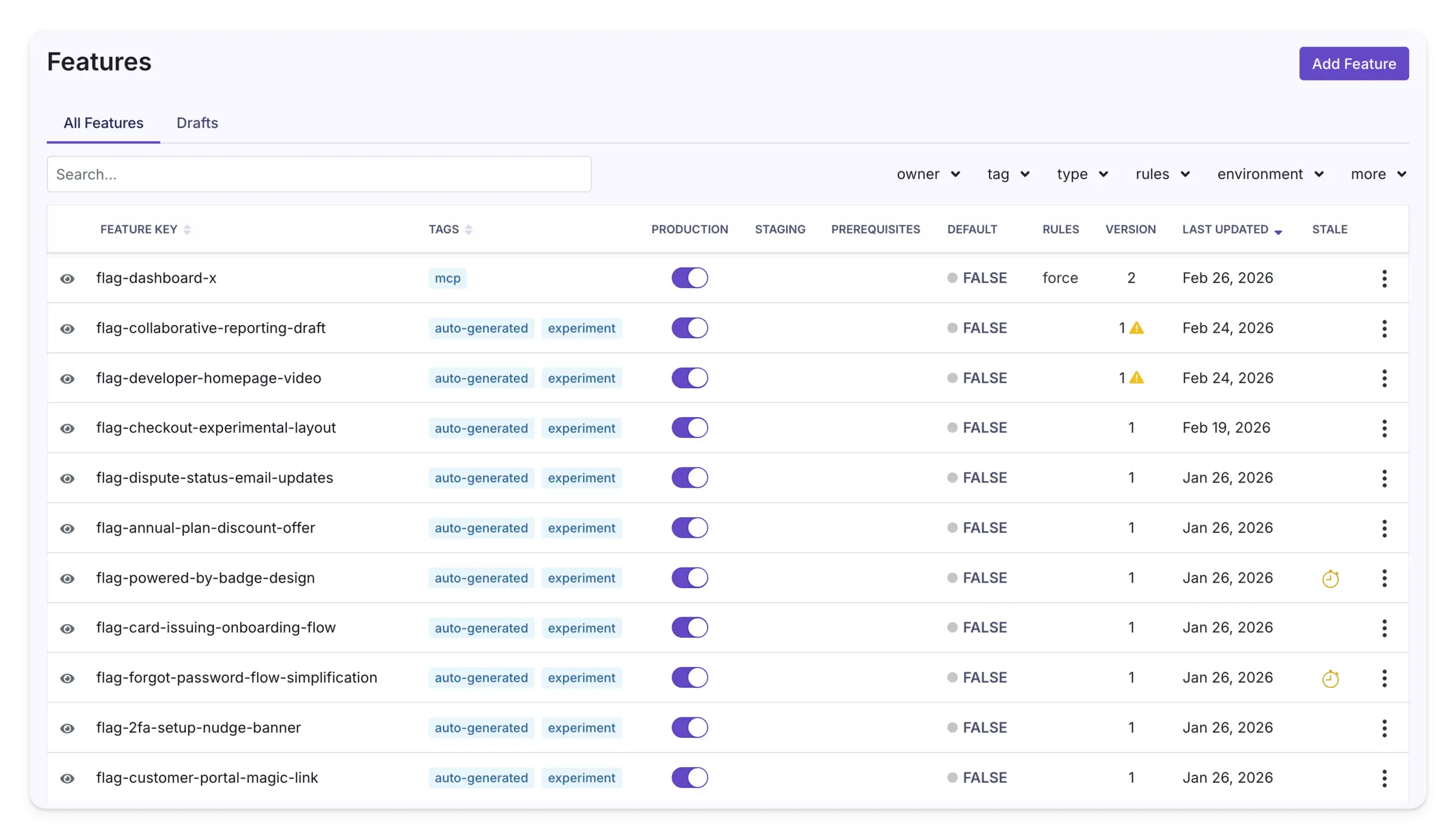
- Turn features on and off without a release Switch a new feature on or off for each environment, such as staging and production, from one list.
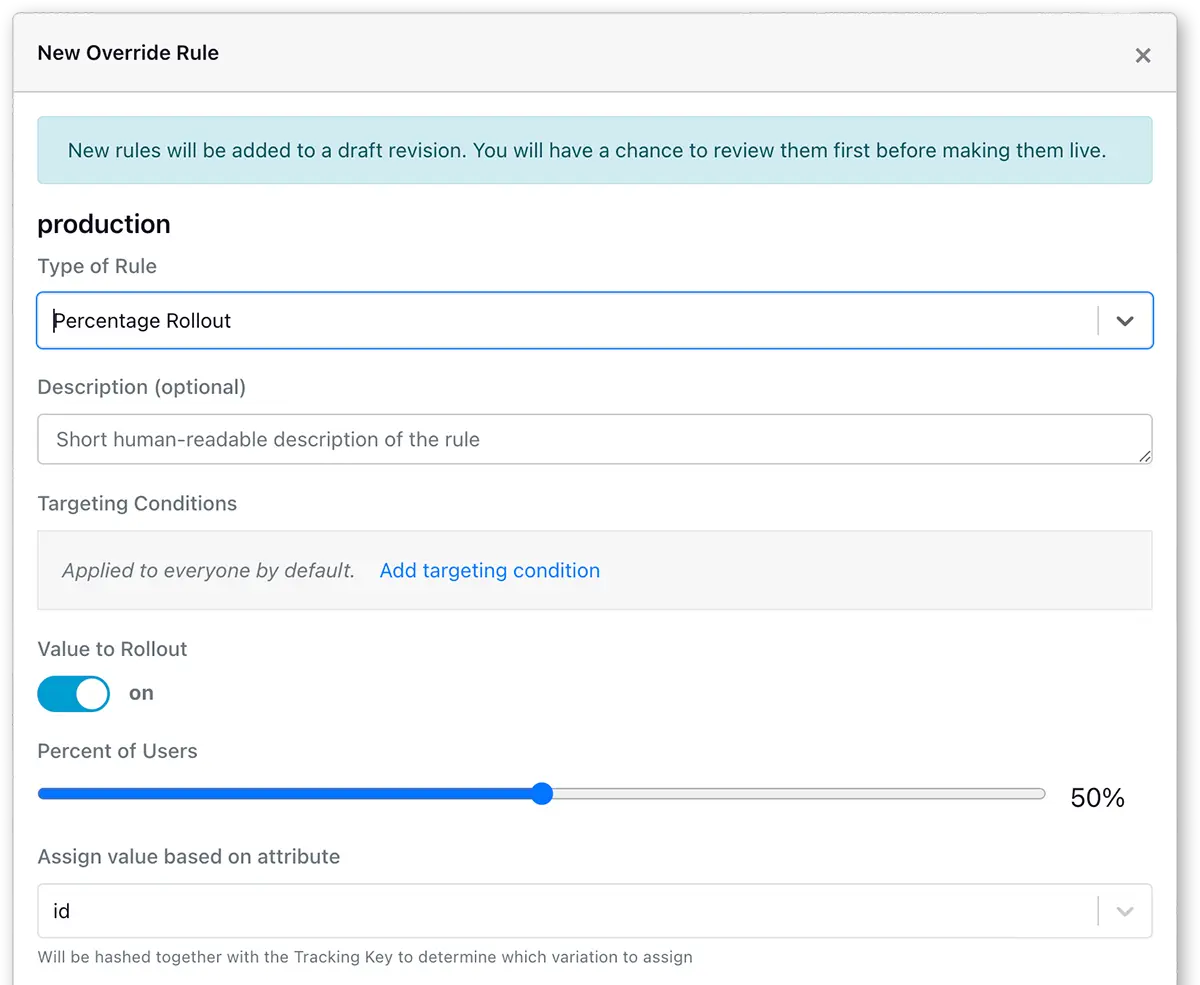
- Roll out to a share of users Show a change to 10% or 50% of users first, or only to users who match the rules you set.
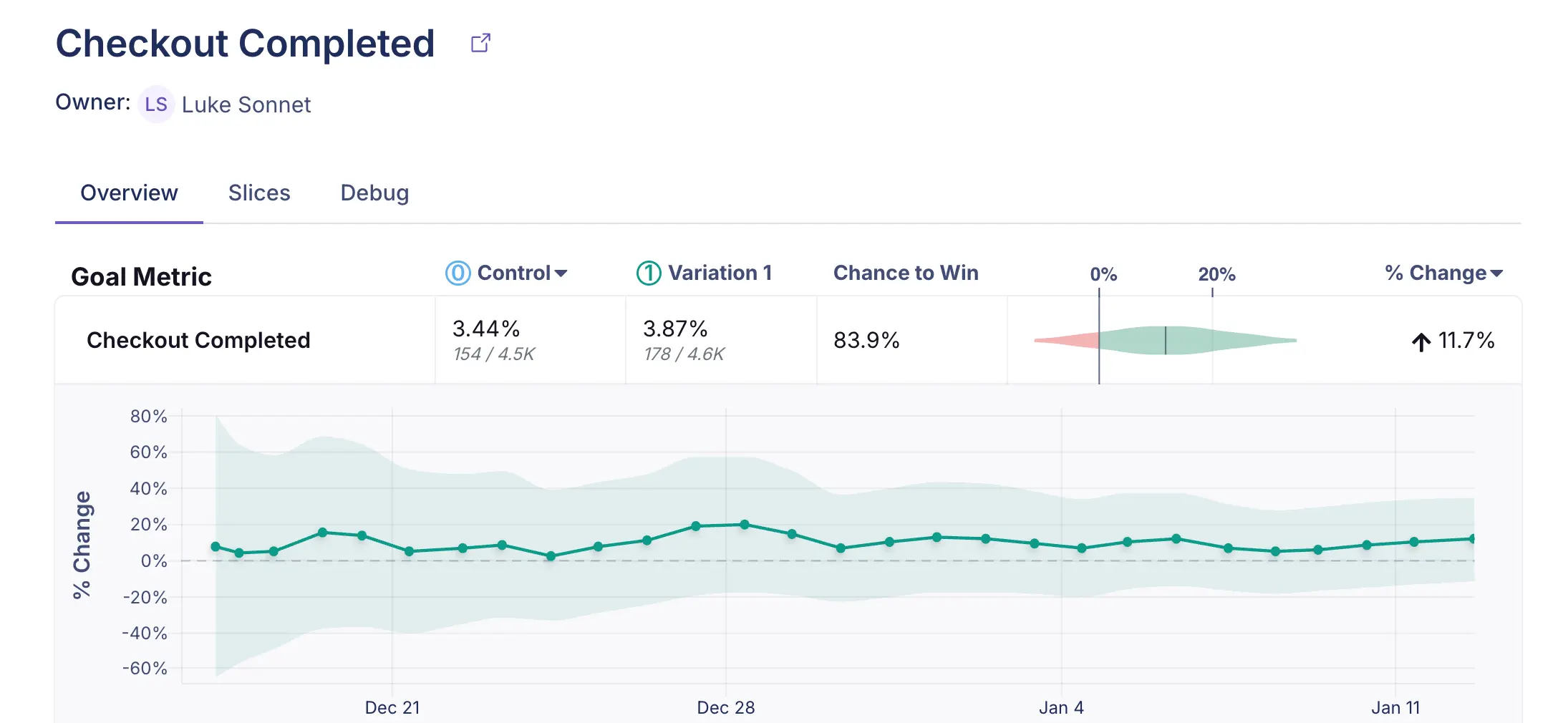
- Run A/B tests Split users between versions of a page or feature, and see each version's chance to win and the % change for every metric.
- Read results from data you already have Connect PostgreSQL, MySQL, SQL Server, BigQuery (including Google Analytics 4 exports), Snowflake, Redshift, ClickHouse or Mixpanel, and your raw data stays where it is.
- Review changes before they go live New rules go into a draft that you check before publishing, and every change keeps a version number.
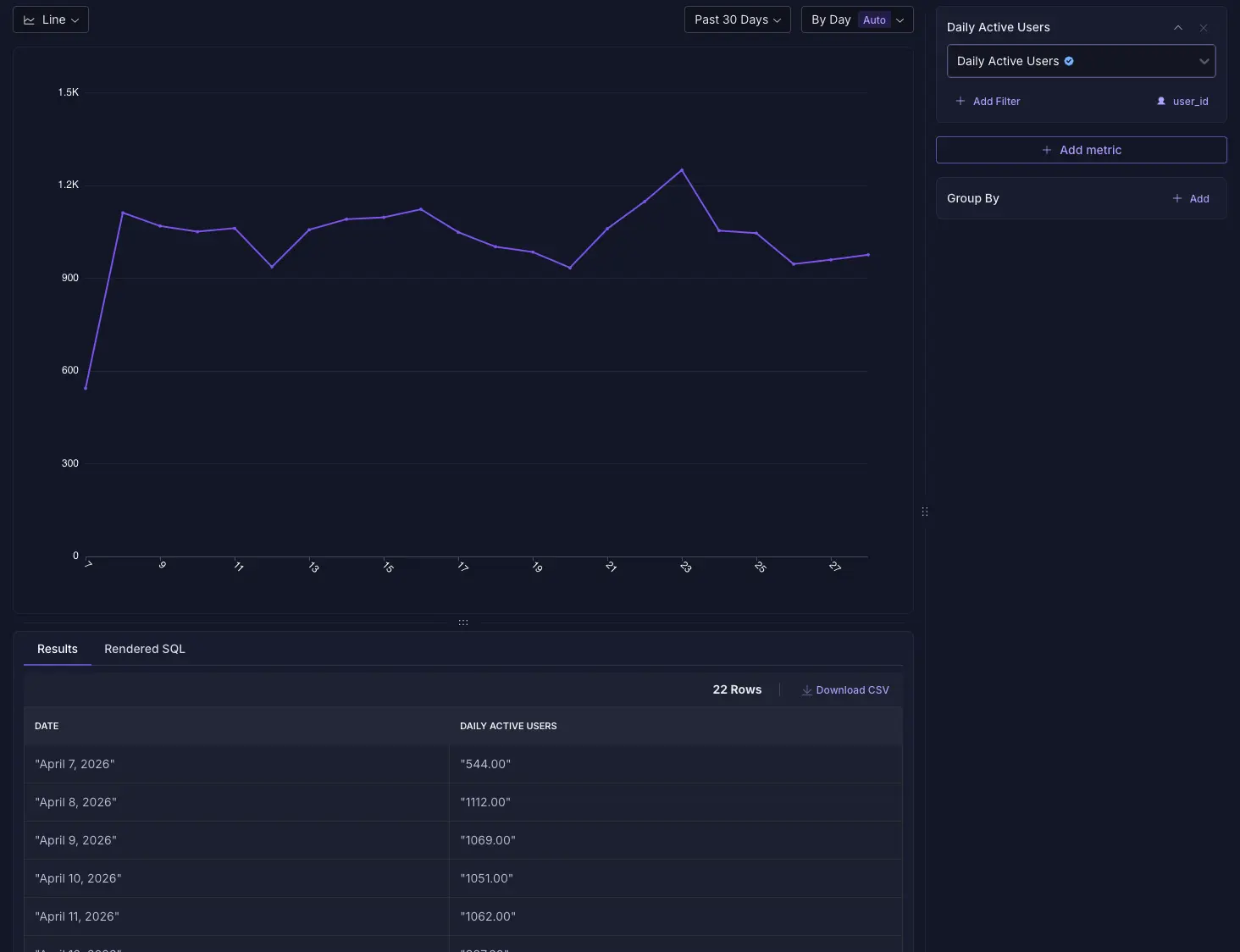
- Explore your metrics Chart a metric such as daily active users over time, filter and group it, and download the numbers as CSV.
- Bring your flags with you Import feature flags from LaunchDarkly, or features and experiments from Statsig.
Replaces LaunchDarkly, Optimizely and Statsig
GrowthBook does the same job as LaunchDarkly, Optimizely and Statsig. Here is what changes when you switch.
- No fee per seat, with unlimited users on your own server
- Experiment results come from your own database, so user data is not copied to another company
- Flags, rollouts and A/B tests in one tool
- LaunchDarkly and Statsig importers to move your flags across
- The free edition has one project and the standard environments only
- The no-code visual editor, safe rollouts, scheduled flags, SSO and advanced statistics need a paid licence
- A/B test results need your own database or analytics tool; GrowthBook does not collect events itself
- A developer has to add GrowthBook to your website or app before flags work
What happens when you click Deploy?
You do not need a server or any technical knowledge. Four steps, and GrowthBook is running at its own web address.
- Step 1 Click Deploy and create your account
Deploy takes you to Cloudgate. Create an account, or log in if you have one. GrowthBook itself is free.
- Step 2 Choose a server
No server? Get one from Cloudgate: pick a size and a country, and Cloudgate gets it ready. Already have one? Connect it instead.
- Step 3 Cloudgate sets up GrowthBook
It prepares the server, makes the passwords the app needs and starts it. There is nothing to install and nothing to write down.
- Step 4 Open your app and sign in
Your app gets a free web address to start, without https. Add your own domain, like app.yourshop.com, and Cloudgate secures it with https for you.
New to Cloudgate? See what Cloudgate is
Run Cloudgate yourself? Deploy from your own console
In your Cloudgate console, open Templates and choose GrowthBook.
Questions
Is GrowthBook free?
Yes, the self-hosted GrowthBook is free, with unlimited users, feature flags, experiments and traffic, and one project. It is open core, so most of its code is open source under the MIT licence while paid features, such as the visual editor, safe rollouts, scheduled flags and SSO, need an Enterprise licence key. You pay only for your server.
Is GrowthBook a good alternative to LaunchDarkly?
Yes, for teams that want feature flags, targeting, percentage rollouts and A/B tests on their own server with no fee per seat. GrowthBook has a LaunchDarkly importer for flags, environments, targeting and rollout rules, though some enterprise workflow features, such as approvals and custom roles, are paid.
Can GrowthBook replace Optimizely?
Partly. The free edition runs A/B tests that a developer sets up in your website or app, with results from your own data. Optimizely-style no-code page editing is GrowthBook's visual editor, which is a paid feature.
Do I need a data warehouse to use GrowthBook?
Not for feature flags, but yes for A/B test results. The self-hosted GrowthBook reads results from a database or analytics tool you already use, such as PostgreSQL, MySQL, BigQuery with Google Analytics 4, Snowflake or Mixpanel, and only runs read queries on it.
How do I sign in to GrowthBook the first time?
The first person to open your GrowthBook web address creates the admin account with a name, email, password and company name. GrowthBook then sets up your organization and a first project. No email server is set up, so to invite your team you copy each invite link from the Members page and send it yourself, or add email settings later.
How do I connect my app to GrowthBook?
A developer adds a GrowthBook library to your website or app and points it at your GrowthBook API address, the second address Cloudgate gives it, not the address where your team signs in. The library then reads your flags and experiments from there.
Can I move my flags from LaunchDarkly or Statsig?
Yes, GrowthBook has importers for both. The LaunchDarkly importer brings over projects, environments and feature flags with their rules; the Statsig importer brings over features and experiments. Check complex rules after importing.
What server size do I need for GrowthBook?
A medium server with 2 GB of memory, which is what GrowthBook asks for as a minimum, together with its MongoDB database. Cloudgate sets up both, and you can move to a bigger server if you run many experiments.
Do I need technical skills to run GrowthBook?
No. Click Deploy, create your Cloudgate account and choose a server, and Cloudgate sets up GrowthBook and gives it a web address. You use it in your browser like any other online tool.
Do I need my own server for GrowthBook?
No. When you deploy GrowthBook, hosted Cloudgate can provide a server. If you already rent one, you can connect it instead.
Related apps

Minimal, cookie-free visitor stats for all your websites.

Dashboards and a SQL editor on your own databases.

App analytics, crash reports and push in one place.

Dashboards and wall screens, built by drag and drop.