

Self-hosted alternatives to SendGrid

useSend is a free, open-source SendGrid alternative for both kinds of email: messages from your app through an API, and campaigns to contact lists from a visual editor, with bounce and complaint tracking. SendGrid is a paid hosted service; self-hosted useSend sends through your own Amazon SES account, though it has fewer features, such as no inbound email.

2 alternatives Free apps Our pick: useSend

At a glance

App Good for Code Import from SendGrid Ease of use
useSend Small product teams sending app and marketing email through their own Amazon SES account Code Open source Import from SendGrid Partly Some setup
Reloop Product teams that want app email, campaigns and automations on a server they control Code Source-available Import from SendGrid Partly Some setup

Why look for an alternative to SendGrid?

SendGrid is a hosted email service for both transactional email sent from apps through its API and SMTP, and marketing campaigns to contact lists, with delivery statistics and inbound email parsing.

Teams look for an alternative because SendGrid is a paid service, and because every email, contact and statistic sits on its platform. A self-hosted useSend handles app emails and campaigns on your own server, sending through your own Amazon SES account, though it is younger and has far fewer features. Reloop, which is source-available, covers both from its own mail server, with automations.

The alternatives, compared

useSend

Our pick

Email sending for your app and newsletters, on Amazon SES.

Covers both sides of SendGrid on a smaller scale: app emails through a REST API and code libraries, and marketing campaigns to contact lists from a visual editor with scheduling, double opt-in and one-click unsubscribe, with delivery statistics and a suppression list for both. It sends only through your own Amazon SES account, has no inbound email, and is still labelled beta, with far fewer features than SendGrid.
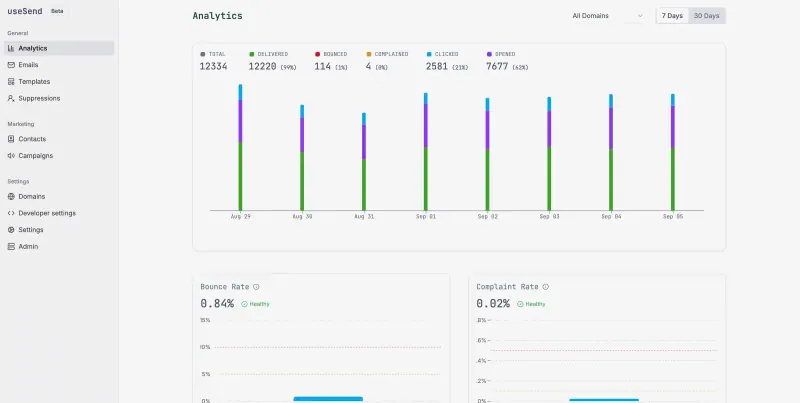
Some setup Open source

An email API and campaigns, an alternative to Resend.

Covers both sides of SendGrid in one dashboard: app emails through a REST API and code libraries, and campaigns to contact groups with a drag-and-drop template editor, topic preferences, automations, logs, metrics and signed webhooks. It sends from its own mail server, so your server must be allowed to send on port 25. This setup does not receive email or accept SMTP, and the licence is source-available rather than open source.

Some setup Source-available

Moving from SendGrid

Export your marketing contacts from SendGrid as a CSV file and upload them to a contact book in useSend; only bring across people who are still subscribed, and add your SendGrid suppressions so useSend does not mail them. Set up Amazon SES with an AWS user and production access, add your sending domain in useSend and publish its DKIM and SPF records. Create an API key and change your app from SendGrid's API to useSend's, then rebuild your email templates in useSend's editor. Run both for a short while and compare bounce rates before you turn SendGrid off. Sending history and statistics stay in SendGrid.

Reloop runs its own mail server, so first check that your server's provider allows outgoing mail on port 25, which many block until you ask, and set a reverse DNS record for the server. Create the admin account with the one-time setup key Cloudgate shows, add your sending domain and publish the DNS records the dashboard lists, then create an API key. Export your still-subscribed marketing contacts from SendGrid as a CSV file and import them into a contact group, copy your HTML templates across, and change your app from SendGrid's API to Reloop's. Run both for a while and compare bounce rates before you turn SendGrid off.

Questions

What is the best self-hosted alternative to SendGrid?

Start with useSend. Both are free to self-host. useSend is open source; Reloop (source-available) publishes its code under a licence with conditions an open-source licence does not have, such as limits on reselling it, keeping the maker's branding or a paid key for some features.

Can useSend receive email like SendGrid's Inbound Parse?

No. useSend only sends email; receiving and parsing incoming email is not part of it.

Can I bring my SendGrid contacts to useSend?

Yes, as a CSV file. Export the contacts from SendGrid and upload them to a contact book in useSend. Lists, templates and history do not move automatically.

Can my app keep sending over SMTP?

Not with this setup. useSend's SMTP relay runs as a separate service that Cloudgate does not install, so your app sends through useSend's REST API or code libraries. Reloop's SMTP sending is not opened in this setup either, so with Reloop your app also uses the API or code libraries.

Should I choose useSend or Reloop?

Choose useSend if you already use Amazon SES or want the lighter, open-source app. Choose Reloop if you send both app emails and marketing campaigns, as many SendGrid users do, and would rather send from your own mail server without an AWS account; your server must be able to send on port 25 and have at least 4 GB of memory.

Are these SendGrid alternatives really free?

useSend is free and open source; Amazon bills you for what you send through SES. Reloop is free to self-host for your own business, with no plan limits or metered sending, but it is source-available rather than open source: its licence forbids reselling it, offering it as a hosted service or using it in a competing product. To run them you need Cloudgate and a server: use hosted Cloudgate, which can also provide the server, or install Cloudgate on a server of your own for free. Cloudgate's plans and prices are at cloudgate.octabyte.io/pricing.

Do I need a developer to replace SendGrid?

Yes, for app emails. Cloudgate installs useSend, but someone has to create a GitHub app for sign-in and an AWS user with Amazon SES access before installing, then verify your sending domain and ask Amazon to lift the new-account sending limits. A developer then points your app at useSend's API or code libraries. Reloop needs no AWS or GitHub account, but someone has to make sure the server may send mail on port 25, add the DNS records for your sending domain, and point your app at Reloop's API or code libraries. Campaigns to contact lists are sent from the dashboard with no code in either app.