
Open-source alternative to Obsidian Sync

Self-hosted LiveSync is the free, open-source Obsidian Sync alternative: a community plugin that keeps your Obsidian vault the same on every computer and phone through a server you own, with notes encrypted on your device. Obsidian Sync is a paid add-on whose plans limit vaults, file size and storage; LiveSync has no subscription and no limit beyond your server’s disk, though each device takes a few more setup steps and Obsidian does not support it.

Free app Code: Open source Import from Obsidian Sync: No Some setup

Why look for an alternative to Obsidian Sync?

Obsidian Sync is the paid add-on from the makers of Obsidian that keeps your notes the same on every device. It is end-to-end encrypted, takes two clicks to set up and needs no server, and its plans set how many vaults you can sync, the largest file you can store, your storage space and how long version history lasts.

People look for an alternative because Sync is a subscription on top of a free app, because the storage and file-size limits get in the way of vaults with many images and PDFs, or because they want their notes on a server of their own. Self-hosted LiveSync replaces only the Sync add-on: you keep writing in Obsidian with all your plugins, and your encrypted notes pass through a sync server you run, with no limits beyond its disk.

How Self-hosted LiveSync compares

Sync Obsidian notes to every device from your own server.

Keeps an Obsidian vault the same on Windows, Mac, Linux, iPhone, iPad and Android, with notes encrypted on your device before they reach the server, version history, conflict handling and optional sync of themes, plugins and settings. There are no limits on vaults, devices, file size or storage beyond your server's disk. It is a community plugin that Obsidian does not support, each device takes a few more setup steps, and it is built for your own devices rather than vaults shared with other people.

What you gain
  • No monthly subscription, and no vault, storage or file-size limits beyond your server's disk
  • Your notes stay on your own server, encrypted with a passphrase only you know
  • Sync as many vaults and devices as you like
What is different
  • It is a community plugin, so Obsidian's own support does not cover it
  • Setting up each device takes a few more steps than signing in to Obsidian Sync
  • It cannot sync with Obsidian Sync or iCloud, so turn those off for the vault first
Some setup Open source

Moving from Obsidian Sync

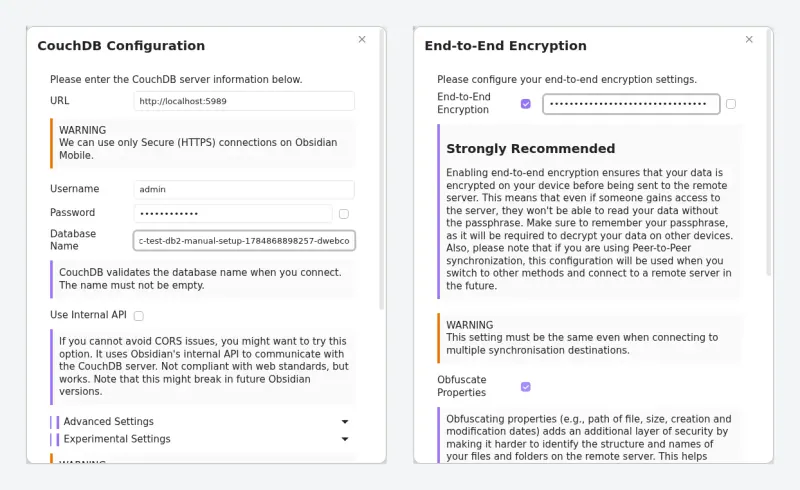
There is nothing to export, because your notes are already files in your vault. Back up the vault first, then turn off Obsidian Sync and iCloud for it, since LiveSync cannot run alongside them. On your main device, install Self-hosted LiveSync from Obsidian's Community plugins list, enter your server's web address, the user name and password from Cloudgate, the database name and an encryption passphrase of your own, and let it upload the vault. On each other device, install the plugin and paste the setup link or scan the QR code from the first device. Keep the passphrase safe: without it your notes on the server cannot be read.

Questions

What is the best open-source alternative to Obsidian Sync?

Self-hosted LiveSync is the free, open-source alternative to Obsidian Sync for syncing Obsidian notes between devices in the catalogue today. Keeps an Obsidian vault the same on Windows, Mac, Linux, iPhone, iPad and Android, with notes encrypted on your device before they reach the server, version history, conflict handling and optional sync of themes, plugins and settings. There are no limits on vaults, devices, file size or storage beyond your server's disk. It is a community plugin that Obsidian does not support, each device takes a few more setup steps, and it is built for your own devices rather than vaults shared with other people.

Can I use Self-hosted LiveSync and Obsidian Sync at the same time?

No. Use one or the other for a vault. Turn off Obsidian Sync, and iCloud on Apple devices, for the vault before you set up LiveSync.

Is Self-hosted LiveSync end-to-end encrypted like Obsidian Sync?

Yes, when you turn on end-to-end encryption, which the plugin strongly recommends. Notes are encrypted on your device with your passphrase, so the server stores only data it cannot read.

Does Self-hosted LiveSync work on iPhone?

Yes. It works in the Obsidian app on iPhone, iPad and Android as well as on computers; phones need the secure https address Cloudgate gives your server.

Is Self-hosted LiveSync really free compared with Obsidian Sync?

Yes, Self-hosted LiveSync is free. To run them you need Cloudgate and a server. Use hosted Cloudgate, which can also provide the server, or install Cloudgate on a server of your own for free. Cloudgate's plans and prices are at cloudgate.octabyte.io/pricing. One server can run several apps.

Do I need a developer to replace Obsidian Sync?

No. Cloudgate installs Self-hosted LiveSync on your server and gives it a secure web address, and you use it in your browser instead of Obsidian Sync.