K

Open-source alternative to Koinly

rotki is a free, open-source Koinly alternative for tracking your crypto across exchanges and wallets and producing profit and loss reports, with your data kept in an encrypted database on your own server. Koinly is a cloud tax service that holds your full transaction history and has more ready-made country tax reports; rotki’s free edition reports on up to 1,000 events and does not file taxes for you.

Free app Code: Open source Import from Koinly: No Some setup

Why look for an alternative to Koinly?

Koinly is a cloud service that imports your crypto transactions from exchanges and wallets, works out gains and losses, and produces tax reports for many countries, with a phone app.

People look for an alternative mostly for privacy: Koinly needs your whole transaction history, exchange connections and wallet addresses on its servers, and its tax reports are part of a paid service. A self-hosted rotki keeps that history in an encrypted database on your own server and calculates profit and loss there. It has fewer ready-made country tax forms, and its free edition covers up to 1,000 events.

How rotki compares

Crypto portfolio tracking and profit and loss reports.

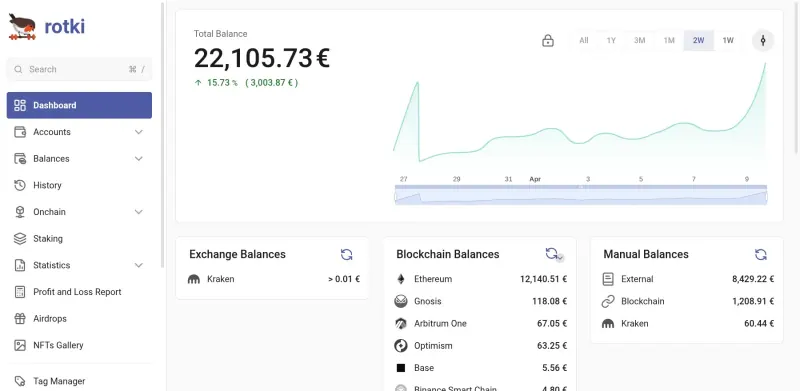
Tracks balances from exchanges through read-only API keys and from blockchain addresses, decodes on-chain transactions into readable events such as swaps, bridges and gas fees, and builds profit and loss reports with FIFO, LIFO, HIFO or ACB cost basis, exported as CSV. Your data stays in an encrypted database on your server. Koinly has many more ready-made country tax reports and a phone app; rotki does not file taxes, and its free edition covers up to 1,000 events, with more on its paid Premium plans.

What you gain
  • Your full transaction history stays on your own server, encrypted with your password, instead of in a tax company's cloud
  • Open-source code you can read, with no account at rotki needed to use it
  • The same profit and loss engine with your choice of cost basis method and tax rules
What is different
  • The free edition covers 1,000 events in history and profit and loss reports, and the net value chart shows two weeks; more needs a paid rotki Premium plan
  • It is not a tax filing service and has fewer ready-made country tax forms than Koinly, so check the results against your local rules
  • No phone app; you use it in a browser
Some setup Open source

Moving from Koinly

rotki has no Koinly importer, so rebuild your history from the sources rather than from Koinly. Sign in, create a rotki account with a password that encrypts your data, then add read-only API keys for each exchange you use and the addresses of your wallets; rotki pulls balances and history from them and decodes your on-chain transactions. For exchanges you no longer use, download their trade history and bring it in with rotki's CSV import, which reads files from Binance, Bitstamp, KuCoin, Nexo, the Crypto.com app and others, or its generic trades and events format. Set your accounting rules, such as cost basis method and tax-free holding period, under the accounting settings, then run a profit and loss report for one tax year and compare it with Koinly's before you rely on it.

Questions

What is the best open-source alternative to Koinly?

rotki is the free, open-source alternative to Koinly for crypto tax reports in the catalogue today. Tracks balances from exchanges through read-only API keys and from blockchain addresses, decodes on-chain transactions into readable events such as swaps, bridges and gas fees, and builds profit and loss reports with FIFO, LIFO, HIFO or ACB cost basis, exported as CSV. Your data stays in an encrypted database on your server. Koinly has many more ready-made country tax reports and a phone app; rotki does not file taxes, and its free edition covers up to 1,000 events, with more on its paid Premium plans.

Does rotki file my crypto taxes?

No. rotki produces profit and loss reports you can export as CSV and give to your accountant or use for your return, but it is not a tax filing service, and its results should be checked against your country's rules.

How many transactions does rotki's free edition handle?

Its history and profit and loss reports cover up to 1,000 events in the free edition. rotki's paid Premium plans raise that limit and add longer graphs and sync between devices.

Is rotki safe to put on the internet?

Keep it private. rotki's own documentation says not to expose it directly to the internet, so use it behind a sign-in, as the Cloudgate template sets up, or over a VPN, and use read-only API keys for your exchanges.

Is rotki really free compared with Koinly?

Yes, rotki is free. To run them you need Cloudgate and a server. Use hosted Cloudgate, which can also provide the server, or install Cloudgate on a server of your own for free. Cloudgate's plans and prices are at cloudgate.octabyte.io/pricing. One server can run several apps.

Do I need a developer to replace Koinly?

No. Cloudgate installs rotki on your server and gives it a secure web address, and you use it in your browser instead of Koinly.