
C

Open-source alternative to CoinTracking

rotki is a free, open-source CoinTracking alternative for tracking crypto balances and trades and producing profit and loss reports, with your data in an encrypted database on your own server. CoinTracking is a long-running hosted platform with a very wide range of reports; rotki focuses on core accounting, can import CoinTracking’s trade CSV, and its free edition covers up to 1,000 events.

Free app Code: Open source Import from CoinTracking: Partly Some setup

Why look for an alternative to CoinTracking?

CoinTracking is one of the longest-running crypto portfolio and tax platforms: it imports trades from exchanges and wallets and offers a very wide range of reports, from gains and losses to tax reports for many countries.

People look for an alternative because their full trading history and wallet addresses sit on CoinTracking's servers, in a service they pay for. A self-hosted rotki keeps that history in an encrypted database on your own server and covers the core of the job, balances, decoded transactions and profit and loss reports, with a free edition that handles up to 1,000 events.

How rotki compares

Crypto portfolio tracking and profit and loss reports.

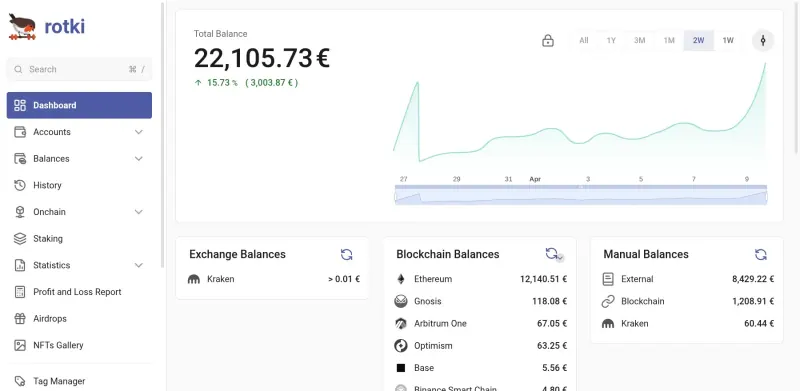
Does the core of CoinTracking's job on your own server: one dashboard for exchange and wallet balances, on-chain history decoded into swaps, bridges and gas fees, and profit and loss reports with FIFO, LIFO, HIFO or ACB cost basis, exported as CSV, all in an encrypted database. CoinTracking offers a much wider range of reports; rotki focuses on core accounting, does not file taxes, and its free edition covers up to 1,000 events, with more on its paid Premium plans.
Some setup Open source

Moving from CoinTracking

rotki can import CoinTracking's trade history as a CSV file, but its documentation warns that CoinTracking's export leaves out a lot of detail, so use it only for history you can't get any other way. The better route is to connect the sources directly: sign in, create a rotki account with a password that encrypts your data, add read-only API keys for your exchanges and the addresses of your wallets, and let rotki pull and decode your history. For closed exchange accounts, import their own CSV files. Set your cost basis method and tax-free holding period in the accounting settings, then compare a profit and loss report for a past year with CoinTracking's.

Questions

What is the best open-source alternative to CoinTracking?

rotki is the free, open-source alternative to CoinTracking for crypto portfolio tracking and tax reports in the catalogue today. Does the core of CoinTracking's job on your own server: one dashboard for exchange and wallet balances, on-chain history decoded into swaps, bridges and gas fees, and profit and loss reports with FIFO, LIFO, HIFO or ACB cost basis, exported as CSV, all in an encrypted database. CoinTracking offers a much wider range of reports; rotki focuses on core accounting, does not file taxes, and its free edition covers up to 1,000 events, with more on its paid Premium plans.

Can I import my CoinTracking data into rotki?

Partly. rotki imports CoinTracking's trades CSV, but that export lacks much of the detail rotki uses, so connecting your exchanges and wallets directly gives a more complete history.

Does rotki have as many reports as CoinTracking?

No. CoinTracking offers a much wider range of reports and country tax forms. rotki covers the core: a dashboard of balances, decoded transaction history and profit and loss reports for any date range, exported as CSV.

Does rotki file my taxes like CoinTracking?

No. rotki does not file taxes; it builds profit and loss reports with FIFO, LIFO, HIFO or ACB cost basis, exported as CSV, for you or your accountant. CoinTracking has a much wider range of reports and country tax forms. rotki's free edition covers up to 1,000 events, with more on its paid Premium plans.

Is rotki really free compared with CoinTracking?

Yes, rotki is free. To run them you need Cloudgate and a server. Use hosted Cloudgate, which can also provide the server, or install Cloudgate on a server of your own for free. Cloudgate's plans and prices are at cloudgate.octabyte.io/pricing. One server can run several apps.

Do I need a developer to replace CoinTracking?

No. Cloudgate installs rotki on your server and gives it a secure web address, and you use it in your browser instead of CoinTracking.