
Zulip
Team chat where every conversation has its own topic.
No server needed to start: Cloudgate can provide one. What happens when you click Deploy



What is Zulip?
Self-hosted Zulip: open-source team chat where every conversation has its own topic, so busy channels stay easy to follow and catch up on.
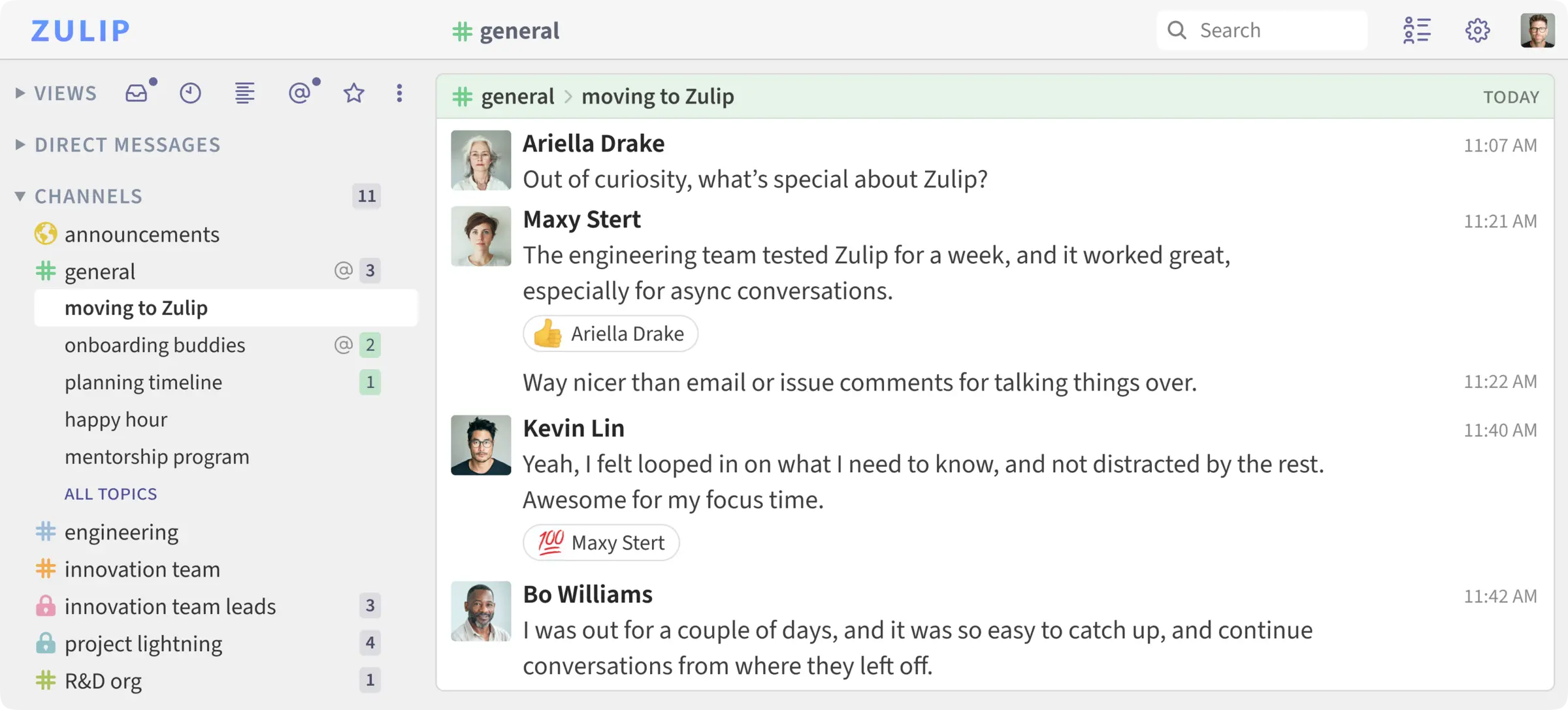
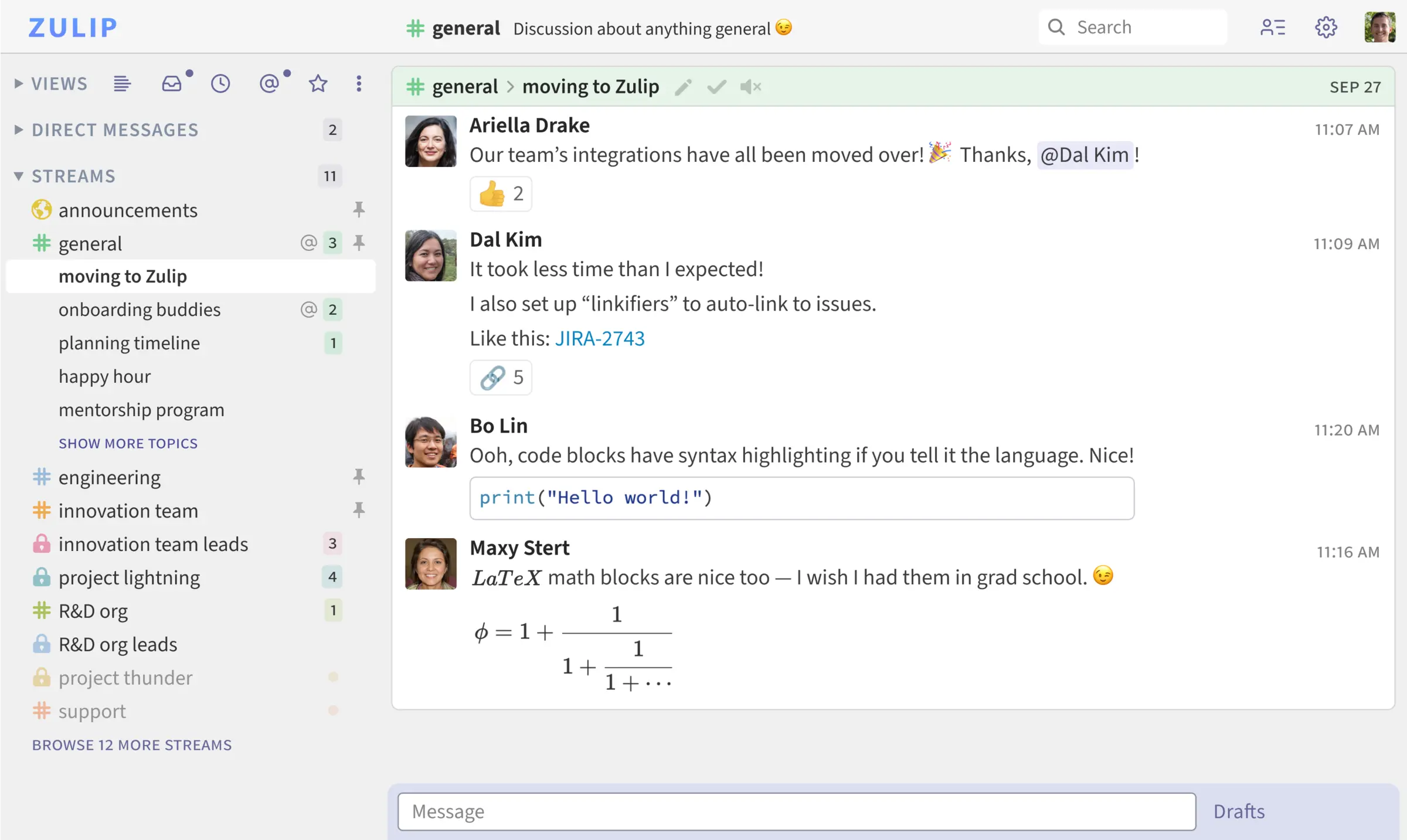
Zulip is an open-source team chat app you can self-host, and a Slack or Microsoft Teams alternative for teams that want organised, searchable conversations on their own server. Like Slack it has channels, direct messages, search and integrations. Unlike Slack, every message in a channel belongs to a named topic, so several conversations can run side by side without getting mixed up, and people can catch up topic by topic.
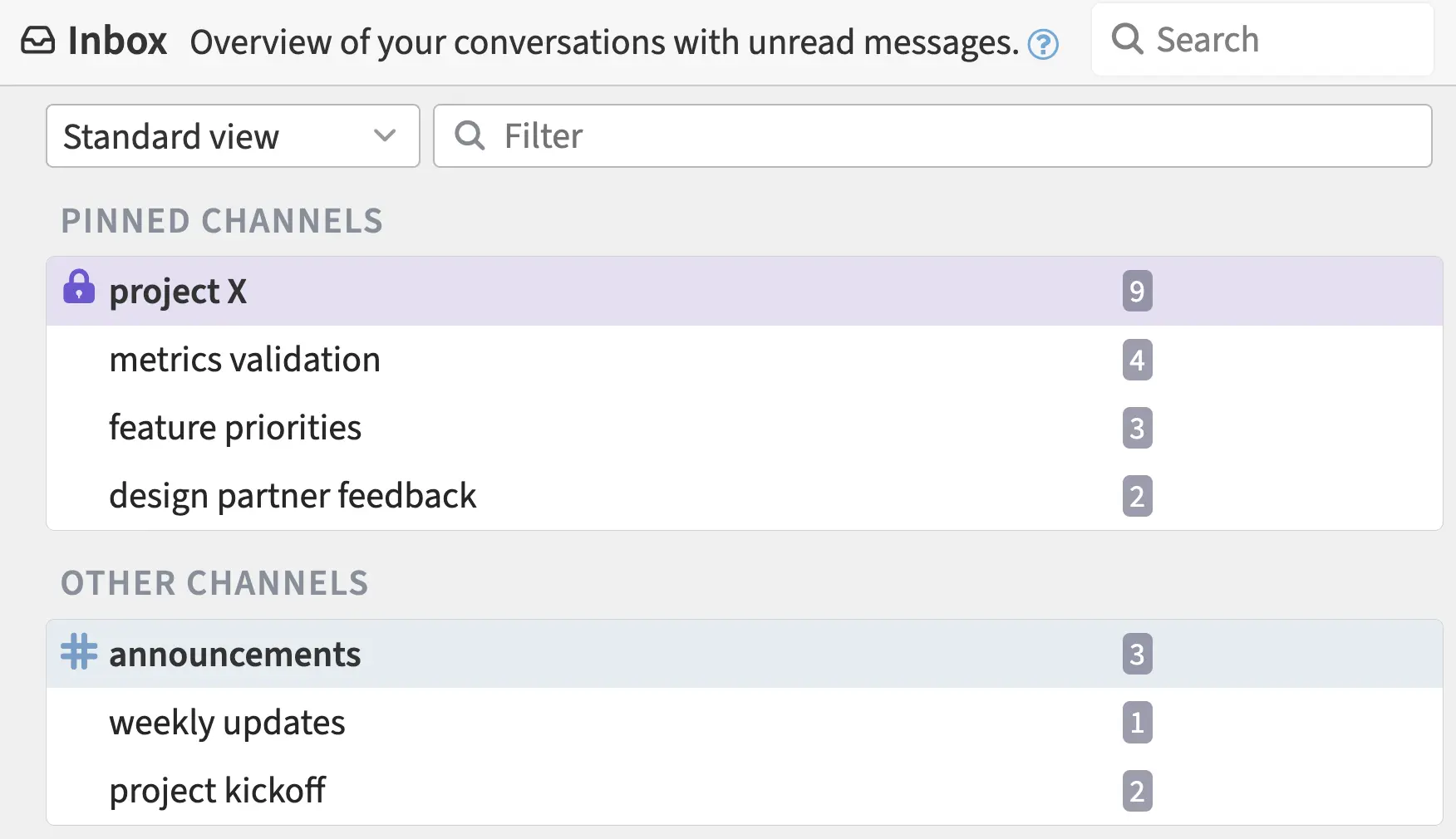
A property management office, for example, could have a channel for each building and a topic for each issue: "lift repair", "new tenant at flat 4", "summer gardening". Someone back from a week off opens the Inbox, reads the topics that concern them and skips the rest, instead of scrolling through hundreds of messages.
There are free apps for Windows, Mac, Linux, iPhone and Android, over 130 integrations, and imports from Slack, Microsoft Teams, Mattermost and Rocket.Chat. The server is fully open source. Phone push notifications are free for up to 10 users or for eligible communities; larger teams pay Zulip for them. Video calls use a service such as Jitsi or Zoom.
Cloudgate installs Zulip and everything it needs on a server Cloudgate provides or one you connect, gives it a secure web address and creates your organization and owner account. Only people you invite can join.
What you can do with Zulip
- Talk in channels with topics Every message in a channel has a topic, like an email subject, so several conversations run side by side without getting mixed up.
- Catch up quickly The Inbox and Recent conversations views list your unread topics, so you can read what matters and skip the rest.
- Message one to one or in groups Send direct and group messages, with files, emoji reactions, polls, to-do lists and scheduled messages.
- Search your whole history Full-text search covers every message your team has ever sent, with no paid plan needed to see older ones.
- Connect your tools Over 130 ready-made integrations, plus bots and an API, post updates from the tools you already use.
- Start calls from a chat Start a video or voice call from any conversation through a call service you choose, such as Jitsi or Zoom.
- Use it anywhere Free apps for Windows, Mac, Linux, iPhone and Android, plus the web app in any browser.
- Choose how people sign in Sign in with email and password, Google, GitHub, Apple, LDAP, SAML or OpenID Connect, with roles, guest accounts and data exports.
Replaces Slack and Microsoft Teams
Zulip does the same job as Slack and Microsoft Teams. Here is what changes when you switch.
- Topics keep busy channels readable, so people catch up without scrolling
- Your full message history stays searchable, with no price per user for the server
- Fully open source, with messages and files on your own server
- You can bring your Slack or Microsoft Teams history with you
- Topics take a few days to get used to for people coming from Slack
- Phone push notifications are free for up to 10 users; larger teams need a paid Zulip plan unless they qualify for the free community plan
- Video calls go through a separate service such as Jitsi or Zoom
- Zulip replaces Teams chat, not Word, SharePoint or the rest of Microsoft 365
What happens when you click Deploy?
You do not need a server or any technical knowledge. Four steps, and Zulip is running at its own web address.
- Step 1 Click Deploy and create your account
Deploy takes you to Cloudgate. Create an account, or log in if you have one. Zulip itself is free.
- Step 2 Choose a server
No server? Get one from Cloudgate: pick a size and a country, and Cloudgate gets it ready. Already have one? Connect it instead.
- Step 3 Cloudgate sets up Zulip
It prepares the server, makes the passwords the app needs and starts it. There is nothing to install and nothing to write down.
- Step 4 Open your app and sign in
Your app gets a free web address to start, without https. Add your own domain, like app.yourshop.com, and Cloudgate secures it with https for you.
New to Cloudgate? See what Cloudgate is
Run Cloudgate yourself? Deploy from your own console
In your Cloudgate console, open Templates and choose Zulip.
Questions
Is Zulip free?
Yes, the self-hosted Zulip server is free and fully open source under the Apache-2.0 licence, with the same software as Zulip Cloud. You pay only for your server. Zulip sells support and unlimited phone push notifications; push notifications are free for up to 10 users, or for any size of eligible community such as an open-source project or a small non-profit.
Is Zulip a good alternative to Slack?
Yes, especially for teams that work at different times. Zulip has the channels, direct messages, search, integrations and apps you know from Slack, keeps your whole history, and adds topics, which make it easier to catch up after a day away. It looks less like Slack than Mattermost does, so expect a short getting-used-to period.
How are Zulip topics different from Slack threads?
In Zulip, every message in a channel belongs to a named topic, like the subject line of an email. Instead of side threads hanging off a busy channel, each conversation has its own place, and you can read a busy channel one topic at a time.
How do I sign in to Zulip the first time?
Cloudgate creates your organization and your owner account when Zulip first starts, from the organization name, email and name you entered. Open your Zulip address and sign in with that email and the password Cloudgate shows. Zulip may ask you once to choose who can see your email address.
Who can join my Zulip?
Only people you invite. A new Zulip organization requires an invitation, so nobody can create an account on their own. Invite people by email once your email server is set up, or create an invitation link, which works without email.
Does Zulip have phone apps and notifications?
Yes, Zulip has free apps for iPhone and Android. Push notifications from your own server go through Zulip's notification service, which your server must be registered with first; Cloudgate does not do this step for you. Notifications are free for up to 10 users, and larger teams need a paid plan unless they qualify for Zulip's free community plan.
Can I import my Slack or Microsoft Teams history into Zulip?
Yes, Zulip can import your workspace from Slack, Microsoft Teams, Mattermost or Rocket.Chat, so your team keeps its past conversations when it switches.
What server size does Zulip need?
Zulip needs at least 2 GB of memory and 10 GB of free disk, which suits a small team. For 100 or more users, Zulip recommends 4 GB of memory and 2 processors.
Do I need technical skills to run Zulip?
No. Click Deploy, create your Cloudgate account and choose a server, and Cloudgate sets up Zulip and gives it a web address. You use it in your browser like any other online tool.
Do I need my own server for Zulip?
No. When you deploy Zulip, hosted Cloudgate can provide a server. If you already rent one, you can connect it instead.
Related apps

Simple self-hosted team chat from the makers of Basecamp.

Light, private self-hosted chat for teams and communities.

A self-hosted Matrix server for private, encrypted team chat.

Team chat like Slack, with your full history kept.