
Spliit
Split shared costs with a group link, no accounts and no limits.
No server needed to start: Cloudgate can provide one. What happens when you click Deploy
What is Spliit?
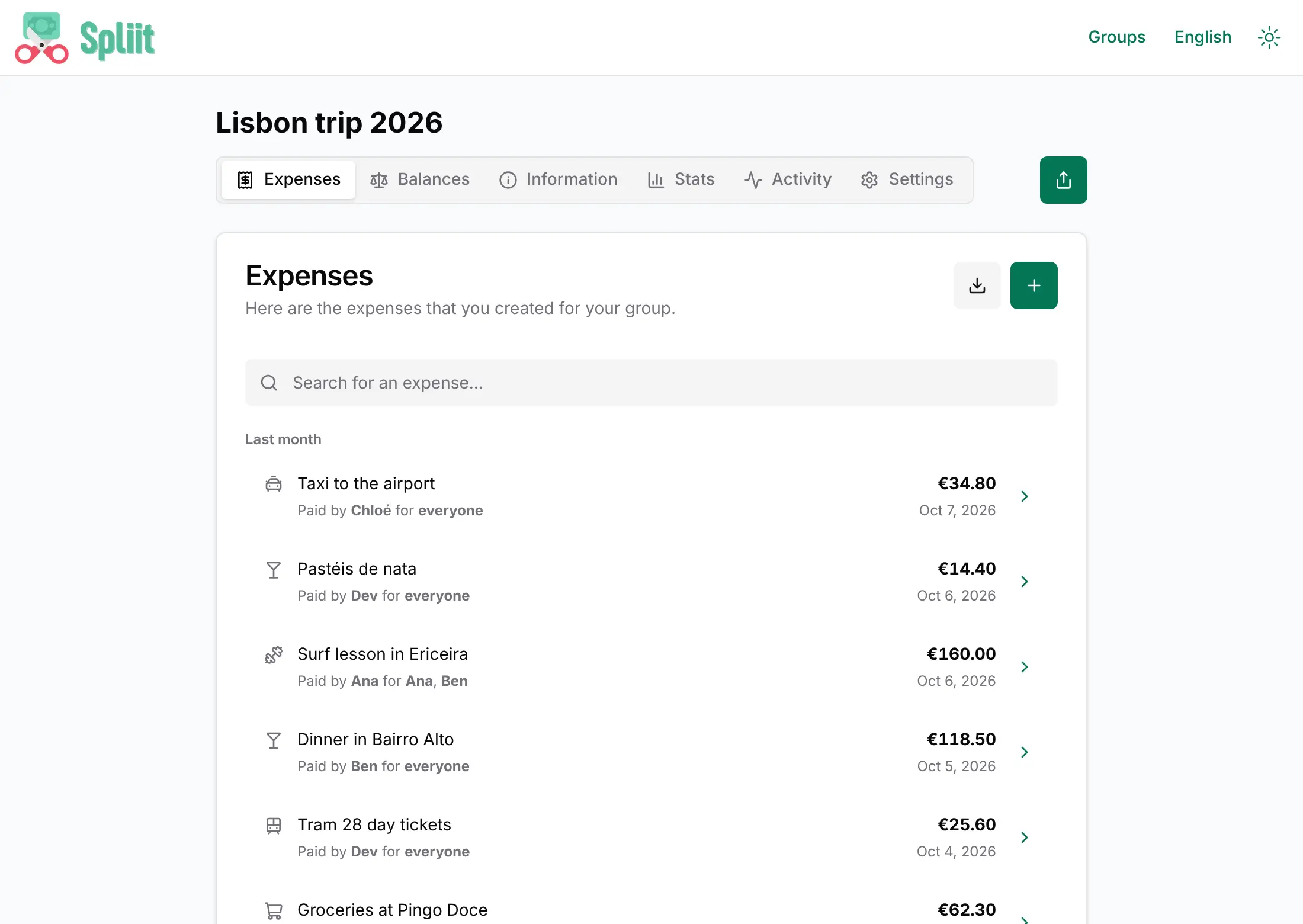
Spliit is a free, self-hosted app for splitting group expenses: share a group by link, log who paid and see who owes whom. No accounts needed.
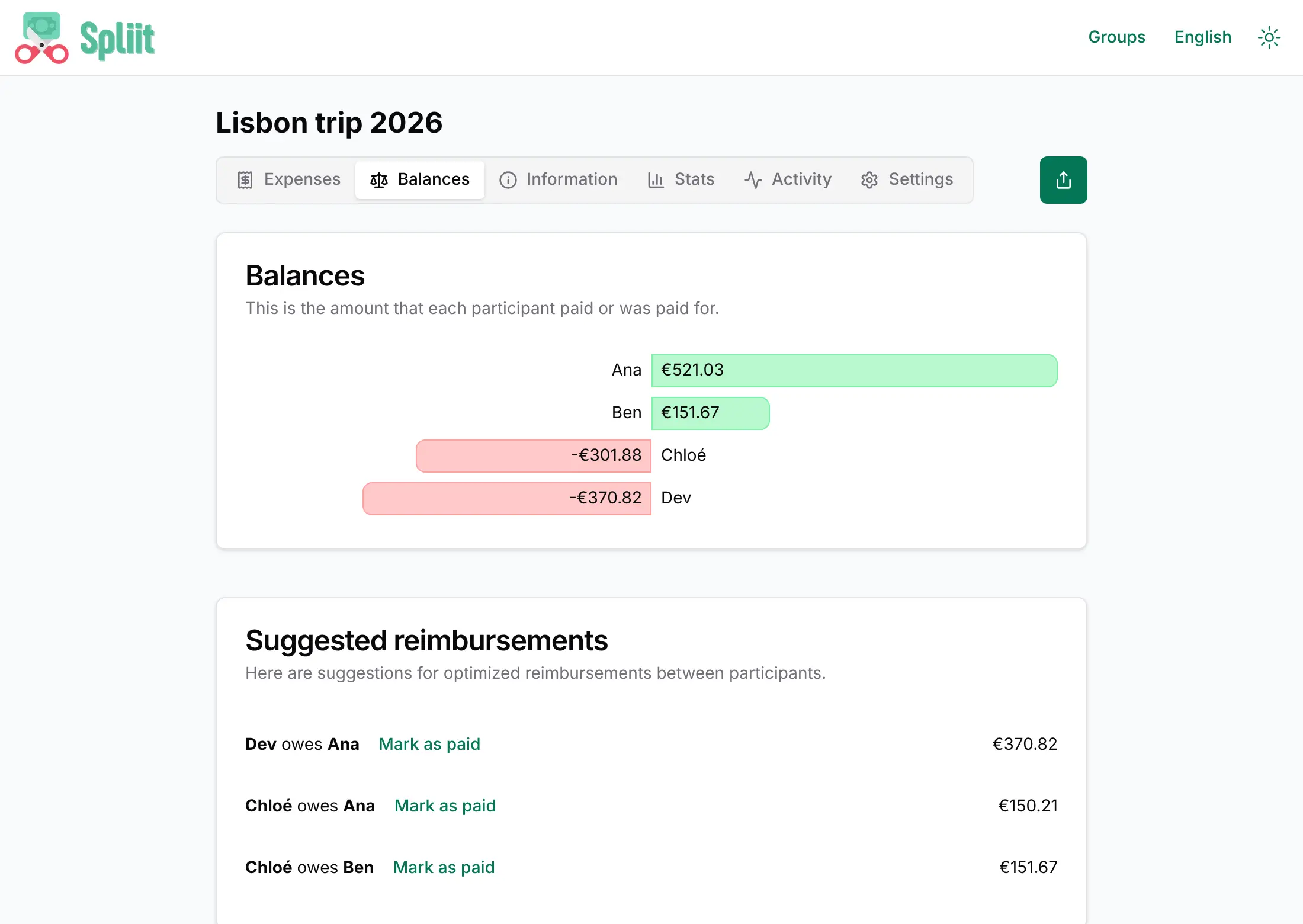
Spliit is a free, open-source app for splitting shared expenses in a group, a self-hosted alternative to Splitwise and Tricount. You create a group, send its link, and everyone adds what they paid. Spliit shows each person's balance and the fewest payments that settle everyone up.
There are no accounts: nobody signs up, and whoever has a group's link can view and edit it. That makes it quick for a trip or a shared flat, but it also means you should share each link only with the people in that group. Expenses can be split evenly, by shares, by percentage or by exact amounts, in any currency. A sailing club, for example, could make one group per regatta, so crew members log fuel, harbour fees and food as they go and settle up on the last evening.
Spliit works in any browser and installs on a phone's home screen; there is also an official iPhone app that can open groups on your own Spliit. You can export each group as a CSV or JSON file. Receipt photos and AI receipt scanning are not switched on in this template.
Cloudgate installs Spliit and its database on a server Cloudgate provides or one you connect, and gives it a secure web address. Anyone who knows that address can create groups.
What you can do with Spliit
- Share a group by link Create a group, send its link, and everyone can add what they paid without signing up.
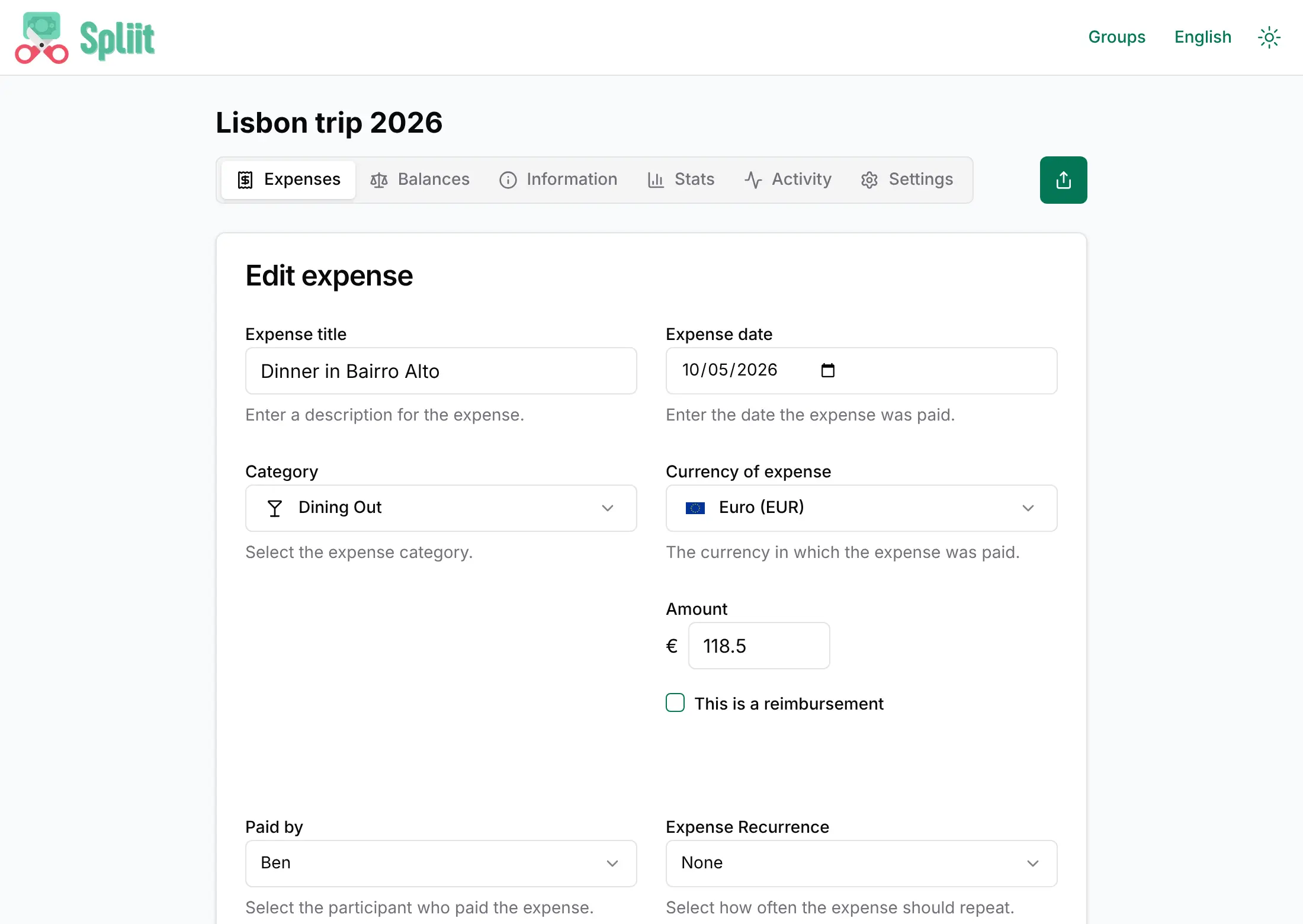
- Split costs any way you like Split an expense evenly, by shares, by percentage or by exact amounts.
- See who owes whom Balances show where each person stands, with the fewest payments needed to settle up and a "Mark as paid" button.
- Log the details Give each expense a date, category and notes, search the list, and see every change in the activity history.
- Pay in another currency Enter an expense in the currency you paid in and Spliit converts it to the group's currency.
- Repeat regular costs Set rent, bills or subscriptions to repeat daily, weekly or monthly.
- Check the totals The stats tab shows the group's total spending, your share and spending over time.
- Export your data Download a group's expenses as a CSV or JSON file at any time.
Replaces Splitwise and Tricount
Spliit does the same job as Splitwise and Tricount. Here is what changes when you switch.
- No daily expense limit and no ads
- Search, charts and currency conversion at no cost
- Nobody has to create an account to join a group
- Your group's expenses stay on your own server
- No accounts, so anyone with a group's link can see and edit that group
- No import of your Splitwise history yet
- No bank or card import, and no Android app (the web app installs on any phone)
- Receipt photos and AI receipt scanning are not switched on in this template
What happens when you click Deploy?
You do not need a server or any technical knowledge. Four steps, and Spliit is running at its own web address.
- Step 1 Click Deploy and create your account
Deploy takes you to Cloudgate. Create an account, or log in if you have one. Spliit itself is free.
- Step 2 Choose a server
No server? Get one from Cloudgate: pick a size and a country, and Cloudgate gets it ready. Already have one? Connect it instead.
- Step 3 Cloudgate sets up Spliit
It prepares the server, makes the passwords the app needs and starts it. There is nothing to install and nothing to write down.
- Step 4 Open your app and sign in
Your app gets a free web address to start, without https. Add your own domain, like app.yourshop.com, and Cloudgate secures it with https for you.
New to Cloudgate? See what Cloudgate is
Run Cloudgate yourself? Deploy from your own console
In your Cloudgate console, open Templates and choose Spliit.
Questions
Is Spliit free?
Yes, Spliit is free and open source under the MIT licence, with no paid edition, no ads and no limit on groups or expenses. You pay only for your server.
Is Spliit a good alternative to Splitwise?
Yes, if your group just needs to log shared costs and settle up. Spliit's own makers describe it as a free, open-source alternative to Splitwise, with uneven splits, balances, search, charts and currency conversion. It has no accounts, friends list, bank import or Android app.
How do people sign in to Spliit?
They don't, because Spliit has no accounts. Whoever opens a group's link can view and edit that group and picks which participant they are, so share each link only with the people in that group. Anyone who knows your Spliit address can also create new groups on it.
Can I import my Splitwise data into Spliit?
No, not yet. Importing from Splitwise is on the project's list of possible features but is not available, so start your groups fresh in Spliit. You can export any Spliit group as CSV or JSON.
Does Spliit have a phone app?
Yes, on iPhone. The official Spliit app for iOS 26 or later can open groups on your own Spliit next to groups on spliit.app. On Android, open Spliit in the browser and add it to your home screen.
Can Spliit scan receipts?
Not in this template. Spliit can attach receipt photos and read them with AI, but those features need separate file storage and an AI provider key, so they are switched off here.
What server size do I need for Spliit?
A small server is enough, because Spliit is one light web app and a database. Cloudgate sets up both and you can move to a bigger server later.
Do I need technical skills to run Spliit?
No. Click Deploy, create your Cloudgate account and choose a server, and Cloudgate sets up Spliit and gives it a web address. You use it in your browser like any other online tool.
Do I need my own server for Spliit?
No. When you deploy Spliit, hosted Cloudgate can provide a server. If you already rent one, you can connect it instead.
Related apps

Split shared expenses for a trip or flat, with no accounts to create.

Split bills with housemates, couples and friends, like Splitwise.

A free envelope budget app, like YNAB, on your own server.

ERP for sales, stock, accounting and HR in one place.