
Slash
Go links that give your team's links short s/ names.
No server needed to start: Cloudgate can provide one. What happens when you click Deploy

What is Slash?
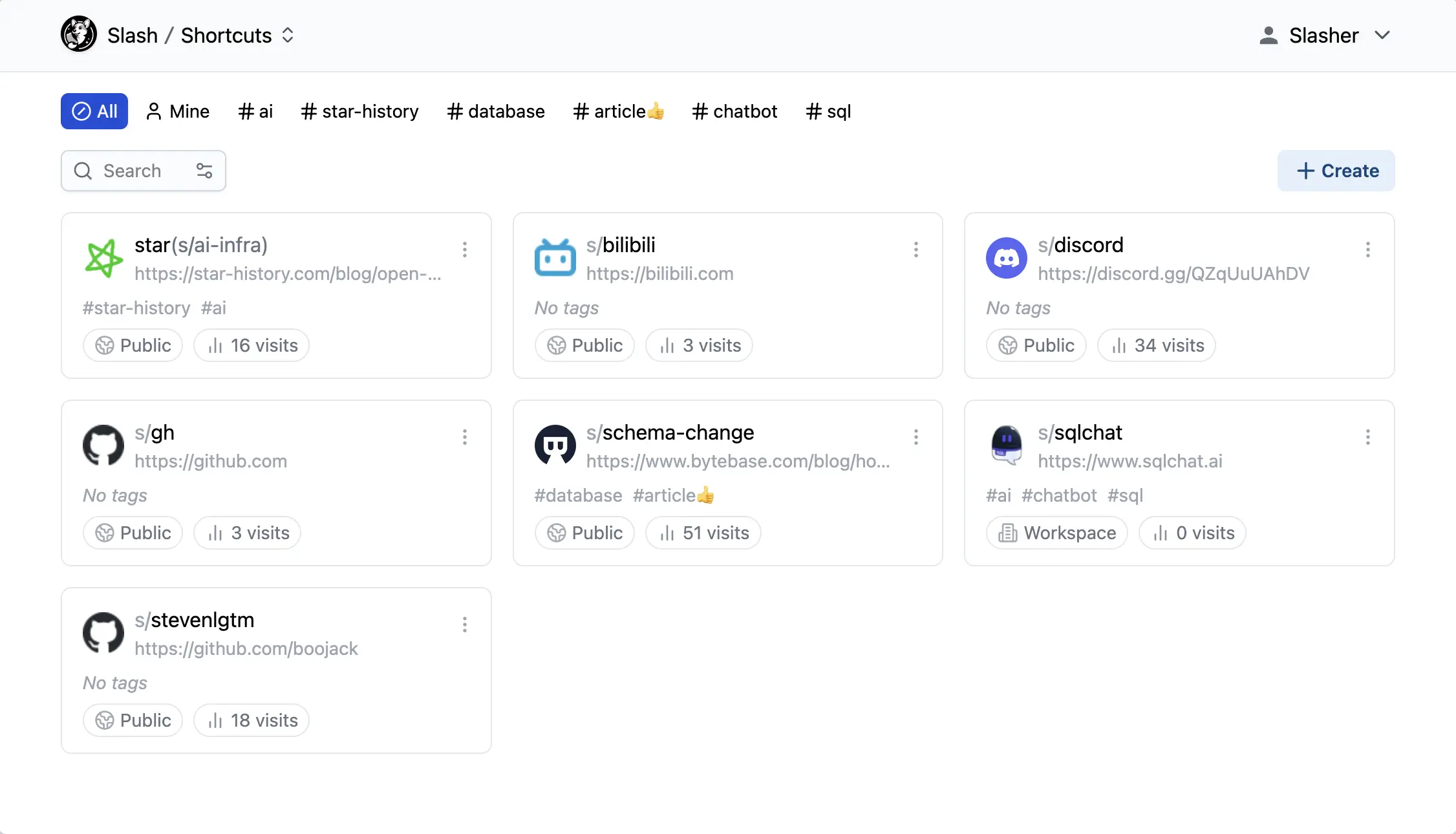
Slash is a self-hosted go links app: give your team's links short s/ names, with tags, private or shared visibility, collections and visit counts.
Slash is a free, open-source, self-hosted go links app and an alternative to GoLinks: it gives the links your team uses every day short, memorable names such as s/handbook, on your own domain. Each link can carry tags and a description, be private, shared with your team or public, and show how often it was opened.
It suits a small team that keeps hunting for the same links in chat and email. A cleaning company, for example, could set up s/rota for the weekly schedule, s/timesheet for the hours form and s/supplies for the order page, then group them into a collection called new-starters and send that one address to every new hire. Nobody has to remember the long addresses.
The free version has no limit on links but allows up to five accounts and five shared collections; a paid Pro licence key from its makers removes those limits. Browser extensions for Chrome, Edge and Firefox let people type s/ and a name straight into the address bar, and there is no phone app.
Cloudgate installs Slash on a server Cloudgate provides or one you connect and gives it a secure web address, which is also the domain your short links use. It needs very little memory, so it fits the smallest server, and your links stay on your server.
What you can do with Slash
- Short links with names you choose Give any long web address a short name such as s/handbook or s/rota, and it opens from your own domain.
- Tags, titles and search Add a title, a description and tags to each link, then filter by tag, show only yours or search the whole list.
- Private, team or public Choose for each link whether only you, everyone on your team or anyone on the internet can open it.
- Collections you can share Group related links into a collection, such as everything a new hire needs, and share it on one address.
- Visits, sources and devices See how often each link was opened and which sites, devices, browsers and systems the visits came from.
- QR codes and link previews Make a QR code for any link, and set the title, description and image people see when the link is shared.
- Type s/name in your browser The browser extension for Chrome, Edge and Firefox opens a link when you type its s/ name in the address bar.
Replaces GoLinks and Bitly
Slash does the same job as GoLinks and Bitly. Here is what changes when you switch.
- No monthly fee per person for your team's short links
- Your own domain, and links that stay on your own server
- Private, team and public links in one place, with tags and collections
- Free and open source, with no limit on the number of links
- Up to five accounts and five shared collections unless you buy a Pro licence key
- No import, so links from GoLinks or Bitly have to be added again
- No phone app, and no single sign-on in the free version
- Releases are slow, and the 1.0 version is still being tested
What happens when you click Deploy?
You do not need a server or any technical knowledge. Four steps, and Slash is running at its own web address.
- Step 1 Click Deploy and create your account
Deploy takes you to Cloudgate. Create an account, or log in if you have one. Slash itself is free.
- Step 2 Choose a server
No server? Get one from Cloudgate: pick a size and a country, and Cloudgate gets it ready. Already have one? Connect it instead.
- Step 3 Cloudgate sets up Slash
It prepares the server, makes the passwords the app needs and starts it. There is nothing to install and nothing to write down.
- Step 4 Open your app and sign in
Your app gets a free web address to start, without https. Add your own domain, like app.yourshop.com, and Cloudgate secures it with https for you.
New to Cloudgate? See what Cloudgate is
Run Cloudgate yourself? Deploy from your own console
In your Cloudgate console, open Templates and choose Slash.
Questions
Is Slash free?
Yes, Slash is free and open source under the AGPL-3.0 licence, with no limit on the number of short links. Without a paid Pro licence key it allows up to five accounts and five collections shared with your team or the public; your only other cost is the server.
Is Slash a good alternative to GoLinks?
Yes, for a small team. Slash gives your team short, memorable names for the links you share, with tags, collections, visit counts and a browser extension, on your own server. Names start with s/ rather than go/, and the free version stops at five accounts.
Is Slash a good alternative to Bitly?
Partly. Slash makes short links on your own domain with visit counts and QR codes, but it is built for a team's everyday links rather than marketing campaigns. For a Bitly-style shortener, Kutt or Shlink are closer fits.
How do I sign in to Slash the first time?
Open your Slash web address and sign up; the first account becomes the admin. Invite your team the same way, then turn off sign-ups in the workspace settings so nobody else can join.
How do I open a Slash link by typing s/ and its name?
Install the Slash extension for Chrome, Edge or Firefox and point it at your app's address. Without the extension, open the full address, such as your domain followed by /s/ and the link's name.
Can I import my links from GoLinks or Bitly into Slash?
No, Slash has no importer. Add the links you still use by hand, giving each one its short name.
Can more than five people use Slash?
No, not in the free version. Slash allows up to five accounts unless you buy a Pro licence key from its makers, which removes that limit.
Do I need technical skills to run Slash?
No. Click Deploy, create your Cloudgate account and choose a server, and Cloudgate sets up Slash and gives it a web address. You use it in your browser like any other online tool.
Do I need my own server for Slash?
No. When you deploy Slash, hosted Cloudgate can provide a server. If you already rent one, you can connect it instead.
Related apps

Short, branded links on your own domain, with click stats.

Short links on your own domain, with secrets, expiry and use limits.
Lightweight self-hosted short links, with expiry and QR codes.
Short links on your domain, with detailed visit stats.