
Shoutrrr
Write a post once and schedule it to every social account you run.
No server needed to start: Cloudgate can provide one. What happens when you click Deploy
What is Shoutrrr?
Self-hosted Shoutrrr schedules posts to X, Bluesky, LinkedIn, Facebook, Instagram, Threads and Discord from one queue and calendar.
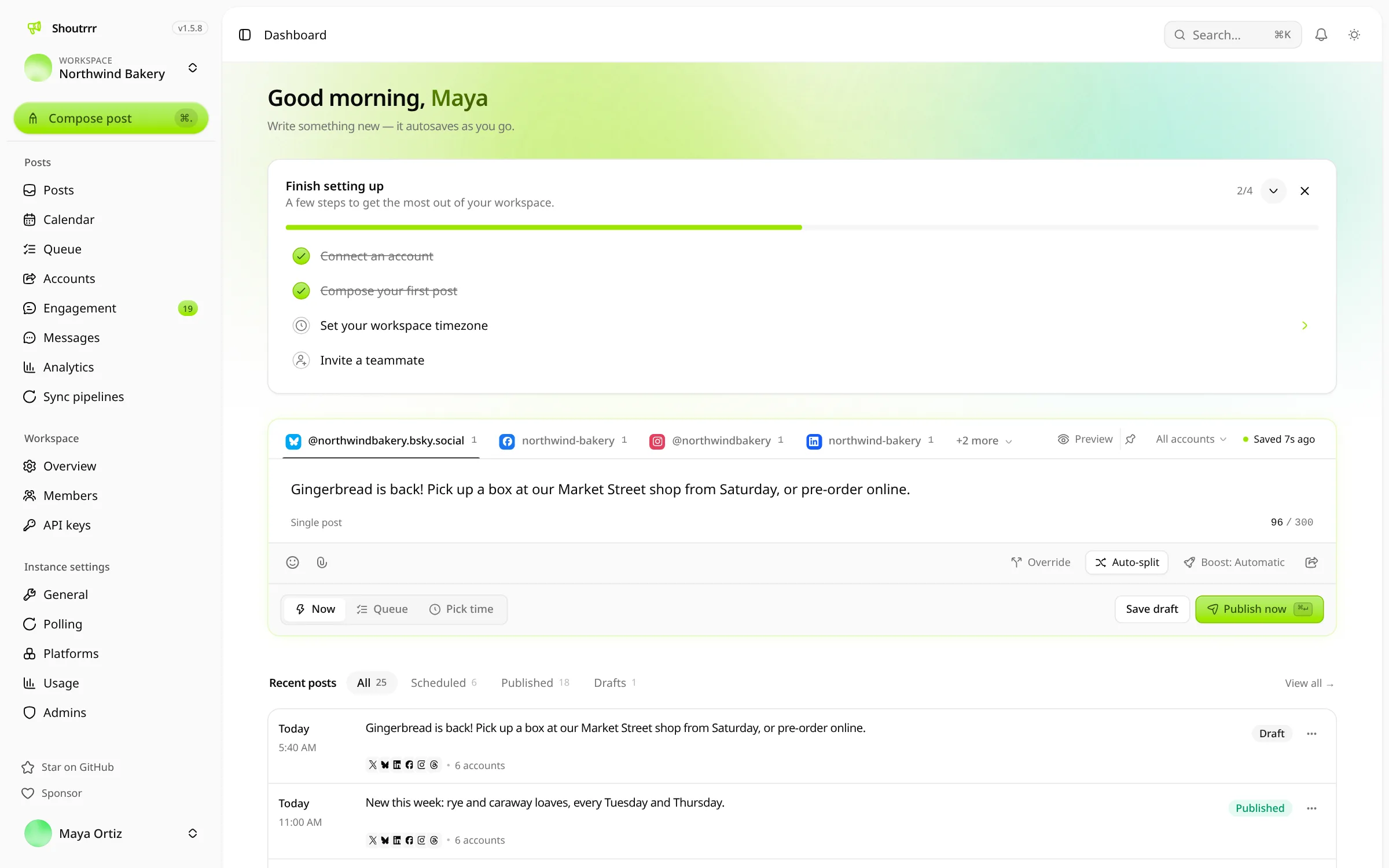
Shoutrrr is an open-source social media scheduler you can self-host, a free alternative to Buffer, Typefully and Hootsuite. You write a post once and publish it, straight away or on a schedule, to X, Bluesky, LinkedIn, Facebook, Instagram, Threads and Discord, from one calendar and weekly posting queue.
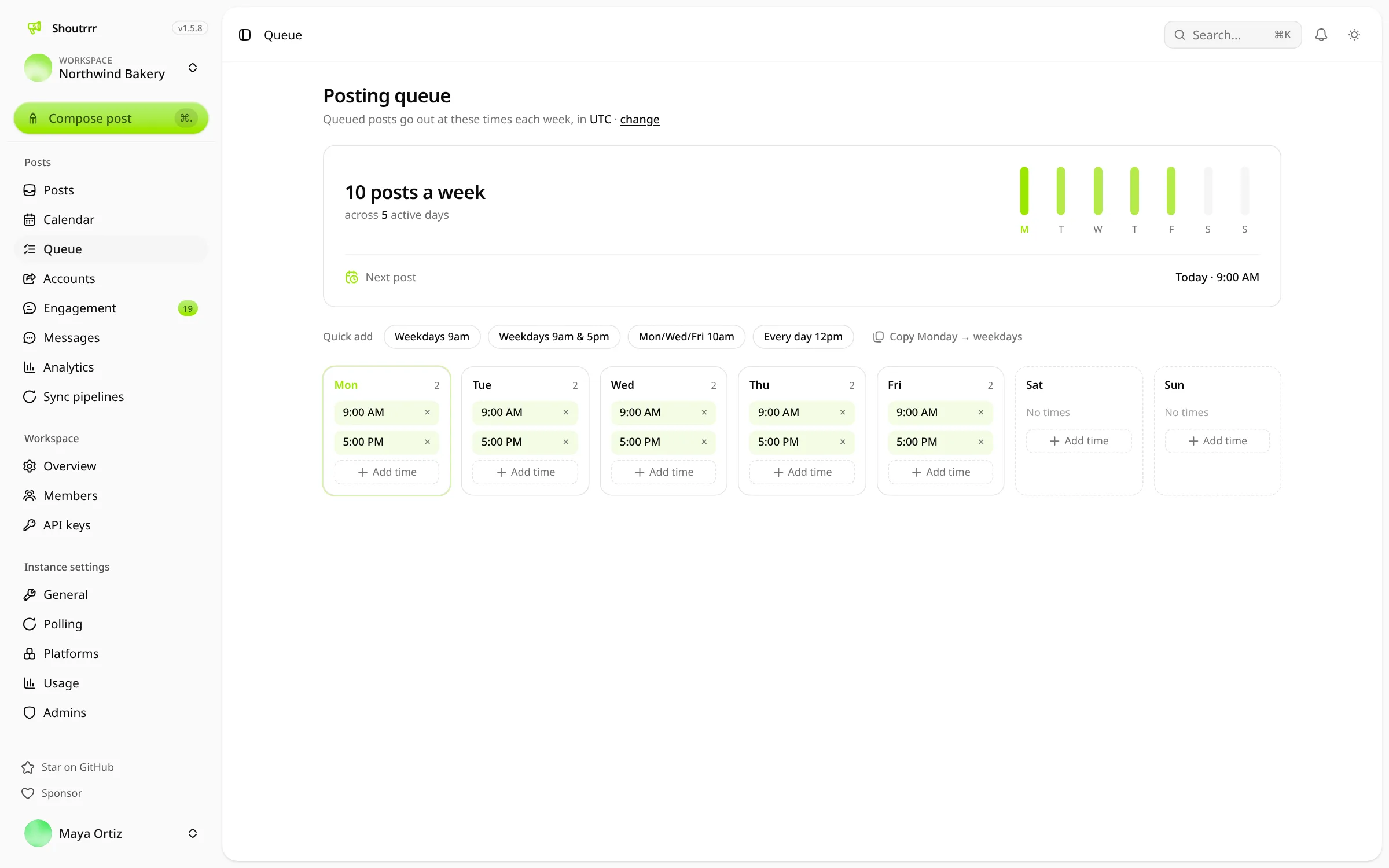
It suits small teams, creators and agencies who post the same news to several accounts and don't want to pay per channel. A bakery, for example, could set posting times for weekday mornings, queue a week of daily specials in one sitting, and answer customers' replies from the same screen. An agency can give each client its own workspace.
The trade-off is setup. Bluesky and Discord connect in a minute, but for X, LinkedIn and Meta you register your own developer app once, Meta reviews it before you can post for real accounts, and X charges for using its API. Shoutrrr covers seven networks, not TikTok, YouTube or Pinterest, and has no phone app, though it works in a phone's browser.
Shoutrrr is made by coollabs, the team behind Coolify, and is not the containrrr notification library of the same name. Cloudgate installs it on a server Cloudgate provides or one you connect and gives it a secure web address. The first person to open it creates the owner account.
What you can do with Shoutrrr
- Write once, post everywhere Write a post with images, video and alt text once, send it to many accounts at the same time, and change the wording for one network if you like.
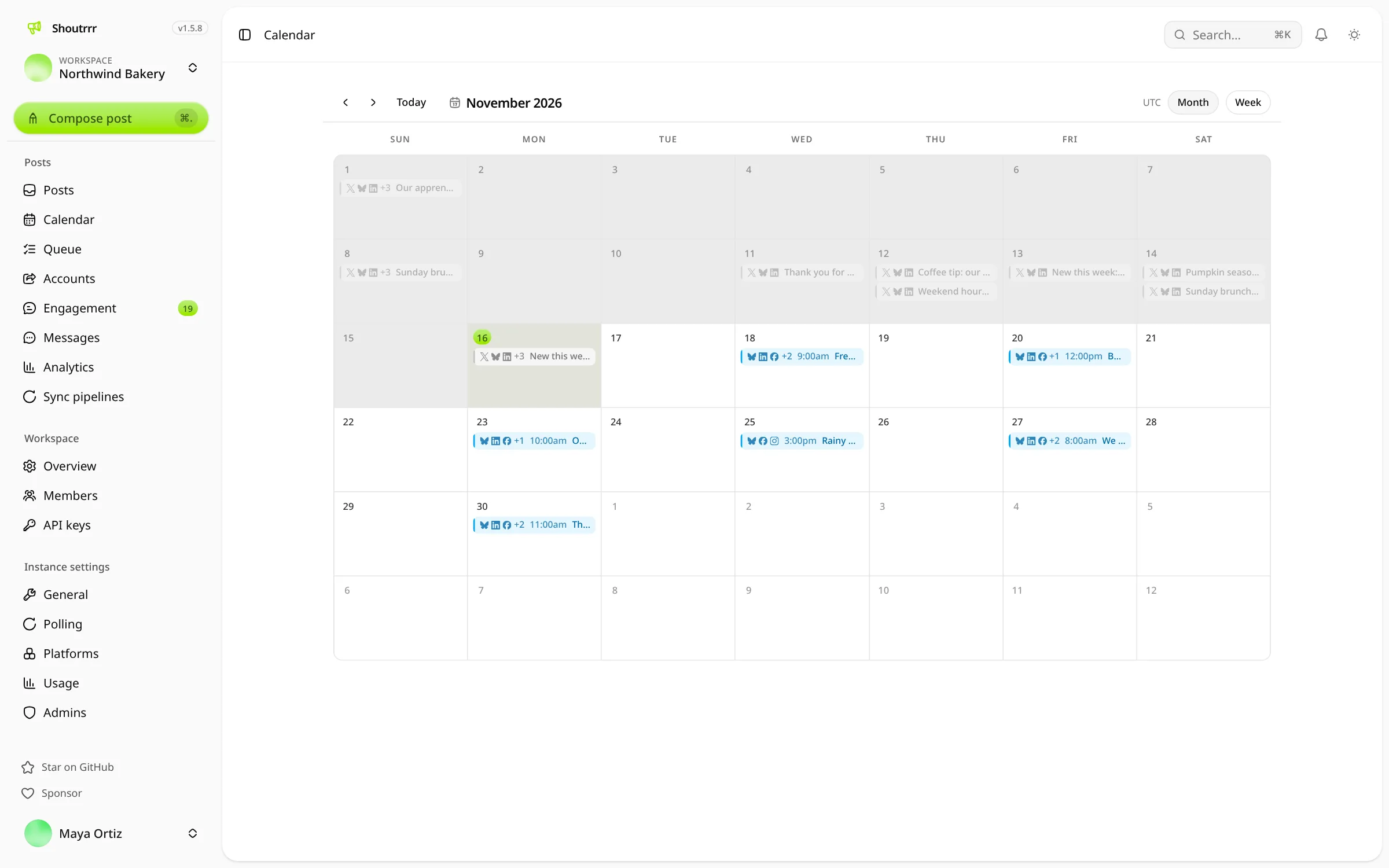
- Fill a weekly queue Set your posting times for each day once, drop posts into the queue, and see everything planned on a month or week calendar.
- Threads made for you A live character count for each network warns you before a post is too long, and long posts are split into a thread on X, Bluesky and Threads.
- Seven networks Post to X, Bluesky, LinkedIn, Facebook Pages, Instagram business accounts, Threads and Discord channels.
- Answer replies in one place Read and answer replies to your posts from several networks in one inbox, without opening each app.
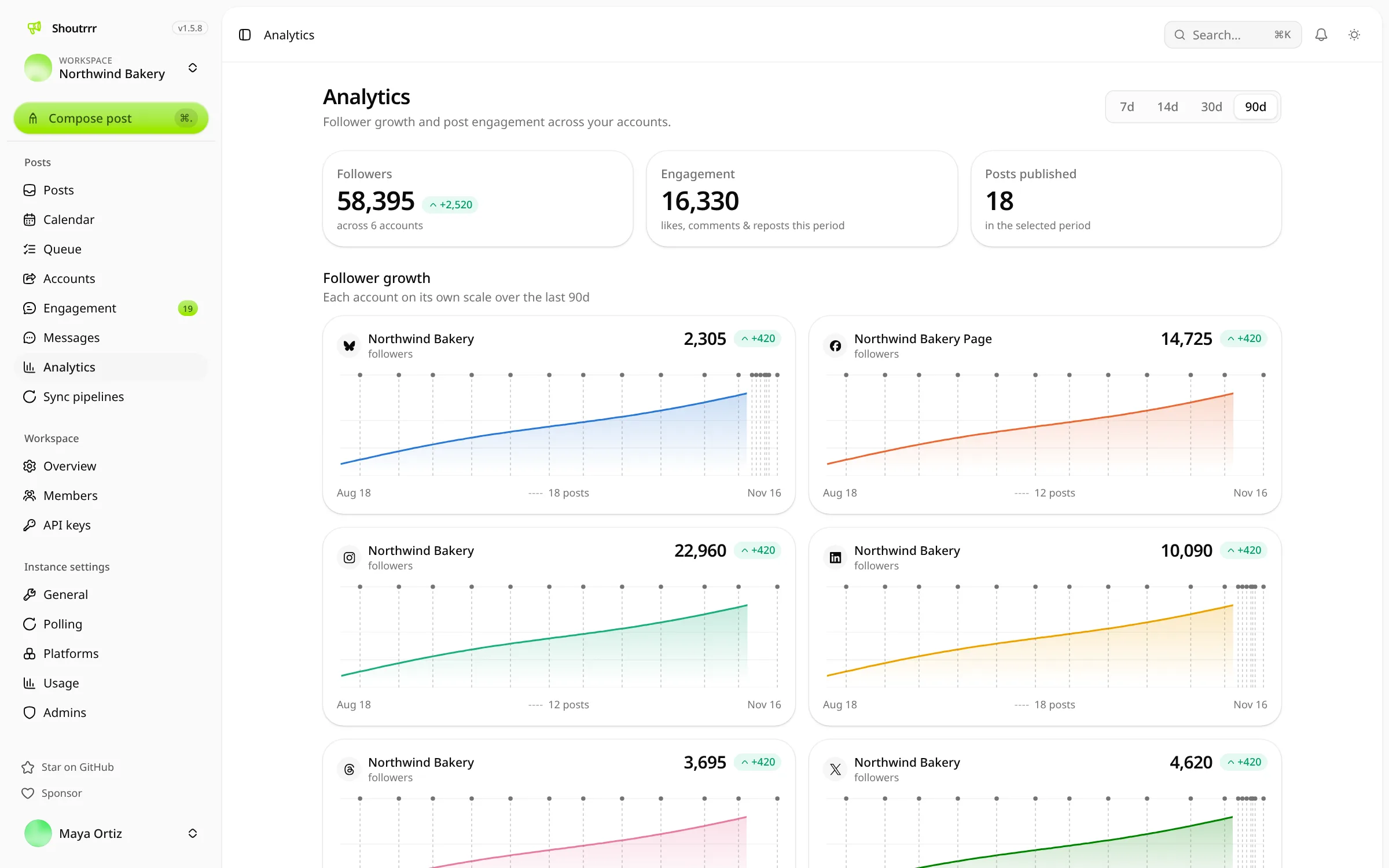
- See what works Follow each account's follower growth and see likes, reposts, replies and views for each post, where the network shares them.
- Separate clients and brands Keep each client or brand in its own workspace, invite teammates by email and give each person a role.
- Let an AI assistant help Connect an AI assistant to draft and schedule posts for you; it asks before anything is published. There is also an API for your own tools.
Replaces Buffer, Typefully and Hootsuite
Shoutrrr does the same job as Buffer, Typefully and Hootsuite. Here is what changes when you switch.
- No fee per channel or per team member, and every feature is included
- Your posts, account connections and statistics stay on your own server
- A weekly posting queue, threads and a replies inbox in one free app
- Open source under the Apache licence, so nothing is locked to one company
- You register your own developer app with X, LinkedIn and Meta, and Meta must review it before you post for real accounts
- X charges for every use of its API, so posting to X costs a little from your own X developer account
- Seven networks only, with no TikTok, YouTube, Pinterest or Mastodon
- Nothing imports from Buffer, Typefully or Hootsuite, so you reconnect accounts and recreate scheduled posts
What happens when you click Deploy?
You do not need a server or any technical knowledge. Four steps, and Shoutrrr is running at its own web address.
- Step 1 Click Deploy and create your account
Deploy takes you to Cloudgate. Create an account, or log in if you have one. Shoutrrr itself is free.
- Step 2 Choose a server
No server? Get one from Cloudgate: pick a size and a country, and Cloudgate gets it ready. Already have one? Connect it instead.
- Step 3 Cloudgate sets up Shoutrrr
It prepares the server, makes the passwords the app needs and starts it. There is nothing to install and nothing to write down.
- Step 4 Open your app and sign in
Your app gets a free web address to start, without https. Add your own domain, like app.yourshop.com, and Cloudgate secures it with https for you.
New to Cloudgate? See what Cloudgate is
Run Cloudgate yourself? Deploy from your own console
In your Cloudgate console, open Templates and choose Shoutrrr.
Questions
Is Shoutrrr free?
Yes, self-hosted Shoutrrr is free and open source under the Apache 2.0 licence, with every feature included and no fee per seat or channel. You pay for your server, and X charges for using its API if you post to X.
Is Shoutrrr a good alternative to Buffer?
Yes, for the networks it supports. Shoutrrr has Buffer's weekly posting queue, a calendar, posts tailored per network, statistics and team workspaces, with no fee per channel. It posts to seven networks (X, Bluesky, LinkedIn, Facebook, Instagram, Threads and Discord), so check that yours are on the list.
Do I need a developer account on each social network for Shoutrrr?
For X, LinkedIn, Facebook, Instagram and Threads, yes. For Shoutrrr you register your own app with each network and add its keys, and Meta requires App Review and Business Verification before you can post for accounts other than test users. X sells API access by usage, so you buy credits from X. Bluesky and Discord need no developer account.
How do I sign in to Shoutrrr the first time?
There is no default login. The first person to open Shoutrrr's web address registers with a name, email and password and becomes the owner. After that, public sign-up is off and new people join by invitation.
How is Shoutrrr different from Postiz?
Shoutrrr posts to seven networks, has an inbox for answering replies and a weekly posting queue, and runs on a small server. Postiz posts to more than 30 networks and lets clients approve posts through a preview link, but needs a bigger server.
Is this the same Shoutrrr as the notification library?
No. This Shoutrrr is the social media scheduler from coollabs, the makers of Coolify. The containrrr Shoutrrr is an unrelated tool developers use to send alerts to Slack, Telegram or email.
What server size do I need for Shoutrrr?
A small server is enough. Shoutrrr runs as one app with its own built-in database and needs no separate database service.
Do I need my own server for Shoutrrr?
No. When you deploy Shoutrrr, hosted Cloudgate can provide a server. If you already rent one, you can connect it instead.
Can I move my data from Buffer to Shoutrrr?
Most people export from Buffer and import into Shoutrrr. The official guides at shoutrrr.com walk through it.
Related apps

Schedule posts to 30+ social networks from one self-hosted calendar.

Social media queues that you or your AI assistant fill.

Let clients book time with you from a simple link.

A light, self-hosted booking link for consultants and small teams.