Node-RED
Flow editor that wires devices, APIs and apps together.
No server needed to start: Cloudgate can provide one. What happens when you click Deploy
What is Node-RED?
Self-hosted Node-RED: wire devices, web APIs and apps together in a browser flow editor to automate jobs, from webhooks to MQTT sensors.
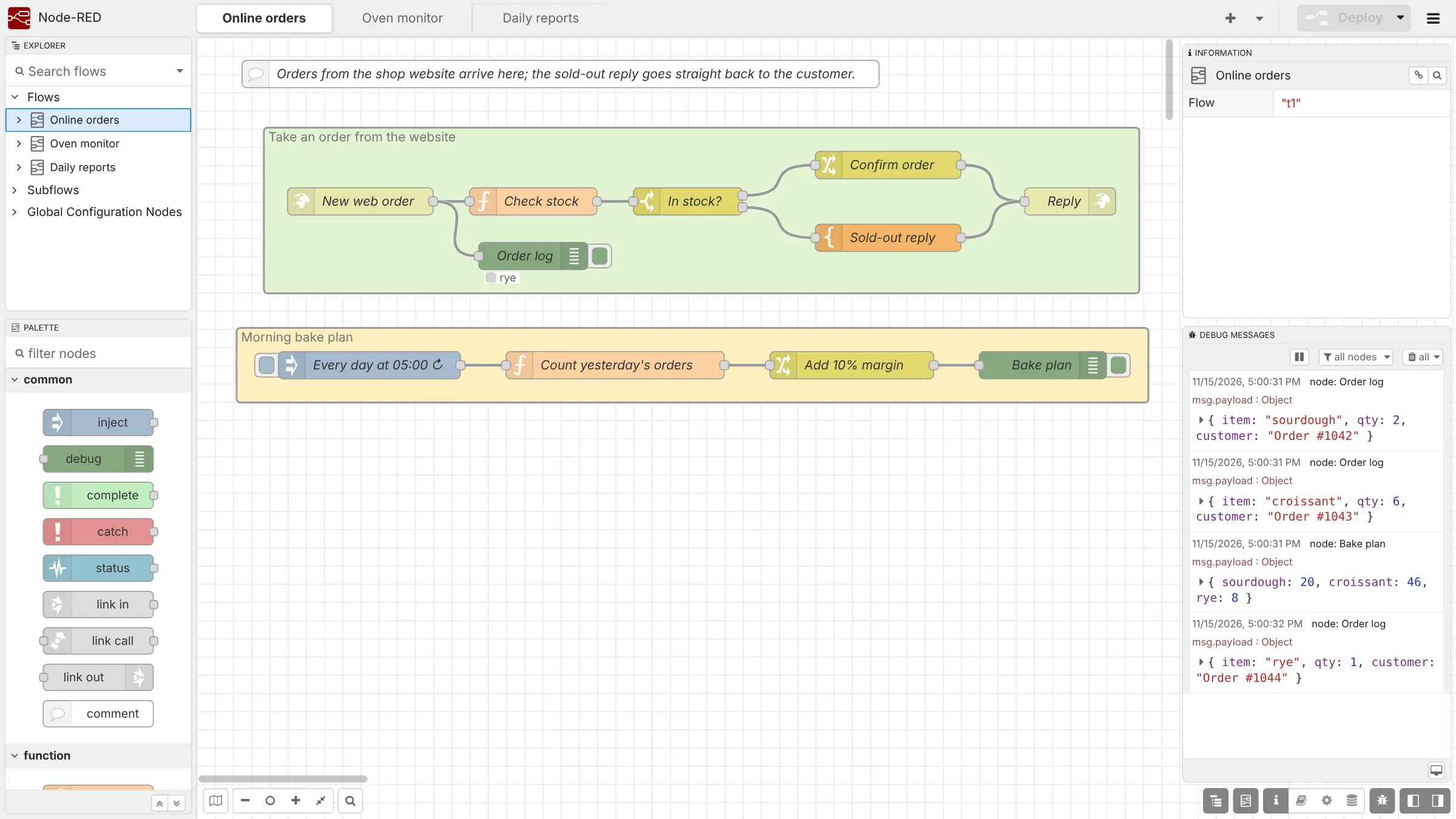
Node-RED is a self-hosted, open-source tool for automating work between devices, web services and apps, and a free alternative to Zapier and IFTTT for people who don't mind a little tinkering. You build each automation as a "flow" in your web browser: drag blocks onto a canvas, wire them together and click Deploy.
A small bakery, for example, could have its website send each new order to Node-RED, check it against the day's stock and reply at once with a confirmation or a sold-out message. Every morning at 5:00, another flow could count yesterday's orders and post a bake plan.
Node-RED speaks the web (webhooks and web requests) and the languages of devices, such as MQTT, out of the box, and its library adds more than 5,000 community blocks and flows, including Home Assistant, databases and chat apps. It is more technical than Zapier: for anything unusual you may write a few lines of JavaScript. There are no phone apps.
How Cloudgate installs Node-RED
Cloudgate installs Node-RED on a server Cloudgate provides or one you connect and gives it its own secure web address. Node-RED's editor is open to anyone by default, so Cloudgate turns on its sign-in: you log in as admin with the password Cloudgate creates.
What you can do with Node-RED
- Build automations by wiring blocks Drag blocks onto a canvas in your browser, join them with wires and click Deploy to put the flow to work.
- Run jobs on a schedule Start a flow by hand, every few minutes, or at a set time such as 5:00 every morning.
- Receive and answer web requests Give a flow its own web address so a website, form or other app can send it data and get a reply.
- Talk to devices and sensors Built-in MQTT, WebSocket, TCP and UDP blocks read sensors and switch smart-home gear on and off.
- Add thousands of community blocks Install extra blocks from the editor, from the official library of more than 5,000 community nodes and flows, such as Home Assistant or Telegram.
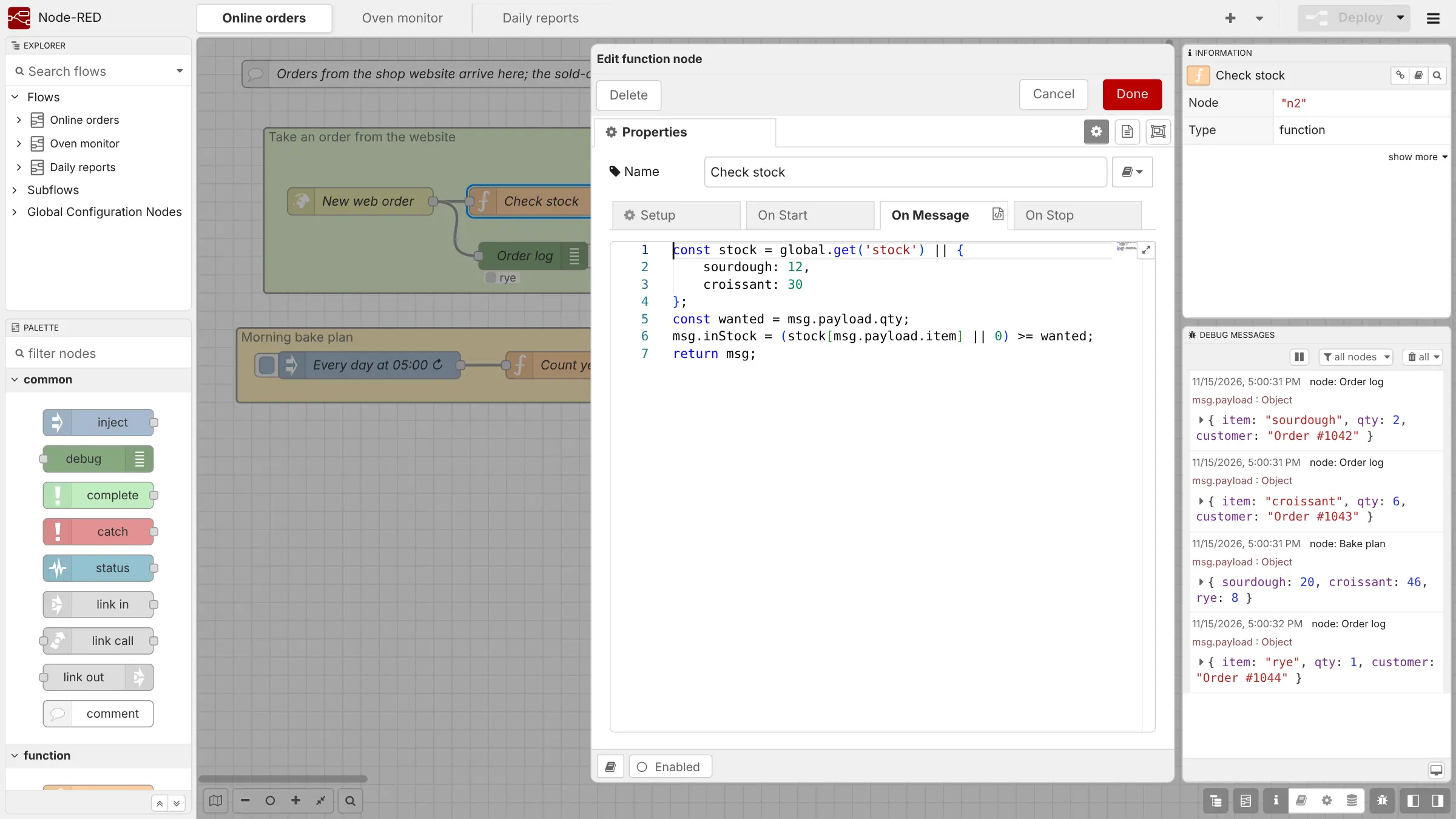
- Write a little code when you need it A function block runs your own JavaScript for the steps no ready-made block covers.
- Watch messages as they flow The debug panel shows each message live, so you can see what a flow is doing and fix it.
- Share and reuse flows Export a flow as a file, import one from someone else, or save useful pieces in the built-in library.
Replaces Zapier, IFTTT and Make
Node-RED does the same job as Zapier, IFTTT and Make. Here is what changes when you switch.
- No monthly task limits and no price per run
- Reaches devices, sensors and home gear on your network, not only online apps
- Your data and flows stay on your own server
- Open source under Apache-2.0, with every feature free
- More technical than Zapier; plan time to learn how messages move between blocks
- Fewer ready-made blocks with one-click sign-in for business apps, so some need the web-request block
- Zaps, Make scenarios and IFTTT applets cannot be imported; you rebuild them
- There are no phone apps; you build flows in a web browser
What happens when you click Deploy?
You do not need a server or any technical knowledge. Four steps, and Node-RED is running at its own web address.
- Step 1 Click Deploy and create your account
Deploy takes you to Cloudgate. Create an account, or log in if you have one. Node-RED itself is free.
- Step 2 Choose a server
No server? Get one from Cloudgate: pick a size and a country, and Cloudgate gets it ready. Already have one? Connect it instead.
- Step 3 Cloudgate sets up Node-RED
It prepares the server, makes the passwords the app needs and starts it. There is nothing to install and nothing to write down.
- Step 4 Open your app and sign in
Your app gets a free web address to start, without https. Add your own domain, like app.yourshop.com, and Cloudgate secures it with https for you.
New to Cloudgate? See what Cloudgate is
Run Cloudgate yourself? Deploy from your own console
In your Cloudgate console, open Templates and choose Node-RED.
Questions
Is Node-RED free?
Yes. Node-RED is free and open source under the Apache-2.0 licence, and it has no paid edition or locked features. When you self-host it with Cloudgate, you pay only for your server.
Is Node-RED a good alternative to Zapier?
Yes, for webhooks, web APIs, devices and smart homes. Node-RED has no limit on runs and no price per task, and it can reach gear on your own network. For linking many business apps with a quick sign-in, n8n is usually easier.
Should I choose Node-RED or n8n?
Choose Node-RED for sensors, MQTT, Home Assistant and web requests, and n8n for linking business apps such as Gmail, Slack and HubSpot. Node-RED is open source under Apache-2.0; n8n is fair-code. Some people run both.
How do I sign in to Node-RED the first time?
Sign in with the username admin and the password Cloudgate created, shown on the app's variables page in Cloudgate. Node-RED leaves its editor open to anyone by default, so Cloudgate turns on this sign-in for you.
Can I import my Zaps or Make scenarios into Node-RED?
No. There is no import from Zapier, Make or IFTTT, so you rebuild each automation as a flow. Node-RED flows themselves export and import as files, so you can copy flows shared by others.
Does Node-RED work with Home Assistant and MQTT?
Yes. MQTT blocks are built into Node-RED, and Home Assistant blocks are a free community add-on you install from inside the editor.
What server size does Node-RED need?
A small server is enough for most flows. Node-RED is one light app with no separate database, and it is made to run even on a Raspberry Pi.
Do I need technical skills to run Node-RED?
No. Click Deploy, create your Cloudgate account and choose a server, and Cloudgate sets up Node-RED and gives it a web address. You use it in your browser like any other online tool.
Do I need my own server for Node-RED?
No. When you deploy Node-RED, hosted Cloudgate can provide a server. If you already rent one, you can connect it instead.
Related apps

Zapier-style automations between your apps, on your own server.

Simple if-this-then-that flows between your business apps.

Automate work between your apps, with no limit on runs.

Agents that watch websites and feeds and send you alerts or digests.