
Automatisch
Simple if-this-then-that flows between your business apps.
No server needed to start: Cloudgate can provide one. What happens when you click Deploy
What is Automatisch?
Automatisch is an open-source Zapier alternative for simple if-this-then-that flows between your business apps, self-hosted so your data stays with you.
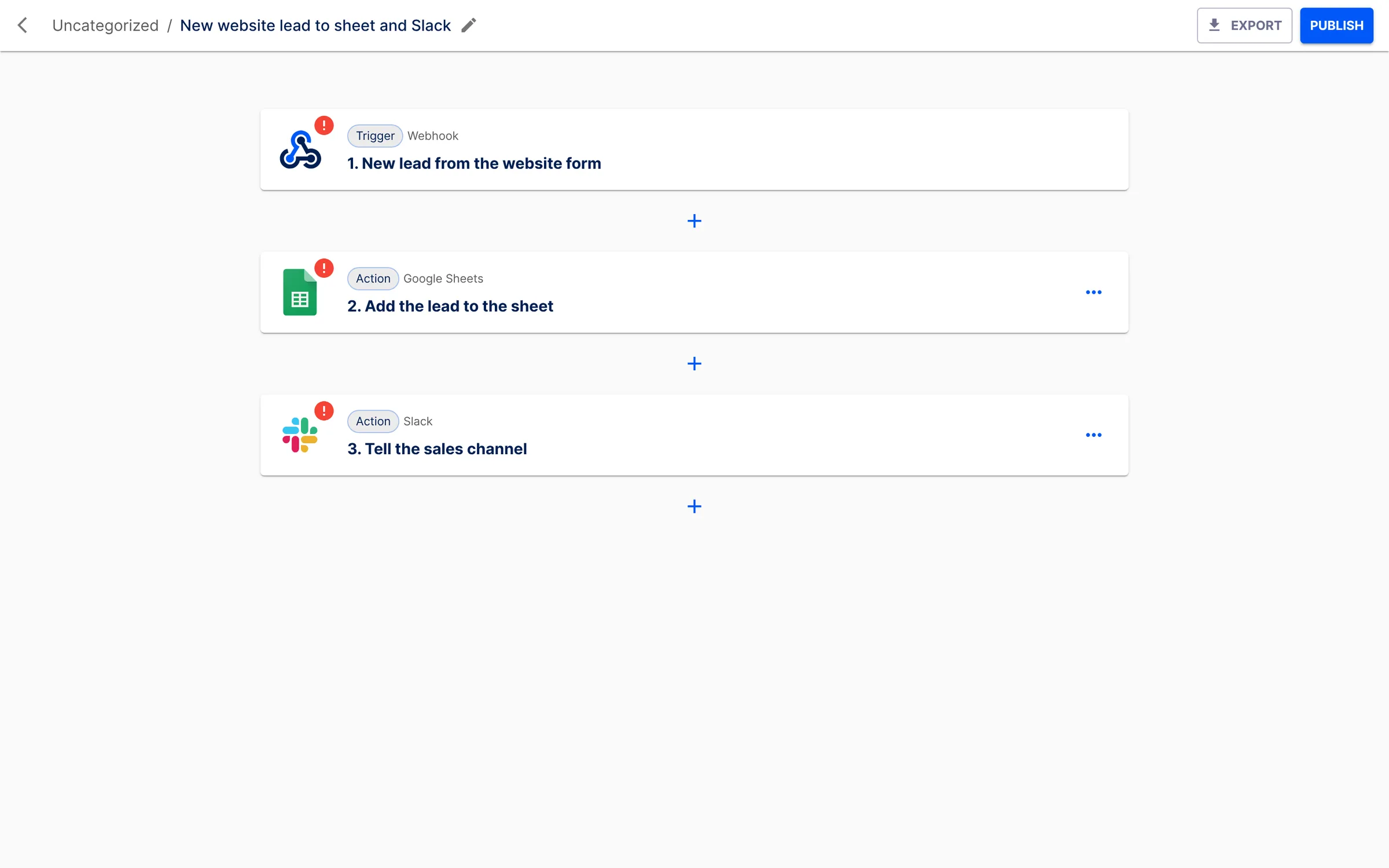
Automatisch is an open-source automation tool that connects your business apps with simple flows: when something happens in one app, it does something in another. For example, when a new row is added to a Google Sheet, it posts a message in Slack, or when a payment arrives in Stripe, it sends a thank-you email.
It is a small, focused tool. There are fewer options than in larger automation apps such as n8n or Activepieces, which makes it quick to learn and easy to hand over to a colleague. A small office could run three or four flows that save someone an hour of copying and pasting every week: new web form entries into a spreadsheet, new customers into Mailchimp, and a daily reminder in the team chat.
Automatisch has ready-made connections for around 80 tools, including Gmail, Google Sheets, Google Calendar, Slack, Notion, Stripe, HubSpot, Pipedrive, Trello and Typeform, plus webhooks and web requests for anything else. Every run is logged so you can see what happened at each step. There is no phone app; you use it in your web browser.
How Cloudgate installs Automatisch
Cloudgate installs Automatisch on a server Cloudgate provides or one you connect, with the database and queue it needs, and gives it a secure web address. The first person to open that address creates the admin account. Your flows and data stay on your own server.
What you can do with Automatisch
- Build a flow in minutes Choose what starts it, such as a new form entry or a paid invoice, then add the steps that follow.
- Connect common apps Ready-made steps for Gmail, Google Sheets, Slack, Notion, Stripe, HubSpot, Mailchimp and around 80 others.
- Run on a schedule Start a flow every hour, every day or every week.
- Only act when it matters A filter step lets a flow carry on only when the data matches your rules.
- Use AI in a step Summarise or draft text with OpenAI, Anthropic, Mistral or your own AI model.
- Check what happened See each run and the data that passed through every step.
Replaces Zapier, IFTTT and Make
Automatisch does the same job as Zapier, IFTTT and Make. Here is what changes when you switch.
- No monthly task limits and no price per run
- Your data stays on your own server
- A short list of options that is quick to learn and hand over
- Far fewer ready-made connections than Zapier or Make
- Best for short, straightforward flows rather than complex ones
- Extra user accounts and roles need the paid enterprise edition
- A smaller community than n8n or Activepieces
What happens when you click Deploy?
You do not need a server or any technical knowledge. Four steps, and Automatisch is running at its own web address.
- Step 1 Click Deploy and create your account
Deploy takes you to Cloudgate. Create an account, or log in if you have one. Automatisch itself is free.
- Step 2 Choose a server
No server? Get one from Cloudgate: pick a size and a country, and Cloudgate gets it ready. Already have one? Connect it instead.
- Step 3 Cloudgate sets up Automatisch
It prepares the server, makes the passwords the app needs and starts it. There is nothing to install and nothing to write down.
- Step 4 Open your app and sign in
Your app gets a free web address to start, without https. Add your own domain, like app.yourshop.com, and Cloudgate secures it with https for you.
New to Cloudgate? See what Cloudgate is
Run Cloudgate yourself? Deploy from your own console
In your Cloudgate console, open Templates and choose Automatisch.
Questions
Is Automatisch free?
Yes. Automatisch is open source under the AGPL-3.0 licence and free to self-host, so you pay only for hosting. A few features, such as extra user accounts and roles, need a paid enterprise licence.
Is Automatisch a good alternative to Zapier?
Automatisch is a good Zapier alternative for simple flows between common apps. It is built the same way, a trigger followed by actions, but it has far fewer ready-made connections, so check that your apps are on its list first.
When should I choose n8n or Activepieces instead?
Choose n8n or Activepieces when you need many different apps, flows with several branches, or a whole team building automations. Automatisch suits a handful of simple flows that one person looks after.
How do I self-host Automatisch?
With Cloudgate, you pick Automatisch from the catalogue and click install. Cloudgate sets up the app, its background worker, database and queue on your server, gives it a secure web address and generates its secret keys.
Is my data private with self-hosted Automatisch?
Yes. Your flows, run history and app logins are stored in a database on your own server, and app logins are encrypted. Data leaves your server only when a flow sends it to an app you connected.
What server size do I need for Automatisch?
Automatisch runs on a small server with 1 GB of memory, which is enough for a few flows running every few minutes.
Do I need technical skills?
No. Click Deploy, create your Cloudgate account and choose a server, and Cloudgate sets up Automatisch and gives it a web address. You use it in your browser like any other online tool.
Do I need my own server?
No. When you deploy Automatisch, hosted Cloudgate can provide a server. If you already rent one, you can connect it instead.
Can I move my data from Zapier?
Most people export from Zapier and import into Automatisch. The official guides at automatisch.io walk through it.

