Linkwarden
A self-hosted bookmark manager that keeps a copy of every page.
No server needed to start: Cloudgate can provide one. What happens when you click Deploy
What is Linkwarden?
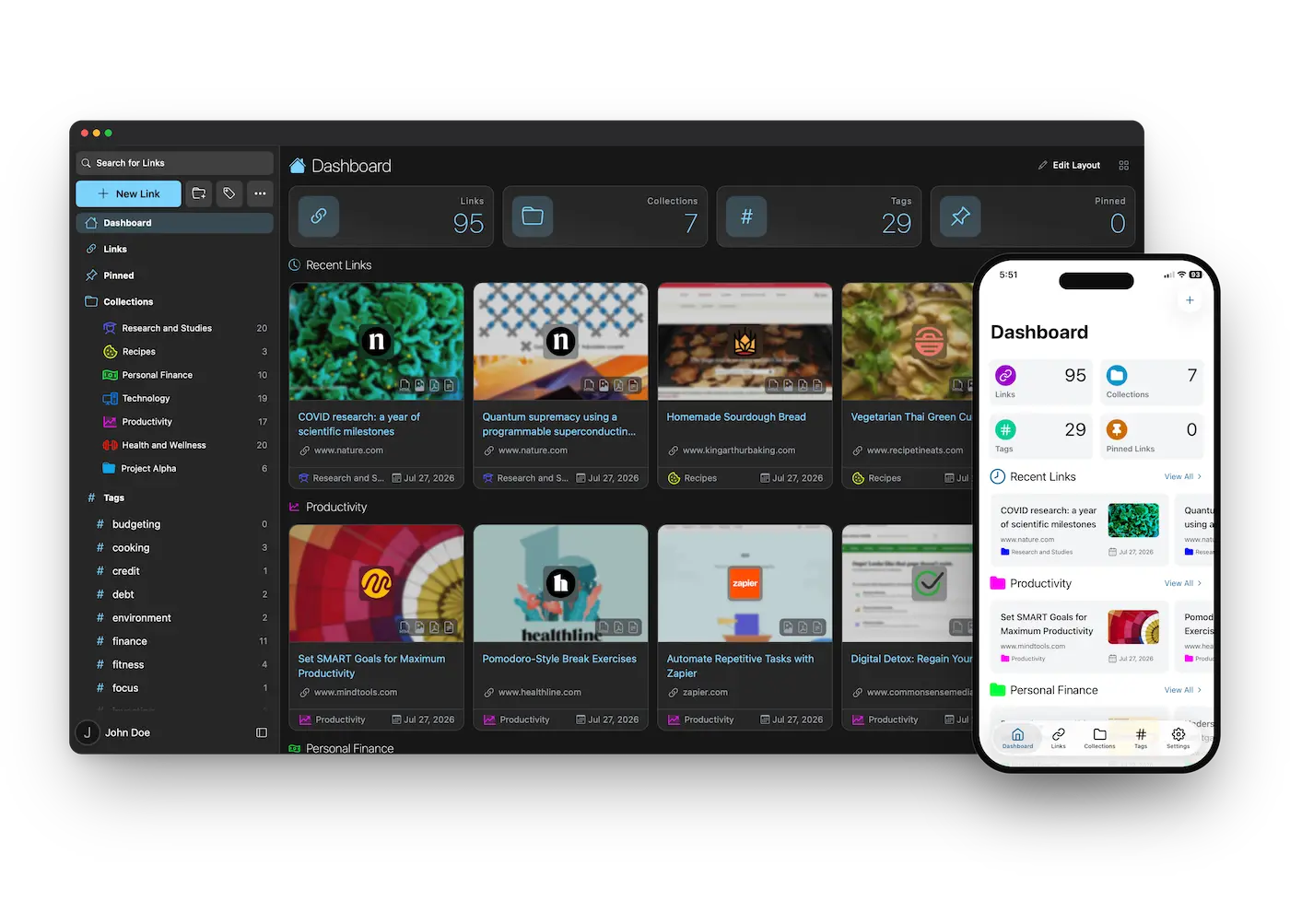
Linkwarden is a self-hosted bookmark manager that keeps a copy of every page you save, with shared collections, full-text search and phone apps.
Linkwarden is a free, open-source, self-hosted bookmark manager that saves a copy of every page you keep, in place of Raindrop.io or Pocket. Each link is stored as a readable article, a full web page copy, a screenshot and a PDF, so it still opens after the original website changes or disappears.
You sort links into collections, sub-collections and tags, find them with full-text search, and highlight and add notes in a clean reader view. Collections can be shared with other people, each as a viewer, a contributor or an admin, or published on a public link. A small architecture firm, for example, could keep a shared collection of planning rules, supplier pages and product data sheets for each project, so the whole team can find the exact page years later, even after the supplier has taken it down.
Linkwarden has extensions for Chrome, Edge, Firefox and Safari and apps for iPhone and Android. It imports from Pocket, Wallabag, Omnivore and browser bookmark files, and can follow RSS feeds. Optional AI tagging uses a local Ollama model or your own AI provider key.
Cloudgate installs Linkwarden on a server Cloudgate provides or one you connect, together with its search and page-saving parts, and gives it a secure web address. The first account you create becomes the admin; then turn off new sign-ups in Cloudgate.
What you can do with Linkwarden
- Keep a copy of every page Each link you save is kept as a readable article, a full web page copy, a full-page screenshot and a PDF, so it still opens if the website removes it.
- Organize in collections and tags Sort links into collections and sub-collections, add as many tags as you like, and pin the ones you use most.
- Share with your team or family Add people to a collection as a viewer, a contributor or an admin, or publish it on a public link anyone can read.
- Read, highlight and add notes Open saved articles in a clean reader view, highlight passages in colour and attach a note to any highlight.
- Find anything again Full-text search looks inside the pages you saved, with filters by collection, tag and more.
- Follow RSS feeds Subscribe to a blog or news feed and new articles are saved into a collection for you.
- Save from browser and phone Use the extensions for Chrome, Edge, Firefox and Safari, or the iPhone and Android apps, to save a link in a tap.
- Tag with AI, if you want Connect a local Ollama model or your own AI provider key and Linkwarden suggests tags for each new link.
Replaces Raindrop.io and Pocket
Linkwarden does the same job as Raindrop.io and Pocket. Here is what changes when you switch.
- Every feature is free when you host it yourself
- Full-text search and lasting page copies, which Raindrop.io keeps for its paid Pro plan
- Shared collections with viewer, contributor and admin roles for your team or family
- Your saved pages stay on your own server and cannot be shut down by someone else
- Less polished than Raindrop.io, especially the phone apps
- Raindrop.io bookmarks come across only through an HTML export, without highlights
- Keeping a copy of every page uses server memory and disk space, so large imports take a while
- AI tagging needs your own AI provider key or a local Ollama model, and is off until you add one
What happens when you click Deploy?
You do not need a server or any technical knowledge. Four steps, and Linkwarden is running at its own web address.
- Step 1 Click Deploy and create your account
Deploy takes you to Cloudgate. Create an account, or log in if you have one. Linkwarden itself is free.
- Step 2 Choose a server
No server? Get one from Cloudgate: pick a size and a country, and Cloudgate gets it ready. Already have one? Connect it instead.
- Step 3 Cloudgate sets up Linkwarden
It prepares the server, makes the passwords the app needs and starts it. There is nothing to install and nothing to write down.
- Step 4 Open your app and sign in
Your app gets a free web address to start, without https. Add your own domain, like app.yourshop.com, and Cloudgate secures it with https for you.
New to Cloudgate? See what Cloudgate is
Run Cloudgate yourself? Deploy from your own console
In your Cloudgate console, open Templates and choose Linkwarden.
Questions
Is Linkwarden free?
Yes, Linkwarden is free and open source under the AGPL-3.0 licence, and the self-hosted version has all the core features. Its makers also sell a hosted Linkwarden Cloud, which you do not need when you host it yourself.
How is Linkwarden different from Karakeep?
Linkwarden is built around links, keeping a copy of each page and sharing collections with other people, with roles for each member and public collection pages. Karakeep is more of a personal inbox for links, notes, images and PDFs, with smart lists and optional AI summaries. Both are free, open source and self-hosted.
Is Linkwarden a good alternative to Raindrop.io?
Yes, if you want your bookmarks and page copies on your own server. Linkwarden has collections, sub-collections, tags, shared and public collections, full-text search and a lasting copy of each page, which Raindrop.io keeps for its Pro plan. Raindrop.io's apps are more polished.
Can I import my bookmarks from Pocket, Raindrop.io or my browser?
Yes. Linkwarden imports a Pocket CSV export, a browser's bookmarks file, and Wallabag and Omnivore exports. Raindrop.io has no importer of its own, so export your Raindrop bookmarks as an HTML file and import that; highlights do not come across.
Can I share bookmarks with my team or family?
Yes. Add people with an account on your Linkwarden to a collection as a viewer, a contributor who can add links, or an admin who can edit them. You can also make a collection public, so anyone with its link can read it.
How do I sign in to Linkwarden the first time?
Open your Linkwarden address and click Sign up; the first account created becomes the admin. Anyone who reaches the address can sign up until you turn on "Turn off new sign-ups" in Cloudgate, so do that once your people have joined.
Is there a Linkwarden phone app and browser extension?
Yes. Linkwarden has official apps for iPhone and Android and extensions for Chrome, Edge, Firefox and Safari. Each one connects to your own Linkwarden address, so you can save a link from anywhere.
Do I need technical skills to run Linkwarden?
No. Click Deploy, create your Cloudgate account and choose a server, and Cloudgate sets up Linkwarden and gives it a web address. You use it in your browser like any other online tool.
Do I need my own server for Linkwarden?
No. When you deploy Linkwarden, hosted Cloudgate can provide a server. If you already rent one, you can connect it instead.
Related apps

A self-hosted bookmark manager to save and find everything you read.

A fast, self-hosted bookmark manager with tags, notes and read later.

A light, self-hosted bookmark manager that saves pages offline.

A self-hosted bookmark archive that tells you when links break.