
Healthchecks
Get an alert when a backup or scheduled job silently stops running.
No server needed to start: Cloudgate can provide one. What happens when you click Deploy
What is Healthchecks?
Healthchecks is a self-hosted cron job monitor that alerts you when a backup or scheduled task stops running, in place of Cronitor or Dead Man's Snitch.
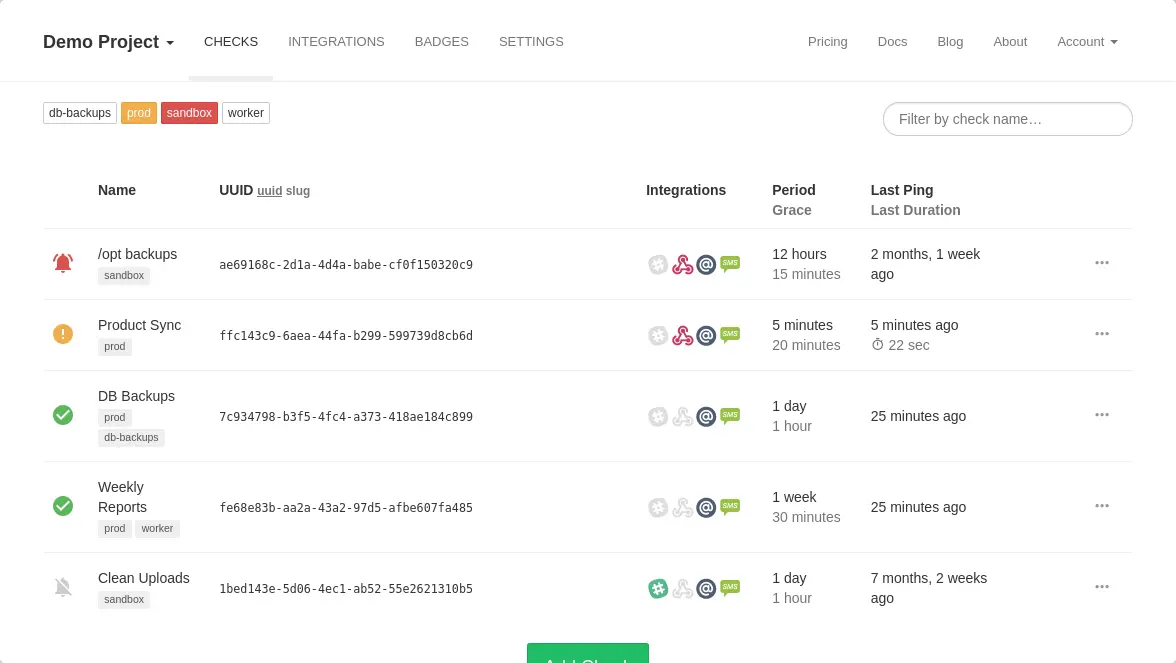
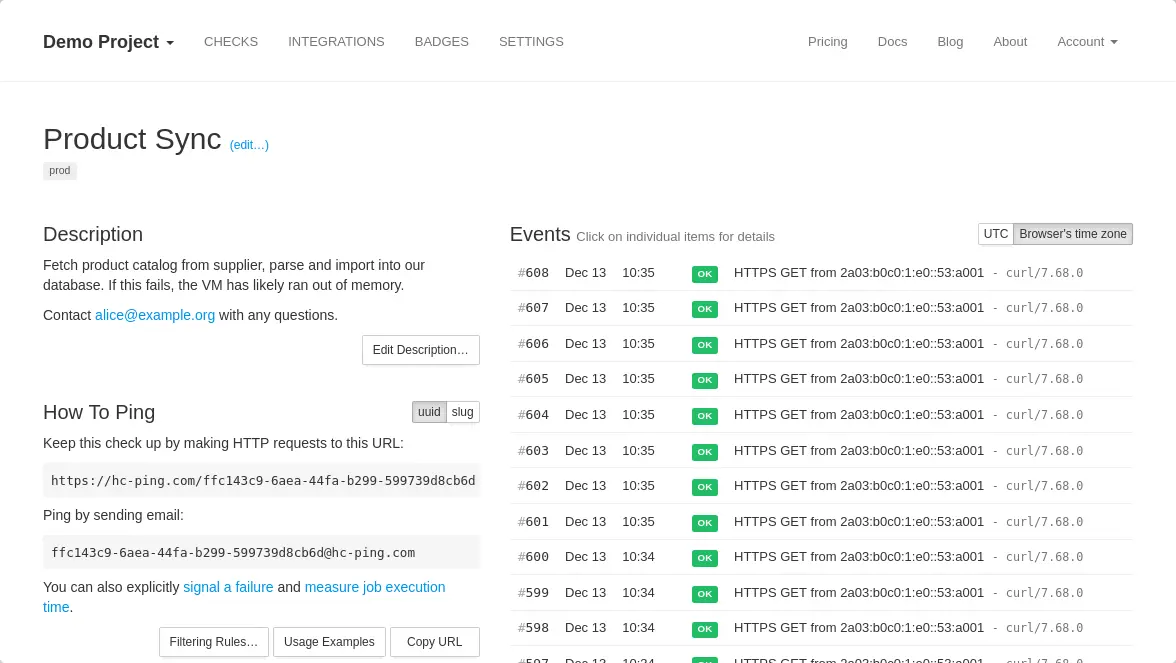
Healthchecks is an open-source, self-hosted cron job monitor that tells you when a backup, import or other scheduled job stops running, replacing hosted services such as Cronitor and Dead Man's Snitch. Each job gets a check with its own ping link, and the job calls that link every time it finishes. If the call does not arrive on time, Healthchecks marks the job late, then down, and sends you an alert.
This is different from website monitoring such as Uptime Kuma, which checks your sites from the outside: Healthchecks waits for your own jobs to check in, so it catches the failures nobody sees. A small accounting firm, for example, can add a check to its nightly backup and get a Slack message the first morning the backup does not run, not weeks later when a file is needed.
Alerts can go to email, Slack, Discord, Microsoft Teams, Telegram, ntfy, PagerDuty, webhooks and more than 25 services in all. There is no official phone app, but the dashboard works in a phone's browser.
How Cloudgate installs Healthchecks
Cloudgate installs Healthchecks on a server Cloudgate provides or one you connect, with the database it needs and a secure web address. Sign in with your admin email and the password on the variables page. For reliable alerts, run it on a different server from the jobs it watches.
What you can do with Healthchecks
- Watch every scheduled job Each backup, import or report gets its own check and a ping link the job calls each time it runs.
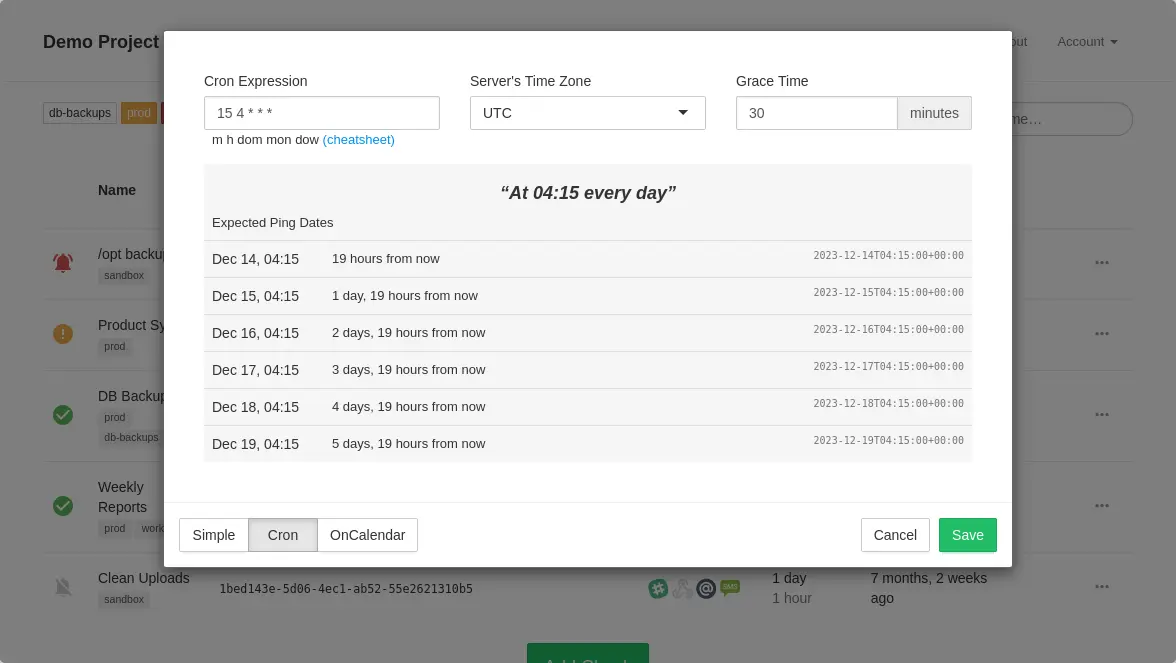
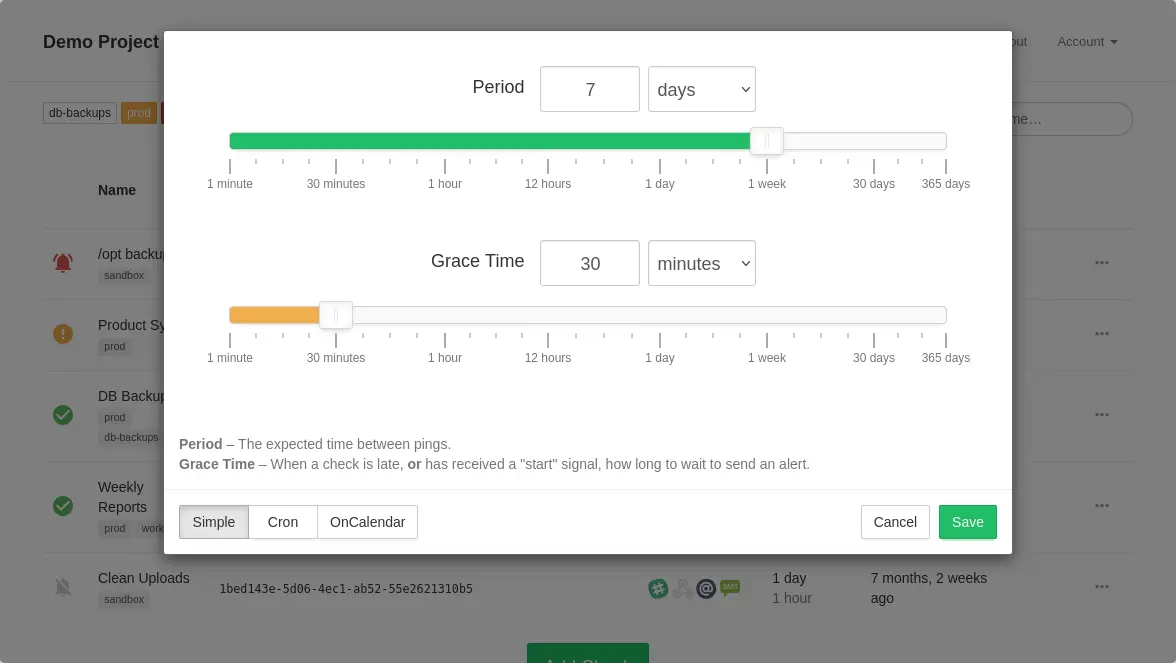
- Set when each job is due Give a simple interval such as every day, or a cron schedule in your time zone, plus how long to wait before alerting.
- Hear when a job is late or fails A check turns late, then down, and you get an alert, plus another when the job is back on track.
- Get alerts where you already look Send alerts to Slack, Discord, Microsoft Teams, Telegram, ntfy, Matrix, PagerDuty, webhooks, email and more than 25 services in all.
- See each run and how long it took A live log per check lists every ping and alert, and a job can report a failure or how long it ran.
- Share with your team Group checks into projects, invite colleagues with full or read-only access and turn on two-step sign-in.
- Show status badges Put a badge on a status page or project page that shows whether a group of jobs is running.
Replaces Cronitor and Dead Man’s Snitch
Healthchecks does the same job as Cronitor and Dead Man’s Snitch. Here is what changes when you switch.
- No limit on checks, team members or log history set by a plan
- Chat and webhook alerts included, with no paid tier to unlock them
- Your job names, schedules and ping logs stay on your own server
- Cron schedules with time zones, grace times and run-time tracking
- It only waits for jobs to check in; it does not check websites itself
- If its own server goes down, it cannot alert you, so run it somewhere else
- Text message and phone-call alerts need your own Twilio account
- There is no import, so you re-create checks and change each job's ping link
What happens when you click Deploy?
You do not need a server or any technical knowledge. Four steps, and Healthchecks is running at its own web address.
- Step 1 Click Deploy and create your account
Deploy takes you to Cloudgate. Create an account, or log in if you have one. Healthchecks itself is free.
- Step 2 Choose a server
No server? Get one from Cloudgate: pick a size and a country, and Cloudgate gets it ready. Already have one? Connect it instead.
- Step 3 Cloudgate sets up Healthchecks
It prepares the server, makes the passwords the app needs and starts it. There is nothing to install and nothing to write down.
- Step 4 Open your app and sign in
Your app gets a free web address to start, without https. Add your own domain, like app.yourshop.com, and Cloudgate secures it with https for you.
New to Cloudgate? See what Cloudgate is
Run Cloudgate yourself? Deploy from your own console
In your Cloudgate console, open Templates and choose Healthchecks.
Questions
Is Healthchecks free?
Yes, Healthchecks is free and open source under the BSD 3-clause licence, and nothing is held back for paid users when you host it yourself. You pay only for your server. The same team also runs a hosted service at healthchecks.io if you would rather not host it.
Is Healthchecks a good alternative to Cronitor or Dead Man's Snitch?
Yes, for watching cron jobs and scheduled tasks. Healthchecks works the same way, where each job checks in and you are alerted when it doesn't, and self-hosted it has no limit on checks or team members. Cronitor also checks websites and hosts status pages, which Healthchecks does not.
How is Healthchecks different from Uptime Kuma?
Uptime Kuma checks your websites from the outside, while Healthchecks waits for your own jobs to check in. Healthchecks is built for scheduled work, with cron schedules, grace times, failure signals and run times. Many people run both.
How do I sign in to Healthchecks the first time?
Sign in to Healthchecks with the admin email you entered at setup and the generated password shown on the app's variables page in Cloudgate, using "Sign in with password". Public sign-up is closed, so only people you invite can get in.
Do I need to set up email for Healthchecks?
Only for email alerts and team invitations in Healthchecks. You can add your email settings at setup or later; without them, alerts still go to Slack, Discord, Telegram, ntfy, webhooks and other chat or push services.
Should Healthchecks run on the same server as the jobs it watches?
No, run it on a different server. If both share a server and that server goes down, Healthchecks goes down with your jobs and cannot alert you.
Can Healthchecks import my checks from Cronitor or Dead Man's Snitch?
No, Healthchecks has no import from Cronitor or Dead Man's Snitch. You add a check for each job again and replace the old ping link in the job with the new one.
Do I need technical skills to run Healthchecks?
No. Click Deploy, create your Cloudgate account and choose a server, and Cloudgate sets up Healthchecks and gives it a web address. You use it in your browser like any other online tool.
Do I need my own server for Healthchecks?
No. When you deploy Healthchecks, hosted Cloudgate can provide a server. If you already rent one, you can connect it instead.
Related apps

Watch all your servers and Docker apps on one light dashboard.

Get an alert when a web page, a price or stock status changes.

Uptime, server and SSL monitoring with status pages.

Uptime monitoring for your websites and servers, with status pages.