
Feishin
A Spotify-style web player for your Navidrome or Jellyfin music.
No server needed to start: Cloudgate can provide one. What happens when you click Deploy
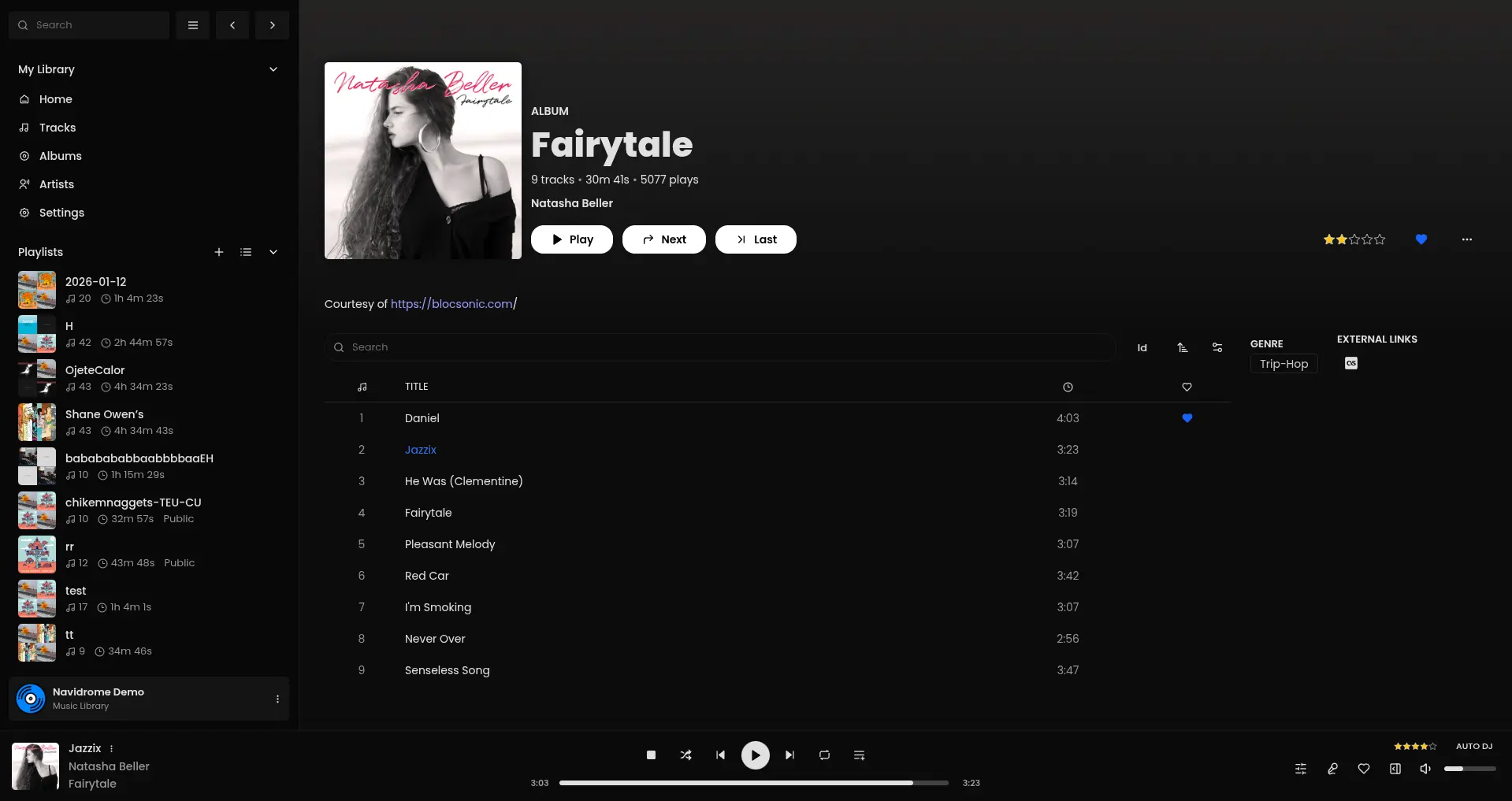

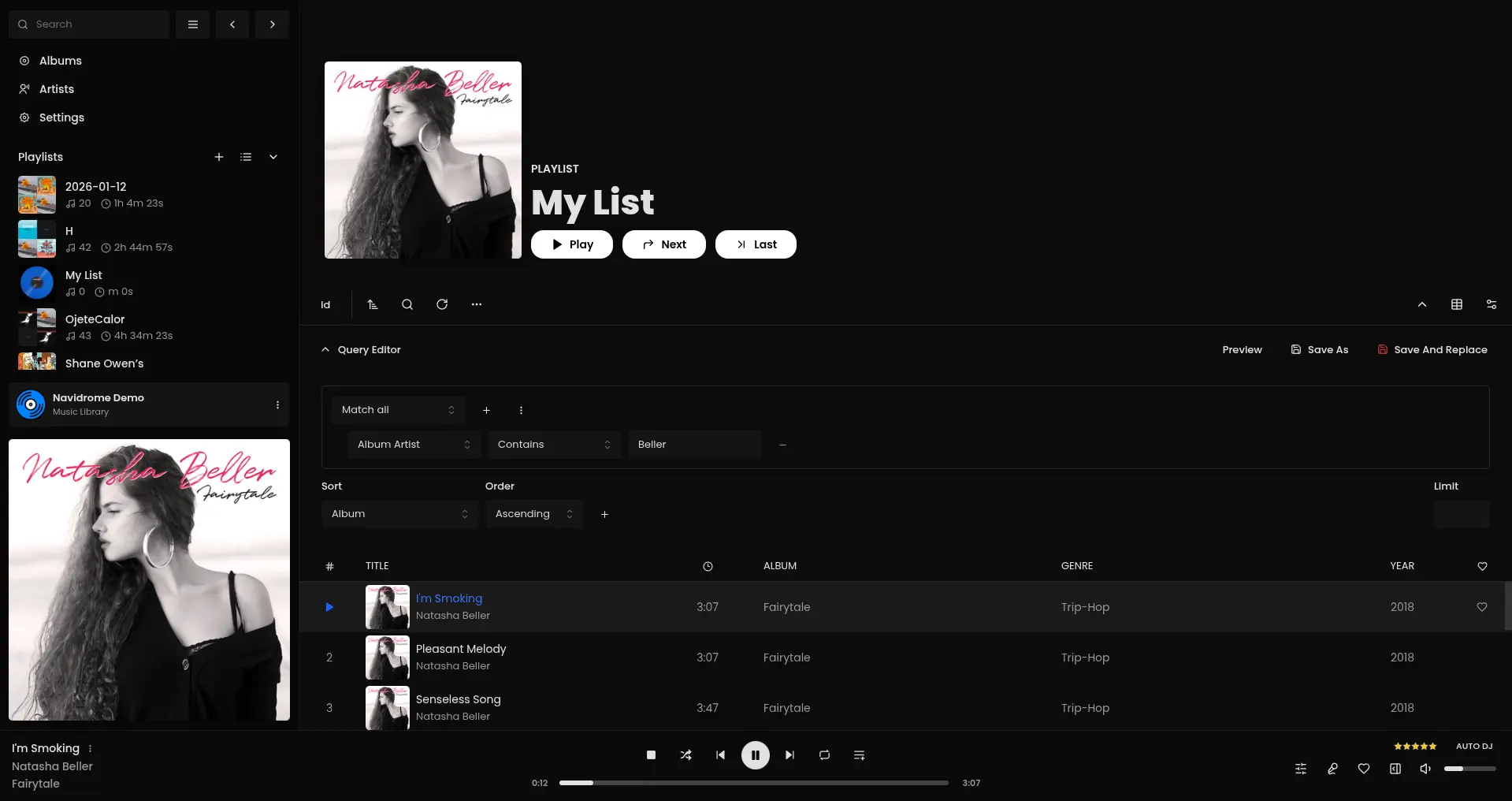
What is Feishin?
Feishin is a self-hosted music player for Navidrome and Jellyfin: a Spotify-style web player for your own music, with playlists and lyrics.
Feishin is a self-hosted music player that gives your Navidrome or Jellyfin server a Spotify-style interface in any web browser. It does not store music itself: it signs in to the music server you already run and plays your own collection, with albums, artists, playlists, lyrics and favourites in one clean window.
A family that keeps its CDs as files on Navidrome, for example, can open Feishin on the living-room laptop, pick an album, follow the lyrics in the full-screen player and build a smart playlist of everything from the 1990s, without paying for a streaming subscription.
Feishin works with Navidrome, Jellyfin and other Subsonic-compatible servers, and both Navidrome and Jellyfin are in this catalogue if you don't have a server yet. There are also desktop apps for Windows, macOS and Linux, but no phone app.
Cloudgate installs the Feishin web player on a server Cloudgate provides or one you connect, with a secure web address and analytics tracking turned off. Open it, add your music server's address and sign in with your music account.
What you can do with Feishin
- Play from the server you already have Feishin connects to Navidrome, Jellyfin and other Subsonic-compatible music servers and plays your own collection.
- Browse like a streaming app Move between home, albums, artists and tracks, search your library and queue songs with Play, Next and Last.
- Build smart playlists With Navidrome, set rules such as artist, genre or year and the playlist fills itself.
- Sing along with lyrics Synced lyrics scroll with the song in the full-screen player, next to the queue and related tracks.
- Keep favourites and ratings Heart songs and albums, give star ratings and send your plays back to the server as scrobbles.
- Use it in your language The community translates the interface into other languages, and you can switch between themes.
Replaces Spotify
Feishin does the same job as Spotify. Here is what changes when you switch.
- No monthly subscription and no ads
- You listen to your own files, in their full quality
- Your listening history stays on your own server
- Desktop apps for Windows, macOS and Linux use the same servers
- It is only a player; you need a music server such as Navidrome or Jellyfin
- There is no music catalogue, so you bring your own music
- No phone app; on phones, use the music server's own apps
What happens when you click Deploy?
You do not need a server or any technical knowledge. Four steps, and Feishin is running at its own web address.
- Step 1 Click Deploy and create your account
Deploy takes you to Cloudgate. Create an account, or log in if you have one. Feishin itself is free.
- Step 2 Choose a server
No server? Get one from Cloudgate: pick a size and a country, and Cloudgate gets it ready. Already have one? Connect it instead.
- Step 3 Cloudgate sets up Feishin
It prepares the server, makes the passwords the app needs and starts it. There is nothing to install and nothing to write down.
- Step 4 Open your app and sign in
Your app gets a free web address to start, without https. Add your own domain, like app.yourshop.com, and Cloudgate secures it with https for you.
New to Cloudgate? See what Cloudgate is
Run Cloudgate yourself? Deploy from your own console
In your Cloudgate console, open Templates and choose Feishin.
Questions
What is Feishin?
Feishin is a free, open-source music player for your own music server. It works in the browser and as a desktop app, and plays music from Navidrome, Jellyfin and other Subsonic-compatible servers.
Do I need a music server to use Feishin?
Yes, Feishin stores no music of its own. It plays from Navidrome, Jellyfin or another Subsonic-compatible server, and both Navidrome and Jellyfin are in this catalogue, so you can install one next to Feishin.
Is Feishin free?
Yes, Feishin is free and open source under the GPL-3.0 licence, with no paid edition. You pay only for the server it runs on.
How do I sign in to Feishin the first time?
You sign in with your music server's account, not a Feishin account. Open Feishin, add a server with its web address, username and password, and your library appears; each browser keeps its own list of servers.
Is Feishin a good alternative to Spotify?
Yes, if you own your music and run Navidrome or Jellyfin, Feishin gives you a Spotify-like player with playlists, lyrics and favourites and no subscription. It has no music catalogue, so it does not replace Spotify's library.
Does Feishin work with Plex?
No, Feishin does not support Plex itself. Only a separate, unofficial fork adds Plex; Feishin works with Navidrome, Jellyfin and Subsonic-compatible servers.
Is there a Feishin phone app?
No, Feishin has desktop apps for Windows, macOS and Linux and a web version, but no phone app. On a phone, use your music server's own apps or a Subsonic-compatible app.
Do I need technical skills to run Feishin?
No. Click Deploy, create your Cloudgate account and choose a server, and Cloudgate sets up Feishin and gives it a web address. You use it in your browser like any other online tool.
Do I need my own server for Feishin?
No. When you deploy Feishin, hosted Cloudgate can provide a server. If you already rent one, you can connect it instead.
Can I move my data from Spotify to Feishin?
Most people export from Spotify and import into Feishin. The official guides at github.com walk through it.
Related apps

A self-hosted music server that works with almost any music app.

Sound-based playlists and music discovery for your music server.

A self-hosted music server with its own free iPhone and Android apps.

A lightweight self-hosted music server for Subsonic apps.