
S

Open-source alternative to Skylight Calendar

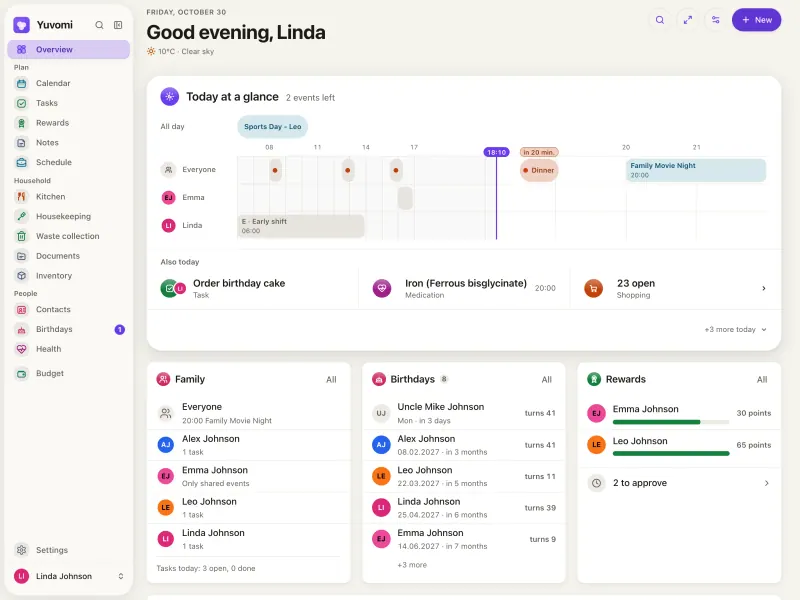
Yuvomi is a free, open-source Skylight Calendar alternative: its wall mode turns a tablet you already own into a kitchen display of the family calendar, chores, meals and the weather. Skylight sells a dedicated touchscreen and keeps meal planning, rewards and its photo screensaver for the paid Skylight Plus plan; Yuvomi includes them at no cost, though you supply and mount the tablet yourself.

Free app Code: Open source Import from Skylight Calendar: No Easy

Why look for an alternative to Skylight Calendar?

Skylight Calendar is a touchscreen that hangs in the kitchen and shows the family's calendar, chores and lists. The screen is bought once, and an optional Skylight Plus subscription adds meal planning, rewards, a photo screensaver and more.

Families look for an alternative when they already own a tablet and don't want to buy a dedicated screen, or don't want a yearly subscription for features such as meal planning and rewards. A self-hosted Yuvomi turns a tablet you already have into the kitchen display, with the same calendar, chores and meals on everyone's phone, and keeps the family's plans on your own server.

How Yuvomi compares

A self-hosted family planner for calendar, chores, meals and money.

Its wall mode turns any tablet into a kitchen display with today's plan, chores, who is up next, the weather, kitchen timers and an optional photo screensaver from Immich, and meal planning and chore rewards are included at no cost. The same family calendar, lists and budget work on everyone's phone. It is software, not a device: you supply and mount the tablet, and there is no Skylight importer.
Easy Open source

Moving from Skylight Calendar

Yuvomi has no Skylight importer, but both work from the calendars you already keep. Create the admin account at your Yuvomi web address, invite the family, and connect your Google, iCloud or Nextcloud calendars, which sync both ways. Re-enter your chores and their reward points, and plan the week's meals so the shopping list fills itself. Then open Yuvomi on a tablet, sign it in with its own account and switch on wall mode; connect Immich if you want family photos as the screensaver.

Questions

What is the best open-source alternative to Skylight Calendar?

Yuvomi is the free, open-source alternative to Skylight Calendar for a family calendar on the kitchen wall in the catalogue today. Its wall mode turns any tablet into a kitchen display with today's plan, chores, who is up next, the weather, kitchen timers and an optional photo screensaver from Immich, and meal planning and chore rewards are included at no cost. The same family calendar, lists and budget work on everyone's phone. It is software, not a device: you supply and mount the tablet, and there is no Skylight importer.

Can I use an old tablet instead of a Skylight Calendar?

Yes. Yuvomi's wall mode runs in the browser of any recent tablet, and the tablet gets its own account, so it shows the family display without anyone's personal sign-in.

Does Yuvomi charge for meal planning or rewards like Skylight Plus?

No. Meal planning, chore rewards and the photo screensaver are part of the free app; Yuvomi has no paid tier.

Can Yuvomi show my Google or iCloud calendar like Skylight Calendar?

Yes. Yuvomi syncs both ways with Google, iCloud and Nextcloud calendars, subscribes to calendar links and imports calendar files. It has no Skylight importer, so chores, lists and meals are set up again in Yuvomi.

Is Yuvomi really free compared with Skylight Calendar?

Yes, Yuvomi is free. To run them you need Cloudgate and a server. Use hosted Cloudgate, which can also provide the server, or install Cloudgate on a server of your own for free. Cloudgate's plans and prices are at cloudgate.octabyte.io/pricing. One server can run several apps.

Do I need a developer to replace Skylight Calendar?

No. Cloudgate installs Yuvomi on your server and gives it a secure web address, and you use it in your browser instead of Skylight Calendar.