J

Open-source alternative to Jamf Pro

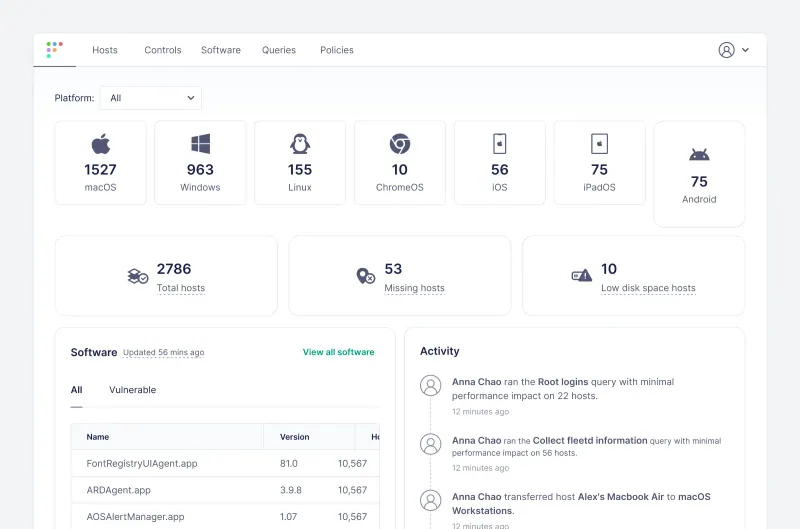
Fleet is a free, open-source Jamf Pro alternative that shows every Mac, as well as every Windows and Linux computer, in one console: hardware, installed software, known vulnerabilities and whether each device passes your security checks. Jamf charges per device each month and covers Apple devices only; Fleet’s free edition has no per-device price, though app deployment, enforced disk encryption and OS updates, and lock and wipe are in its paid Premium tier.

Free app Code: Open source Import from Jamf Pro: No Some setup

Why look for an alternative to Jamf Pro?

Jamf Pro is device management for Apple: IT teams use it to set up, configure, update and secure Macs, iPhones, iPads and Apple TVs, with zero-touch setup, app deployment and a self-service app catalogue.

Teams look for an alternative because Jamf is priced per device and covers only Apple. When we checked Jamf's pricing page in November 2026, Jamf for Mac, which includes Jamf Pro, cost $12.50 per Mac a month, billed yearly, with a 25-device minimum, and a company with Windows or Linux computers still needs a second tool for those. Fleet's free, open-source edition shows and checks every Mac, PC and Linux computer in one console on your own server.

How Fleet compares

Manage and secure every Mac, PC and Linux computer you own.

Shows every Mac's hardware, software and known vulnerabilities, checks each one against your security policies, runs scripts and pushes configuration profiles, and does the same for Windows and Linux computers in the same console. Its free edition does not deploy apps, enforce FileVault or OS updates, lock or wipe devices, or set up new Macs with zero-touch enrolment; those are in Fleet Premium, which is paid per device. Writing your own checks uses SQL.

What you gain
  • Macs, Windows PCs and Linux computers in one console instead of separate tools
  • No fee per device for the free edition, and your device data stays on your server
  • Open source code, so staff can see exactly what the agent collects
What is different
  • Enforcing disk encryption and OS updates, installing apps, lock and wipe, and zero-touch setup need paid Fleet Premium
  • The free edition has no device groups, user roles or two-step sign-in; everyone shares one set of devices
  • Adding a computer means installing Fleet's agent, built once with its command-line tool
Some setup Open source

Moving from Jamf Pro

Nothing is imported automatically: each Mac leaves Jamf and joins Fleet. Start by adding the Mac to Fleet's agent alongside Jamf, using an installer built with Fleet's command-line tool, so you can compare what both show. Before you turn on Fleet's MDM for Macs, create a free Apple Push certificate with your Apple Account and recreate the configuration profiles you need. Fleet's migration guide then explains how to unenrol a Mac from Jamf and enrol it in Fleet; move a few test Macs first, and keep Jamf until the last one has moved.

Questions

What is the best open-source alternative to Jamf Pro?

Fleet is the free, open-source alternative to Jamf Pro for managing company Macs in the catalogue today. Shows every Mac's hardware, software and known vulnerabilities, checks each one against your security policies, runs scripts and pushes configuration profiles, and does the same for Windows and Linux computers in the same console. Its free edition does not deploy apps, enforce FileVault or OS updates, lock or wipe devices, or set up new Macs with zero-touch enrolment; those are in Fleet Premium, which is paid per device. Writing your own checks uses SQL.

Can Fleet manage Macs without Jamf?

Yes. Fleet is a Mac MDM: it enrols Macs, pushes settings, runs scripts and shows their software and vulnerabilities. App deployment, enforced FileVault and OS updates, and lock and wipe need the paid Premium tier.

Does Fleet also manage Windows and Linux computers?

Yes. The same console covers macOS, Windows and Linux, and enrols iPhones, iPads and personal Android phones. Jamf Pro manages Apple devices only.

How do I move my Macs from Jamf Pro to Fleet?

One Mac at a time, nothing is imported automatically. Install Fleet's agent alongside Jamf Pro to compare what both show, create a free Apple Push certificate and recreate your configuration profiles in Fleet, then follow Fleet's migration guide to unenrol each Mac from Jamf Pro and enrol it in Fleet.

Is Fleet really free compared with Jamf Pro?

Yes, Fleet is free. To run them you need Cloudgate and a server. Use hosted Cloudgate, which can also provide the server, or install Cloudgate on a server of your own for free. Cloudgate's plans and prices are at cloudgate.octabyte.io/pricing. One server can run several apps.

Do I need a developer to replace Jamf Pro?

No. Cloudgate installs Fleet on your server and gives it a secure web address, and you use it in your browser instead of Jamf Pro.