
Umami
Lightweight, cookie-free website stats for one site or fifty.
No server needed to start: Cloudgate can provide one. What happens when you click Deploy
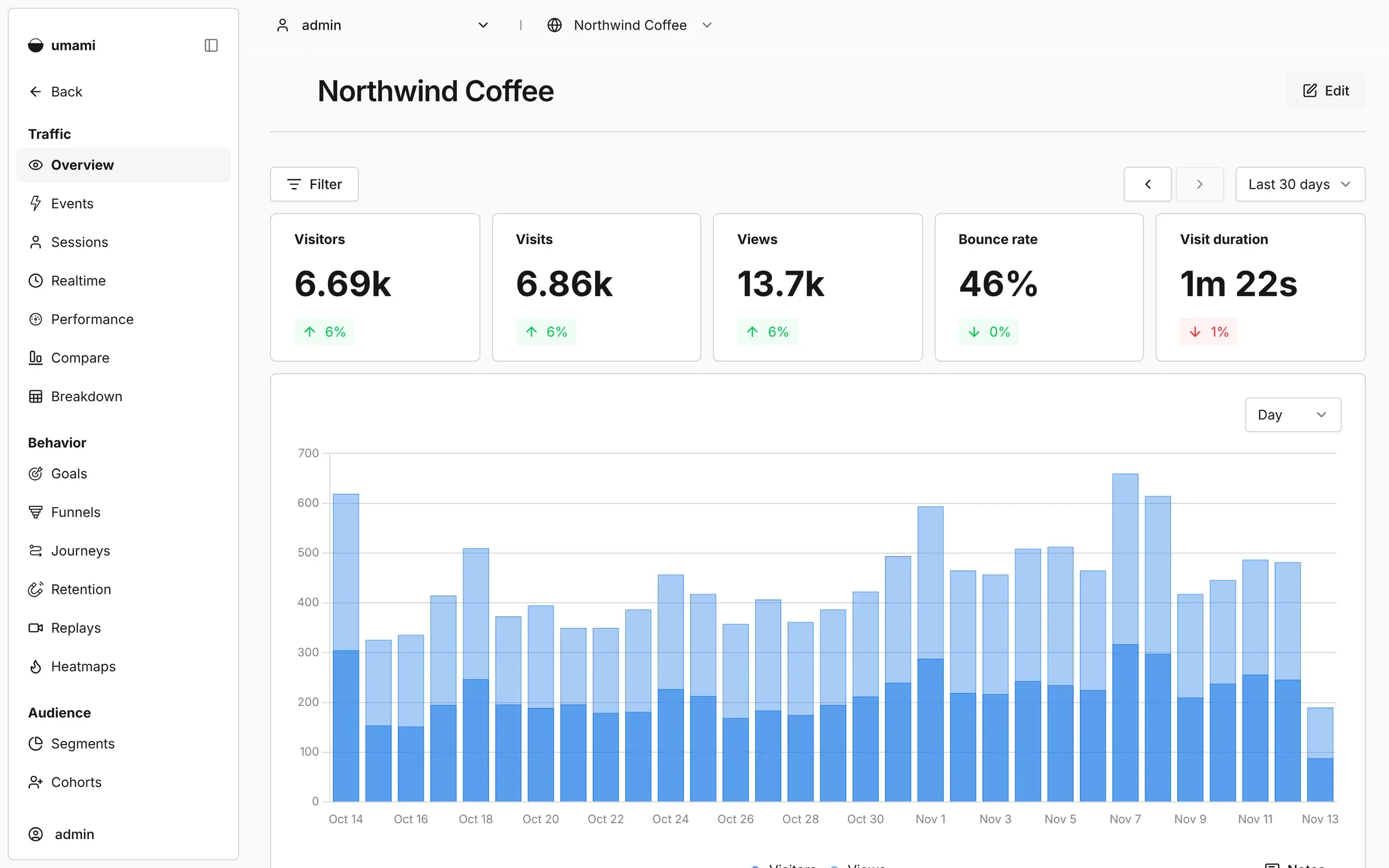
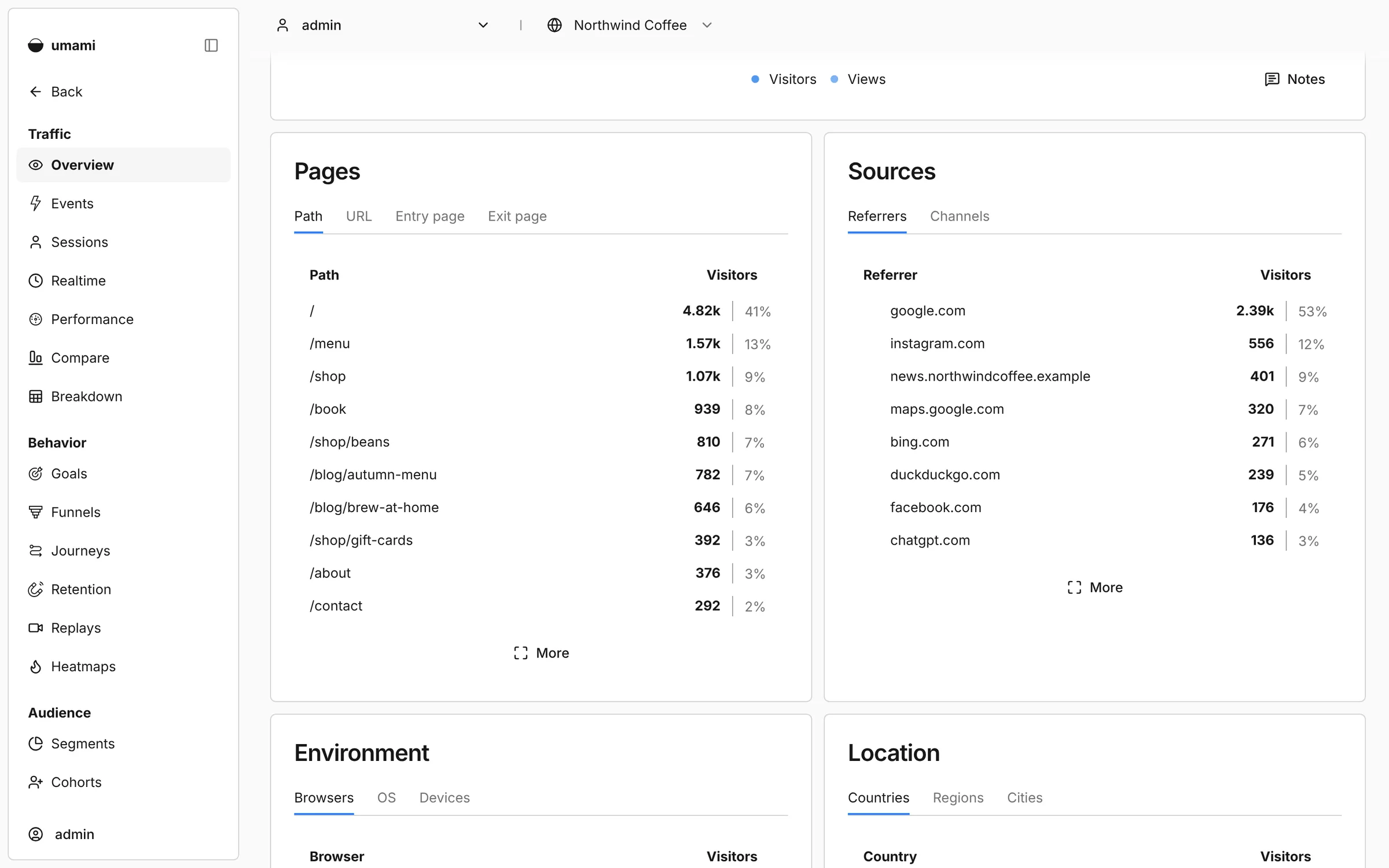
What is Umami?
Self-hosted Umami: open-source, cookie-free website analytics and a light Google Analytics alternative. Track many sites from one simple dashboard.
Umami is an open-source, privacy-focused web analytics tool that counts the people who visit your website and shows where they came from, which pages they read and what devices they use. Everything fits on one clear dashboard, and one Umami can track as many websites as you like.
It uses no cookies and does not follow visitors across other websites, so most sites can use it without a cookie banner. Agencies like it because they can track every client's website in one place and send each client a read-only link to their own stats. A freelance designer, for example, can check in under a minute which blog posts brought in enquiries this month, and share that page with the client instead of a monthly PDF.
Umami works with any website: you paste one line into the site's header, the same way you would add Google Analytics, including on WordPress, Shopify, Wix, Squarespace and Ghost. There is no phone app, but the dashboard works in a phone's browser.
Cloudgate installs Umami on a server Cloudgate provides or one you connect, together with the database it needs, and gives it a secure web address. Sign in with the default admin account, change its password straight away, then add your first website and copy its tracking line. Your statistics stay on your server.
What you can do with Umami
- See your visitors at a glance Visitors, pages, referrers, countries, browsers and devices on one clear dashboard.
- Track every website in one place Add as many websites as you like and switch between them in one click.
- Count what matters Track button clicks, sign-ups and other events, and set goals for them.
- Follow the path to a sale Funnel, journey and retention reports show where visitors drop off and who comes back.
- Share a public link Give each client a read-only view of their own website's stats, with no login needed.
- Work as a team Invite colleagues and choose which websites each person or team can see.
- Sign in safely Turn on two-step sign-in with an authenticator app for every account.
Replaces Google Analytics
Umami does the same job as Google Analytics. Here is what changes when you switch.
- No cookies, so most websites need no cookie banner for it
- Your visitors' data stays on your server
- One account and one dashboard for all your websites
- A tracking script small enough not to slow your pages down
- Fewer reports than Google Analytics
- No link to Google Ads
- Your old Google Analytics data does not move across
What happens when you click Deploy?
You do not need a server or any technical knowledge. Four steps, and Umami is running at its own web address.
- Step 1 Click Deploy and create your account
Deploy takes you to Cloudgate. Create an account, or log in if you have one. Umami itself is free.
- Step 2 Choose a server
No server? Get one from Cloudgate: pick a size and a country, and Cloudgate gets it ready. Already have one? Connect it instead.
- Step 3 Cloudgate sets up Umami
It prepares the server, makes the passwords the app needs and starts it. There is nothing to install and nothing to write down.
- Step 4 Open your app and sign in
Your app gets a free web address to start, without https. Add your own domain, like app.yourshop.com, and Cloudgate secures it with https for you.
New to Cloudgate? See what Cloudgate is
Run Cloudgate yourself? Deploy from your own console
In your Cloudgate console, open Templates and choose Umami.
Questions
Is Umami free?
Yes, Umami is free and open source under the MIT licence. You pay only for hosting, with no limit on websites or visitors.
Is Umami a good alternative to Google Analytics?
Yes, if you want clear visitor numbers without cookies or a cookie banner. Umami has fewer reports than Google Analytics and no Google Ads link, but it covers visitors, sources, events, goals and funnels.
Does Umami need a cookie banner?
For most websites, no, because Umami sets no cookies and does not follow visitors across other sites. Other tools on your site may still need one.
How do I sign in to Umami the first time?
Umami starts with one admin account, username admin and password umami. Sign in and change that password straight away, before you share the address with anyone.
Can I track more than one website with Umami?
Yes, you can add as many websites as you like to one Umami and switch between them from the dashboard. Each one gets its own tracking line and, if you want, its own public share link.
Can I import my Google Analytics data into Umami?
No, the self-hosted Umami does not import Google Analytics history. Keep your old Google Analytics reports for comparison and start fresh in Umami.
What server size do I need for Umami?
A small server is enough for most small business websites, because Umami is one light app plus a PostgreSQL database. Cloudgate sets up both, and you can move to a bigger server later if your traffic grows.
Do I need technical skills?
No. Click Deploy, create your Cloudgate account and choose a server, and Cloudgate sets up Umami and gives it a web address. You use it in your browser like any other online tool.
Do I need my own server?
No. When you deploy Umami, hosted Cloudgate can provide a server. If you already rent one, you can connect it instead.
Related apps

Full website analytics, with your visitors' data kept private.

Simple website visitor stats, with no cookie banner needed.

Turn your business data into charts your whole team can use.