
Matomo
Full website analytics, with your visitors' data kept private.
No server needed to start: Cloudgate can provide one. What happens when you click Deploy
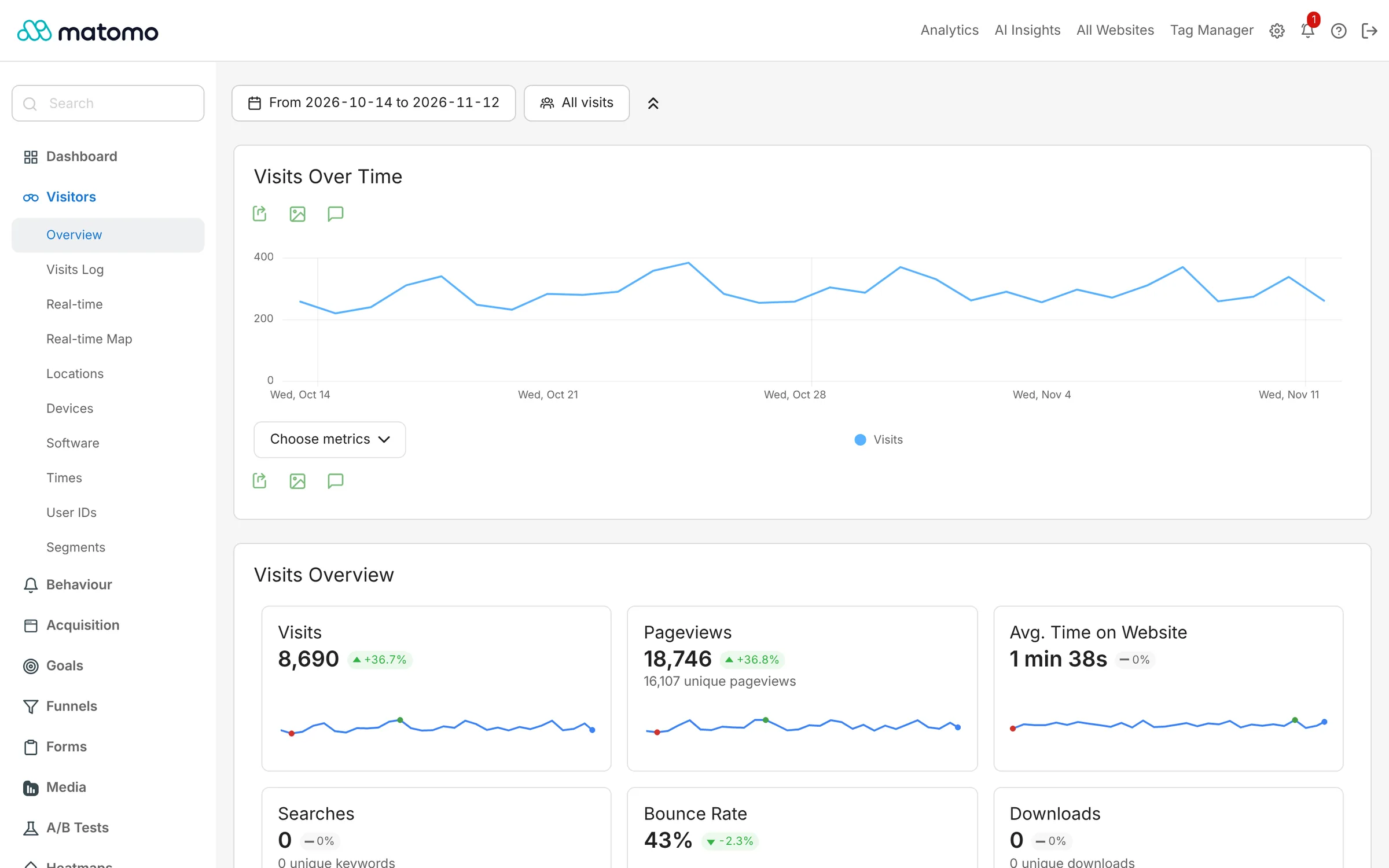
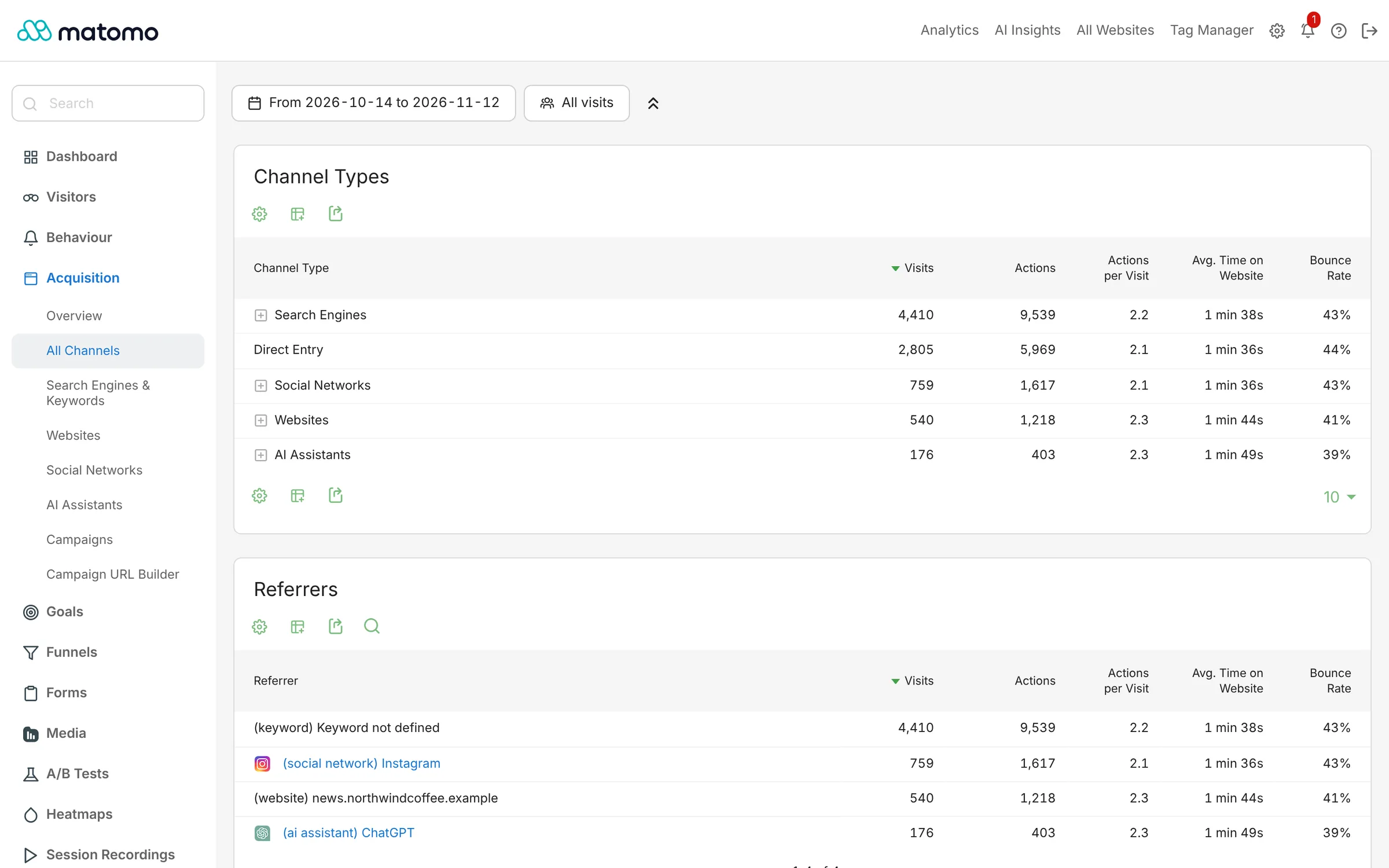
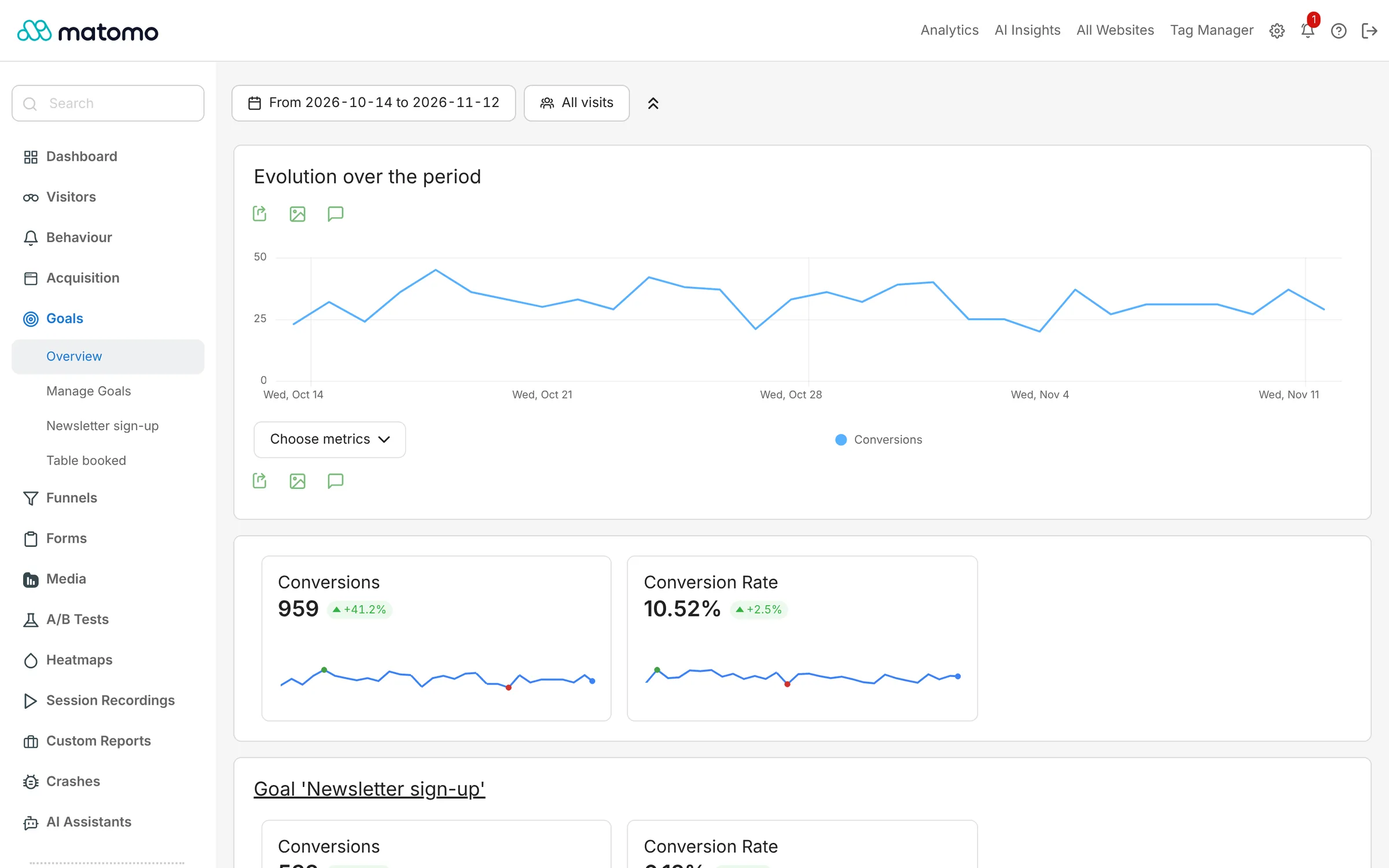
What is Matomo?
Self-hosted Matomo: the open-source Google Analytics alternative with goals, funnels and e-commerce reports, and your visitors' data kept on your server.
Matomo is an open-source web analytics platform, formerly called Piwik, that gives you reports much like Google Analytics while keeping your visitors' data on your own server. It shows who visits your website, where they came from, which pages they read and what they do before they buy or sign up.
You can set goals, follow visitors through a checkout funnel, track online shop sales and compare campaigns, and every visit is counted, with no sampling. It can also track without cookies and anonymise IP addresses, which helps you follow privacy rules such as GDPR. A marketing team, for example, can see which of last month's newsletters and ads brought in paying customers, not just clicks, and how much each one earned.
Matomo has plugins for WordPress, WooCommerce, Drupal, Joomla and many other platforms, and a tracking code for any other website. The free Matomo Mobile app for iPhone and Android shows your reports on the go, and a free plugin imports your history from Google Analytics.
Cloudgate installs Matomo on a server Cloudgate provides or one you connect, together with its database, and gives it a secure web address. The first person to open it runs a short setup wizard, with the database already filled in, then creates the admin account and adds the first website. Matomo has more to learn than simpler tools, so plan an hour to set up goals and reports the way you want them.
What you can do with Matomo
- See detailed reports Visitors, pages, traffic sources, campaigns, devices and locations, with no data sampling.
- Track goals and sales Count sign-ups and purchases, see revenue per product, and find what led to each sale.
- Follow funnels See the step where visitors drop off on the way to checkout or a contact form.
- Import from Google Analytics Bring your past Google Analytics reports across with the free import plugin.
- Respect privacy rules Built-in GDPR tools, IP anonymising and an option to track without cookies.
- Check stats on your phone The free Matomo Mobile app for iPhone and Android shows your reports on the go.
- Add heatmaps if you need them Heatmaps and session recordings are available as paid add-ons from Matomo's marketplace.
Replaces Google Analytics
Matomo does the same job as Google Analytics. Here is what changes when you switch.
- Your visitors' data stays on your server and is not shared with an ad company
- No sampling, so every visit is counted
- Reports that feel familiar to Google Analytics users
- Your Google Analytics history can come with you
- More settings to learn than simpler tools like Plausible or Umami
- Heatmaps, session recordings and some other features are paid add-ons
- No link to Google Ads
- Busy websites need a bigger server and a scheduled report job
What happens when you click Deploy?
You do not need a server or any technical knowledge. Four steps, and Matomo is running at its own web address.
- Step 1 Click Deploy and create your account
Deploy takes you to Cloudgate. Create an account, or log in if you have one. Matomo itself is free.
- Step 2 Choose a server
No server? Get one from Cloudgate: pick a size and a country, and Cloudgate gets it ready. Already have one? Connect it instead.
- Step 3 Cloudgate sets up Matomo
It prepares the server, makes the passwords the app needs and starts it. There is nothing to install and nothing to write down.
- Step 4 Open your app and sign in
Your app gets a free web address to start, without https. Add your own domain, like app.yourshop.com, and Cloudgate secures it with https for you.
New to Cloudgate? See what Cloudgate is
Run Cloudgate yourself? Deploy from your own console
In your Cloudgate console, open Templates and choose Matomo.
Questions
Is Matomo free?
Yes, Matomo On-Premise is free and open source under the GPL licence. You pay only for hosting, plus any paid add-ons you choose, such as heatmaps.
Is Matomo a good alternative to Google Analytics?
Yes, Matomo is the closest open-source match to Google Analytics, with goals, funnels, campaigns and e-commerce reports. It has more to learn than simpler tools such as Plausible, and no Google Ads link.
Can I import my data from Google Analytics into Matomo?
Yes, the free Google Analytics Importer plugin copies your past Universal Analytics and GA4 reports into Matomo. It needs a Google Cloud connection to read your data, which takes a few setup steps.
Does Matomo work without cookies?
Yes, Matomo can track visits without cookies with one setting, which helps many websites skip the cookie banner. Check your country's rules, since requirements differ.
How do I self-host Matomo?
With Cloudgate you pick Matomo, choose a server and press Set up; Cloudgate installs it with its database and a secure web address. The first person to open that address runs Matomo's setup wizard, where the database details are already filled in.
What server size do I need for Matomo?
Matomo recommends 2 CPUs and 2 GB of memory for websites with up to about 100,000 page views a month, so Cloudgate starts it on a 2 GB server. Busier websites need a larger server.
Is my visitors' data private with Matomo?
Yes, every report is stored in your own database on your own server, and Matomo shares nothing with third parties. You own the data and can delete or export it at any time.
Do I need technical skills?
No. Click Deploy, create your Cloudgate account and choose a server, and Cloudgate sets up Matomo and gives it a web address. You use it in your browser like any other online tool.
Do I need my own server?
No. When you deploy Matomo, hosted Cloudgate can provide a server. If you already rent one, you can connect it instead.
Related apps

Simple website visitor stats, with no cookie banner needed.

Lightweight, cookie-free website stats for one site or fifty.

Turn your business data into charts your whole team can use.