
Helfertool
Volunteers sign up for event shifts online; you see who works when.
No server needed to start: Cloudgate can provide one. What happens when you click Deploy
What is Helfertool?
Self-hosted Helfertool lets volunteers sign up for your event's shifts online, with badges, emails and no ads, replacing SignUpGenius.
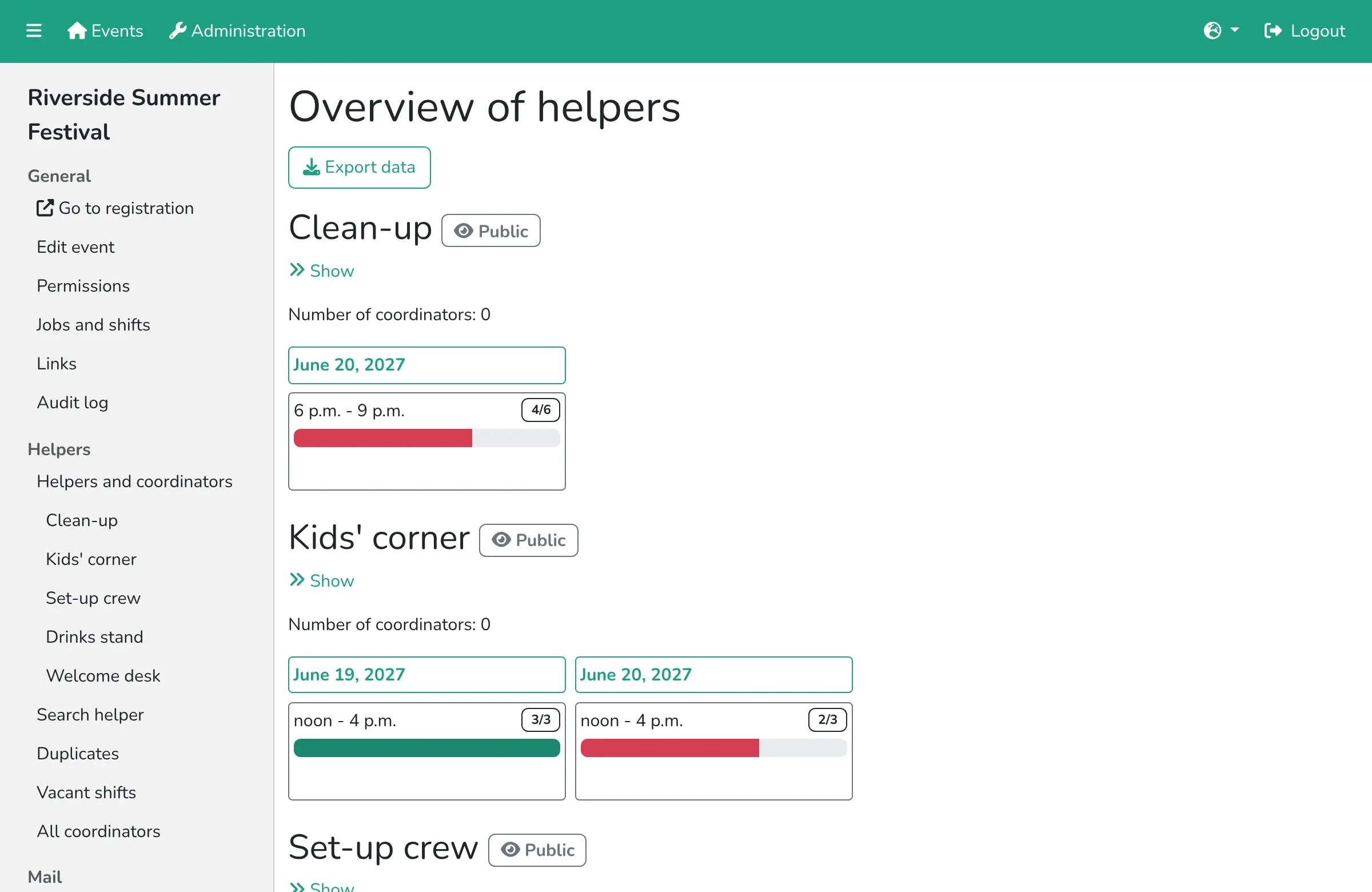
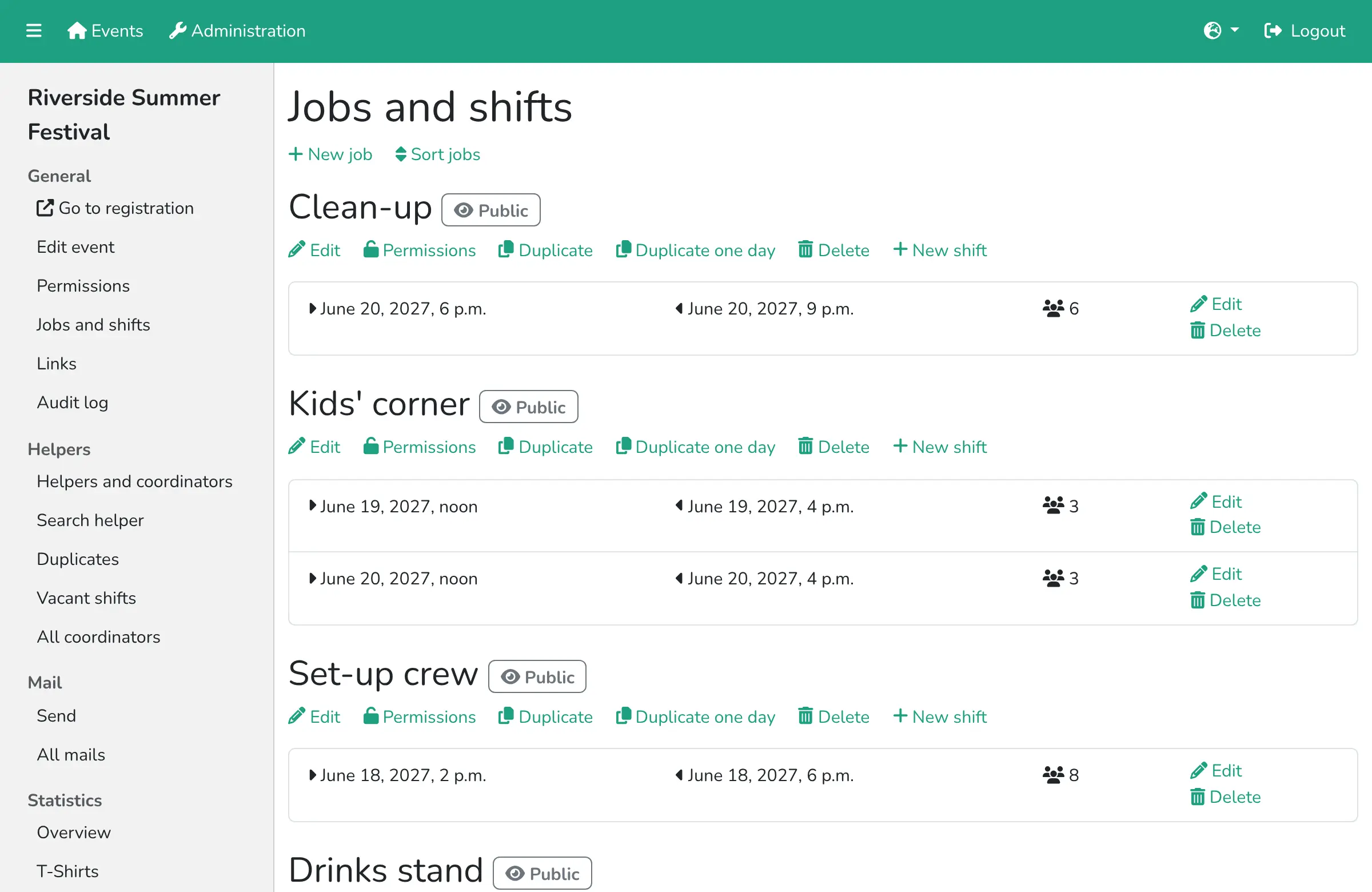
Helfertool is free, open-source, self-hosted volunteer shift planning for events, an alternative to SignUpGenius: you set up jobs and shifts, volunteers sign up online, and you see who works when. Each shift has a start, an end and the number of helpers it needs, so you can see straight away where you are short.
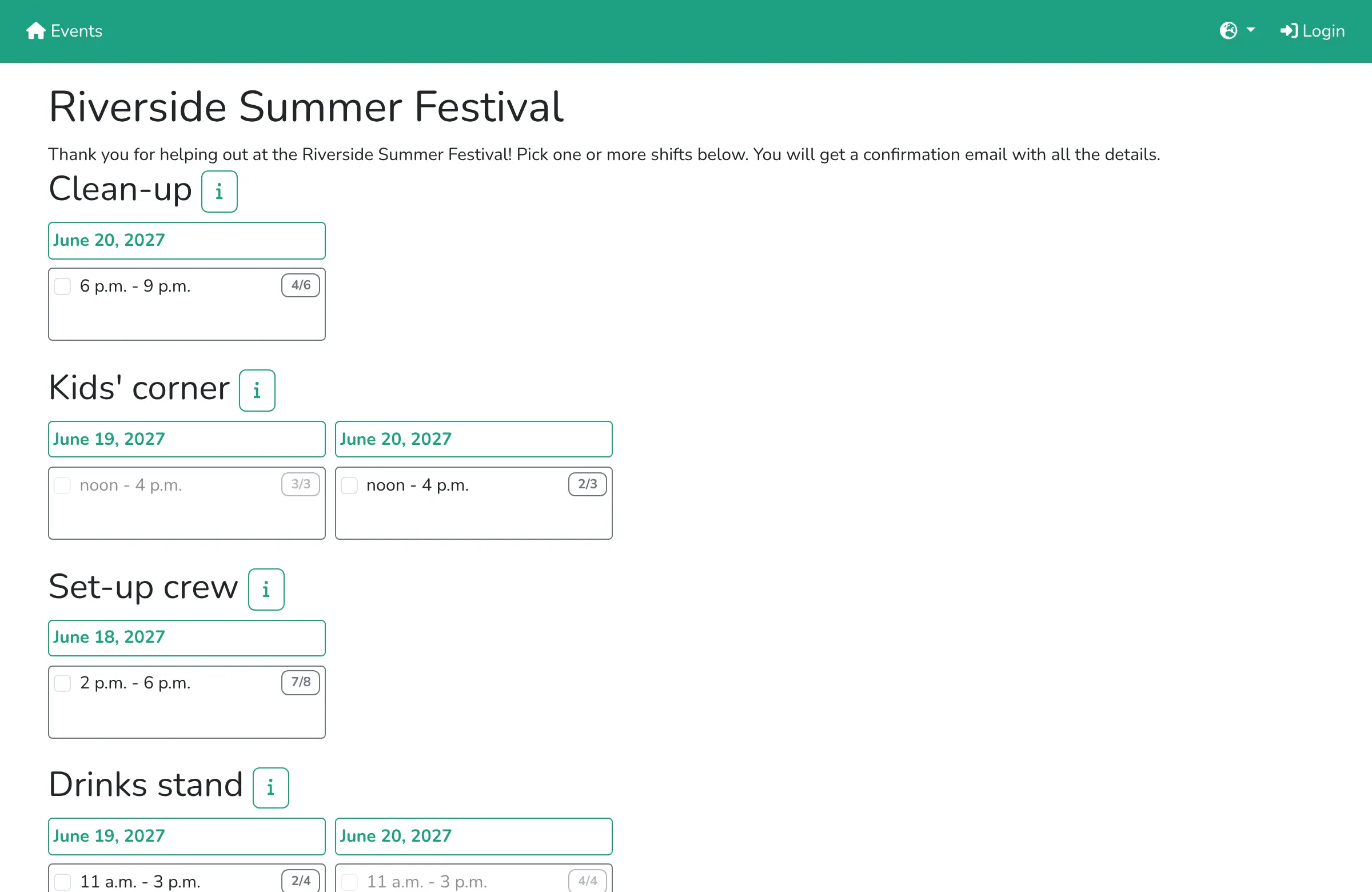
Volunteers need no account: they open your event's page, tick their shifts and get a confirmation email. Team leads can look after the helpers of their own job, and you can email everyone, print badges, and note who got their T-shirt or thank-you gift. A town festival, for example, could fill its drinks stand, welcome desk and clean-up shifts from one link in its newsletter, then duplicate the event next year with all its shifts.
Helfertool is made by volunteers in Germany. It works in English and German, in any browser on a phone or computer, and exports helper lists to Excel or PDF.
Cloudgate installs Helfertool on a server Cloudgate provides or one you connect, with its database, and gives it a secure web address. Sign in as admin with the password Cloudgate created, then create your first event.
What you can do with Helfertool
- Plan jobs and shifts Create jobs such as bar, entrance or set-up, each with shifts that have a start, an end and a number of helpers.
- Let volunteers sign up online Helpers pick their shifts on your event's sign-up page, with no account, and get a confirmation email.
- Keep some shifts private Hide internal jobs from the public page and send a private sign-up link to the people you choose.
- Share the work with coordinators Give each team lead access to their own job's helpers, and let the front desk look up helpers without changing their shifts.
- Email your helpers Write to the helpers of one job or the whole event, and keep a newsletter list for next year.
- Print badges and track gifts Make badges for access control, note who got their T-shirt or thank-you gift, and lend out equipment with barcodes.
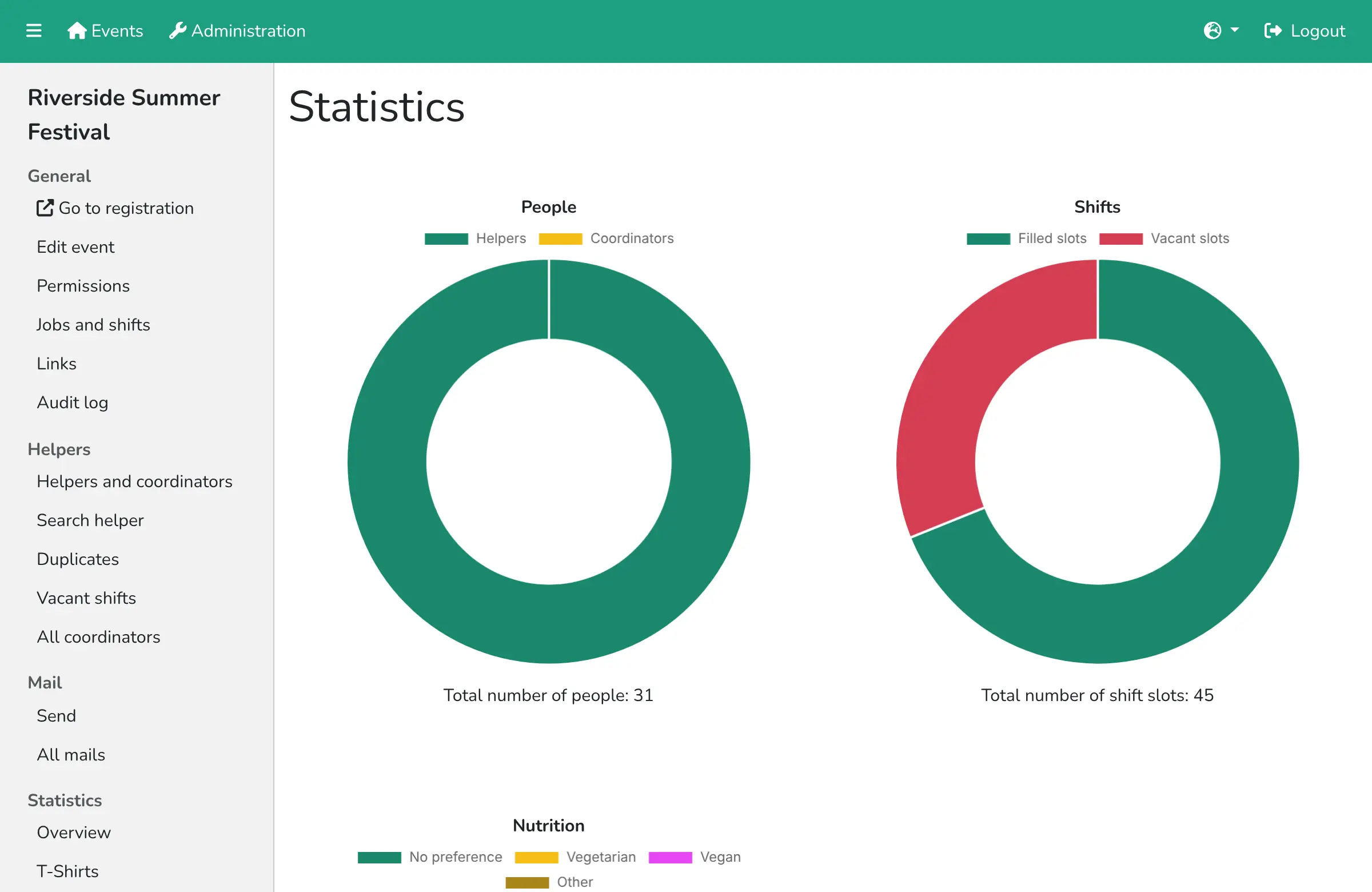
- See where you're short Statistics show filled and empty shifts, T-shirt sizes and food preferences, and lists export to Excel or PDF.
Replaces SignUpGenius
Helfertool does the same job as SignUpGenius. Here is what changes when you switch.
- No fee, no ads and no limit on events, shifts or helpers
- Your volunteers' names, emails and phone numbers stay on your own server
- Badges, T-shirt and gift tracking and equipment lending in the same tool
- Reuse last year's event by duplicating it with all its jobs and shifts
- Made for events with shifts, not for general sign-ups such as potlucks or appointments
- No volunteer hours tracking across the year and no background checks
- A plain interface in English and German only, with no phone app
- Needs an email server to send confirmations, and some settings are in a configuration file
What happens when you click Deploy?
You do not need a server or any technical knowledge. Four steps, and Helfertool is running at its own web address.
- Step 1 Click Deploy and create your account
Deploy takes you to Cloudgate. Create an account, or log in if you have one. Helfertool itself is free.
- Step 2 Choose a server
No server? Get one from Cloudgate: pick a size and a country, and Cloudgate gets it ready. Already have one? Connect it instead.
- Step 3 Cloudgate sets up Helfertool
It prepares the server, makes the passwords the app needs and starts it. There is nothing to install and nothing to write down.
- Step 4 Open your app and sign in
Your app gets a free web address to start, without https. Add your own domain, like app.yourshop.com, and Cloudgate secures it with https for you.
New to Cloudgate? See what Cloudgate is
Run Cloudgate yourself? Deploy from your own console
In your Cloudgate console, open Templates and choose Helfertool.
Questions
Is Helfertool free?
Yes, Helfertool is free and open source under the AGPL-3.0 licence, with no ads and no limit on events or helpers. You pay only for your server and, if you use one, your email sending service.
Is Helfertool a good alternative to SignUpGenius?
Yes, if you need volunteers to sign up for shifts at an event. Helfertool has shifts with a set number of helpers, private sign-up links, coordinators, badges and gift tracking, with no ads; SignUpGenius is better for general sign-up sheets such as potlucks or parent-teacher slots.
Do volunteers need a Helfertool account to sign up?
No, Helfertool volunteers fill in a short form on your event's sign-up page and confirm by email. Only organisers and coordinators have accounts.
How do I sign in to Helfertool the first time?
Go to the app's address, choose Login and sign in with the username admin and the password Cloudgate created, shown on the app's variables page. Then create your first event and add your jobs and shifts. The footer's Imprint and Privacy links point to the Helfertool project's own pages until you set your organisation's pages in its configuration file.
Can Helfertool send confirmation emails?
Yes, Helfertool emails each volunteer a confirmation with their shifts, once you give it the details of an email sending service at setup. Without one, sign-ups still work but no emails go out.
Which languages does Helfertool support?
Helfertool is in English and German, and shows each visitor the language of their browser.
Can Helfertool import my sign-ups from SignUpGenius?
No, Helfertool has no SignUpGenius importer. Download your current sign-up lists from SignUpGenius to keep them, set up your next event's jobs and shifts in Helfertool, and share its sign-up link where you posted the old one.
What server size do I need for Helfertool?
A small server is enough, because Helfertool and its database use less than 1 GB of memory. Cloudgate sets up everything it needs.
Do I need technical skills to run Helfertool?
No. Click Deploy, create your Cloudgate account and choose a server, and Cloudgate sets up Helfertool and gives it a web address. You use it in your browser like any other online tool.
Do I need my own server for Helfertool?
No. When you deploy Helfertool, hosted Cloudgate can provide a server. If you already rent one, you can connect it instead.
Related apps

Free membership management for clubs: members, roles, events, email.

Free church management software for members, attendance and giving.

Run consultations, proposals and participatory budgets online.

Free membership software for associations, with dues and reminders.