
Baserow
Open-source Airtable alternative, as easy to use as a spreadsheet.
No server needed to start: Cloudgate can provide one. What happens when you click Deploy
What is Baserow?
Self-hosted Baserow: an open-source Airtable alternative. Build no-code databases that work like spreadsheets for customers, projects and stock.
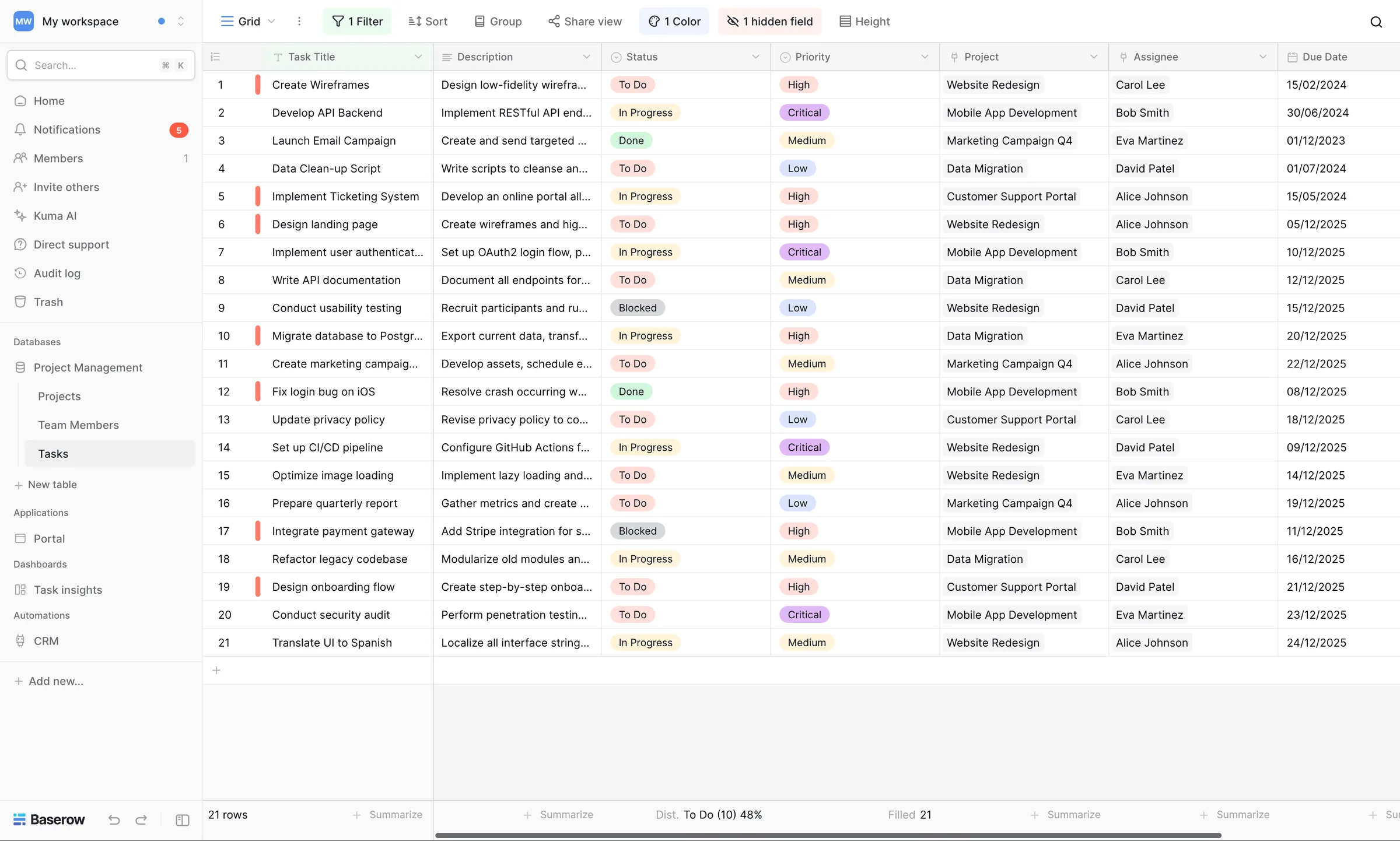
Baserow is an open-source no-code database that looks and feels like a spreadsheet but works like a database. Each table holds one kind of thing, such as customers, orders or equipment, and tables can be linked, so you can see every order a customer has placed straight from their row.
You can filter, sort and group your data, look at it as a grid or as a gallery of cards, and share forms so people can add rows without seeing the rest. A small events company, for example, could keep its venues, suppliers and bookings in linked tables and collect new enquiries through a form on its website.
Baserow imports Airtable bases from a share link, as well as CSV, Excel, JSON and XML files, and has ready-made templates for uses such as a CRM, a content calendar or a stock list. Its API and webhooks connect it to other apps, directly or through tools like Zapier, Make and n8n. There is no phone app, but it works in a phone's web browser. Board and calendar views and row comments are part of Baserow's paid plans.
Cloudgate installs Baserow on a server Cloudgate provides or one you connect and gives it a secure web address. The first person to create an account becomes the admin and invites the rest of the team.
What you can do with Baserow
- Work like a spreadsheet Rows and columns, with field types for dates, files, links, choices and formulas.
- Link your tables Connect customers to orders or products to suppliers, and see related rows in one click.
- See it your way Switch between grid and gallery views, with filters, sorting and grouping you can save.
- Collect data with forms Share a form, and every answer becomes a new row in your table.
- Work together live Colleagues edit the same tables at the same time and see each other's changes straight away.
- Start from a template Pick a ready-made database for a CRM, project tracker, content calendar or stock list.
- Connect other apps Use the built-in API and webhooks, or tools like Zapier, Make and n8n, to move data in and out.
Replaces Airtable
Baserow does the same job as Airtable. Here is what changes when you switch.
- No price per editor
- No row or storage caps from Baserow; your server's size is the limit
- Your data stays on your own server
- Board, calendar and timeline views and row comments are in Baserow's paid plans
- Fewer ready-made integrations and extensions than Airtable
- There is no phone app; it works in the phone's web browser
- Very large tables need a bigger server
What happens when you click Deploy?
You do not need a server or any technical knowledge. Four steps, and Baserow is running at its own web address.
- Step 1 Click Deploy and create your account
Deploy takes you to Cloudgate. Create an account, or log in if you have one. Baserow itself is free.
- Step 2 Choose a server
No server? Get one from Cloudgate: pick a size and a country, and Cloudgate gets it ready. Already have one? Connect it instead.
- Step 3 Cloudgate sets up Baserow
It prepares the server, makes the passwords the app needs and starts it. There is nothing to install and nothing to write down.
- Step 4 Open your app and sign in
Your app gets a free web address to start, without https. Add your own domain, like app.yourshop.com, and Cloudgate secures it with https for you.
New to Cloudgate? See what Cloudgate is
Run Cloudgate yourself? Deploy from your own console
In your Cloudgate console, open Templates and choose Baserow.
Questions
Is Baserow free?
Yes. Baserow's self-hosted edition is free and open source under the MIT licence, and you pay only for hosting. Some extras, such as board and calendar views and row comments, need a paid Premium licence.
Is Baserow a good alternative to Airtable?
Yes, for teams that want Airtable-style linked tables, forms and an API without a price per editor. It has fewer integrations and extensions than Airtable, and some views Airtable includes are paid add-ons in Baserow.
Can I import my data from Airtable?
Yes. Baserow can import a whole Airtable base from its share link, including tables, fields and rows. It also imports CSV, Excel, JSON and XML files.
How do I self-host Baserow?
The simplest way is to install it with Cloudgate on a server Cloudgate provides or one you connect. Cloudgate sets up Baserow with a secure web address, and the first person to create an account becomes the admin.
Is my data private with Baserow?
Yes. Your tables, files and settings are stored on your own server, not with Baserow, and you decide who gets an account.
What server size does Baserow need?
Cloudgate installs Baserow on a server with at least 2 GB of memory, which suits a small team. Large tables, many users or heavy file use need more memory.
Do I need technical skills?
No. Click Deploy, create your Cloudgate account and choose a server, and Cloudgate sets up Baserow and gives it a web address. You use it in your browser like any other online tool.
Do I need my own server?
No. When you deploy Baserow, hosted Cloudgate can provide a server. If you already rent one, you can connect it instead.


