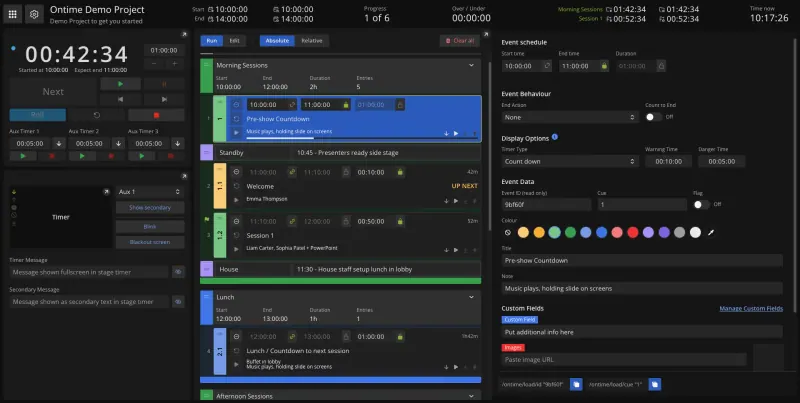
Open-source alternative to Stagetimer

Ontime is a free, open-source Stagetimer alternative for live events: presenter countdowns, messages to the stage and a full run of show with groups, delays and cuesheets, shown in any browser from your own server. Stagetimer’s free plan allows three timers and three connections, with more on paid licences; self-hosted Ontime has every feature and no limits, though everyone shares one password and a single-presenter countdown can be quicker to set up in Stagetimer.

Free app Code: Open source Import from Stagetimer: No Easy

Why look for an alternative to Stagetimer?

Stagetimer is a hosted, remote-controlled countdown timer for live events: you run timers from one device while presenters see a fullscreen countdown on another, with messages to the stage and a rundown of timers.

Event teams look for an alternative because Stagetimer's free plan allows three timers and three connections, and more timers, connections and its API need a paid licence. Ontime gives presenters the same countdowns and messages and adds a full run of show, delays and cuesheets for the crew, all on your own server with no limits. It shares one password across the crew rather than personal accounts.

How Ontime compares

Your event rundown and stage timer, self-hosted for the whole crew.

Shows presenters a countdown on any screen and lets you send them messages, blink or black out the timer, and it adds what Stagetimer keeps simpler: a full run of show with groups, delays that carry through the day, cuesheets for each department, extra timers and a studio clock. Every view opens in a browser, with a Bitfocus Companion module and a web API. There are no per-person accounts, only a shared password, and OSC control is not available through Cloudgate's web address.

What you gain
  • No limit on timers, screens or crew members, and no event pass to buy
  • The full rundown and the timers in one place, not only a countdown
  • Your show plans stay on your own server
What is different
  • One shared password for the whole crew, with no separate accounts or roles
  • Control over OSC is not available through the web address; use Companion or the web API
  • No script writing or teleprompter
Easy Open source

Moving from Stagetimer

Ontime has no import from Stagetimer, so rebuild your timers as items in a rundown, with a title, start time and duration for each. If you keep your run of show in Excel or Google Sheets, import it into Ontime instead, one row per item. Then open the stage timer view on the presenter screen, the backstage or cuesheet view for the crew, and save short links with URL presets so each screen opens the right view. If you control timers from a Stream Deck, install Ontime's Bitfocus Companion module.

Questions

What is the best open-source alternative to Stagetimer?

Ontime is the free, open-source alternative to Stagetimer for stage timers for live events in the catalogue today. Shows presenters a countdown on any screen and lets you send them messages, blink or black out the timer, and it adds what Stagetimer keeps simpler: a full run of show with groups, delays that carry through the day, cuesheets for each department, extra timers and a studio clock. Every view opens in a browser, with a Bitfocus Companion module and a web API. There are no per-person accounts, only a shared password, and OSC control is not available through Cloudgate's web address.

Does Ontime limit timers or connected screens like Stagetimer's free plan?

No. Self-hosted Ontime has every feature with no limit on timers, rundowns or screens; you pay only for your server.

Can presenters see the Ontime timer on a phone or TV?

Yes. Every Ontime view opens in a web browser, so presenters, crew and signage screens can use a phone, tablet, laptop or TV with no app to install.

Is Ontime harder to set up than Stagetimer?

A little, for one simple countdown, because Ontime is built around a full rundown. For a conference or show with many items, the rundown saves work, since every screen follows it.

Is Ontime really free compared with Stagetimer?

Yes, Ontime is free. To run them you need Cloudgate and a server. Use hosted Cloudgate, which can also provide the server, or install Cloudgate on a server of your own for free. Cloudgate's plans and prices are at cloudgate.octabyte.io/pricing. One server can run several apps.

Do I need a developer to replace Stagetimer?

No. Cloudgate installs Ontime on your server and gives it a secure web address, and you use it in your browser instead of Stagetimer.