
S

Open-source alternative to Scholastica

Open Journal Systems (OJS) is a free, open-source Scholastica alternative for running a peer-reviewed journal: online submissions, peer review, copyediting, production and the journal website in one app. Scholastica charges per submission and per journal; self-hosted OJS has no fee per submission, though you set it up and run it yourself and it offers no typesetting service.

Free app Code: Open source Import from Scholastica: No Some setup

Why look for an alternative to Scholastica?

Scholastica is a hosted platform for academic journals, with a peer review system, an open access publishing platform and paid typesetting services.

Editors look for an alternative because Scholastica charges per submission plus a yearly fee, and per journal for hosting, so costs grow with each journal and each manuscript. Open Journal Systems, made by the Public Knowledge Project at Simon Fraser University, runs peer review and the journal website on your own server with no fee per submission.

How Open Journal Systems compares

Run a peer-reviewed academic journal, from submission to issue.

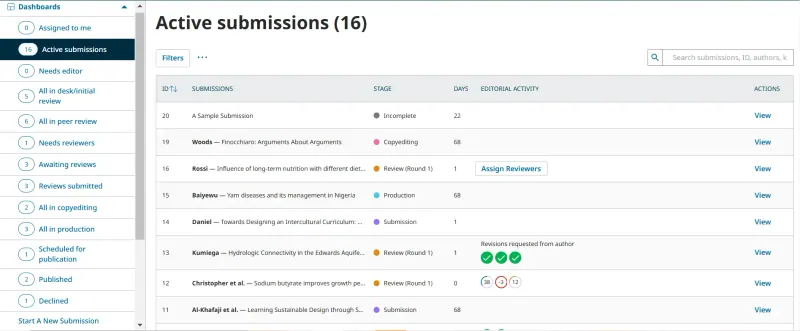
Runs the whole journal in one app, as Scholastica does: online submissions, anonymous or open peer review with reminders, copyediting, production and a journal website with issues, DOIs, ORCID and indexing exports. You install and configure it yourself, editors need some training, and it offers no typesetting or production service; DOI registration needs your own Crossref or DataCite membership.

What you gain
  • No fee per submission or per journal, however many you run
  • Peer review and the journal website in one place
  • Manuscripts, reviews and reader data stay on your own server
What is different
  • You set up the journal yourself, including its sections, review forms and emails
  • Typesetting and production services are not included
  • There is no one-click import from Scholastica, ScholarOne or Editorial Manager
Some setup Open source

Moving from Scholastica

There is no Scholastica importer. Set up your journal in OJS first: sections, review forms, email templates and theme, plus an email sending service so authors and reviewers get notified. Take new submissions in OJS from a set date and let manuscripts already in review finish in Scholastica. Add back issues with OJS's QuickSubmit tool, or with its Native XML import if you can convert your records, and keep your DOIs pointing to the new article pages.

Questions

What is the best open-source alternative to Scholastica?

Open Journal Systems is the free, open-source alternative to Scholastica for peer review and journal publishing in the catalogue today. Runs the whole journal in one app, as Scholastica does: online submissions, anonymous or open peer review with reminders, copyediting, production and a journal website with issues, DOIs, ORCID and indexing exports. You install and configure it yourself, editors need some training, and it offers no typesetting or production service; DOI registration needs your own Crossref or DataCite membership.

Does OJS charge per submission like Scholastica?

No. OJS is free software with no fee per submission or per journal. You pay for the server, and for DOI registration through your own Crossref or DataCite membership.

Can one OJS install run several journals?

Yes. A site administrator can add as many journals as needed to one install, each with its own settings, editors and website.

Can I move my Scholastica journal to OJS?

Not automatically. There is no direct importer; back issues go in through QuickSubmit or OJS's Native XML import, and PKP, which makes OJS, sells a paid migration service.

Is Open Journal Systems really free compared with Scholastica?

Yes, Open Journal Systems is free. To run them you need Cloudgate and a server. Use hosted Cloudgate, which can also provide the server, or install Cloudgate on a server of your own for free. Cloudgate's plans and prices are at cloudgate.octabyte.io/pricing. One server can run several apps.

Do I need a developer to replace Scholastica?

No. Cloudgate installs Open Journal Systems on your server and gives it a secure web address, and you use it in your browser instead of Scholastica.