L

Open-source alternative to LingQ

LinguaCafe is a free, open-source LingQ alternative for learning a language by reading your own books, articles and subtitles, with unknown words highlighted, one-click lookups and flash-card reviews. LingQ charges a subscription for its full features; self-hosted LinguaCafe includes everything free, though it has no lesson library, no audio lessons and no phone apps.

Free app Code: Open source Import from LingQ: No Some setup

Why look for an alternative to LingQ?

LingQ is a language-learning service built around reading: you read lessons from its library or your own imports, unknown words are highlighted, and the words you save, called LingQs, come back for review. Its free plan limits how many words you can save, and the full features need a subscription.

People look for an alternative because they mostly read their own material and don't want to pay a subscription for it, or want their reading and vocabulary kept on their own server. A self-hosted LinguaCafe offers the same read, look up and review loop for free, though you bring your own texts and dictionaries and use it in the browser.

How LinguaCafe compares

Learn a language by reading books, articles and subtitles.

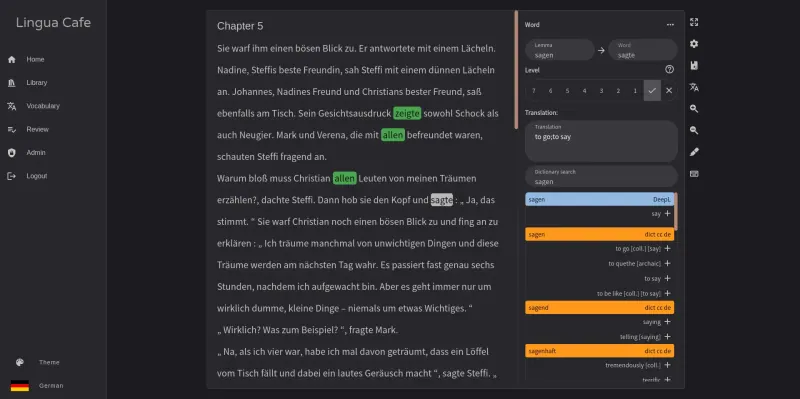
Works like LingQ for your own material: import e-books, web pages, YouTube subtitles or text, read with unknown and learning words highlighted, look up words with a click and review them as flash cards, with daily goals and statistics across 27 languages. It has no lesson library, no audio lessons and no phone apps, and dictionaries are files you download and upload yourself.

What you gain
  • No subscription; every feature is included
  • Your reading list, words and progress stay on your own server
  • Read anything you can import, from e-books to subtitles and web pages
What is different
  • No ready-made library of lessons; you bring your own texts
  • No phone or tablet app; you read in the web browser
  • No new release since March 2025, and some rough edges remain
Some setup Open source

Moving from LingQ

LinguaCafe cannot import your LingQs, so you start your word list again. Create the first account, which becomes the admin, then install your languages under Admin > Languages and upload dictionary files from LinguaCafe's GitHub release, or add DeepL with your own key, under Admin > Dictionaries. Import the texts you were reading in LingQ, as e-books, web pages or pasted text, and mark words you already know as you read; finishing a chapter marks the rest as known, so your list grows quickly.

Questions

What is the best open-source alternative to LingQ?

LinguaCafe is the free, open-source alternative to LingQ for learning a language by reading in the catalogue today. Works like LingQ for your own material: import e-books, web pages, YouTube subtitles or text, read with unknown and learning words highlighted, look up words with a click and review them as flash cards, with daily goals and statistics across 27 languages. It has no lesson library, no audio lessons and no phone apps, and dictionaries are files you download and upload yourself.

Can I import my LingQs into LinguaCafe?

No. LinguaCafe has no LingQ importer, so your saved words and known-word count start again. Marking words as known while you read catches up quickly.

Does LinguaCafe have lessons like LingQ?

No. LinguaCafe has no lesson library or audio lessons; you import your own books, articles and subtitles.

Is there a LinguaCafe phone app?

No. LinguaCafe is a web app with layouts for phones and tablets.

Is LinguaCafe really free compared with LingQ?

Yes, LinguaCafe is free. To run them you need Cloudgate and a server. Use hosted Cloudgate, which can also provide the server, or install Cloudgate on a server of your own for free. Cloudgate's plans and prices are at cloudgate.octabyte.io/pricing. One server can run several apps.

Do I need a developer to replace LingQ?

No. Cloudgate installs LinguaCafe on your server and gives it a secure web address, and you use it in your browser instead of LingQ.