
Tandoor Recipes
A self-hosted recipe manager for big, detailed recipe collections.
No server needed to start: Cloudgate can provide one. What happens when you click Deploy
What is Tandoor Recipes?
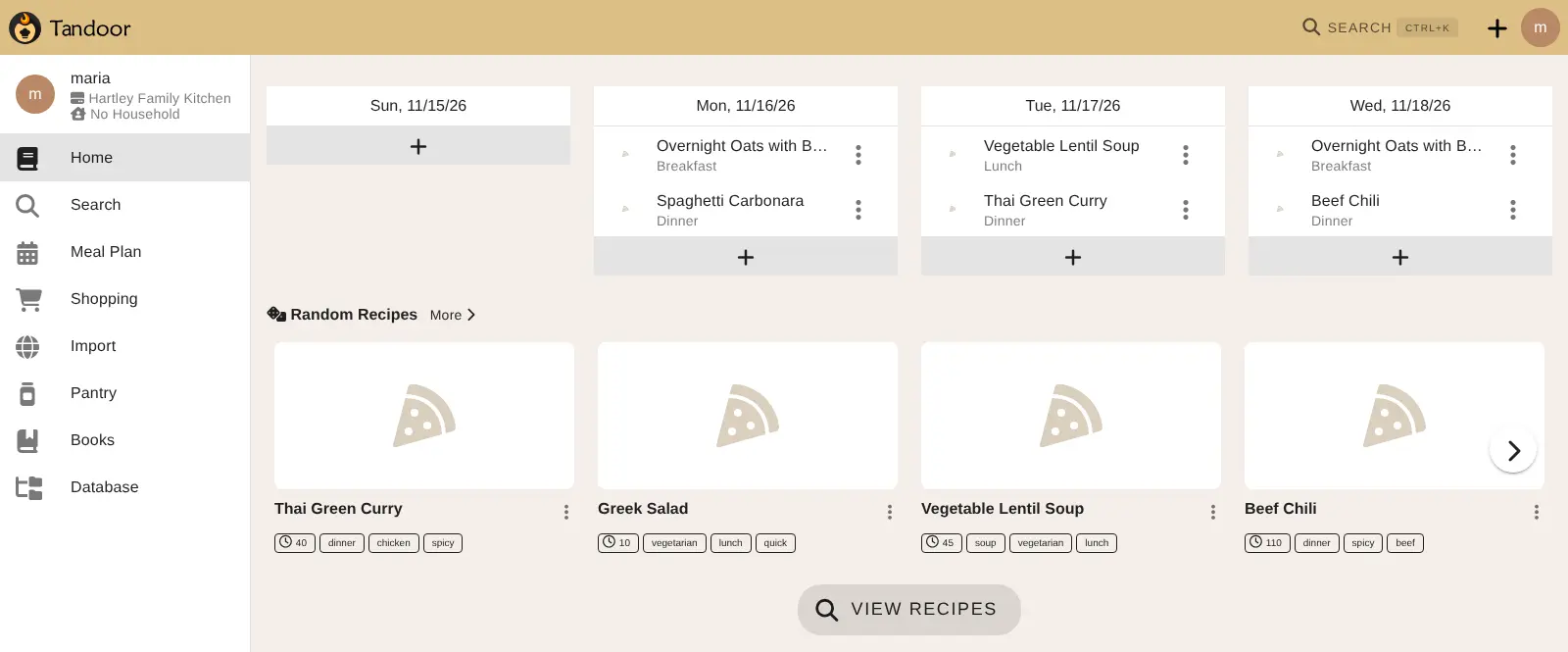
Tandoor Recipes is a self-hosted recipe manager for big collections: detailed recipes, nutrition, meal plans and shopping lists your household shares.
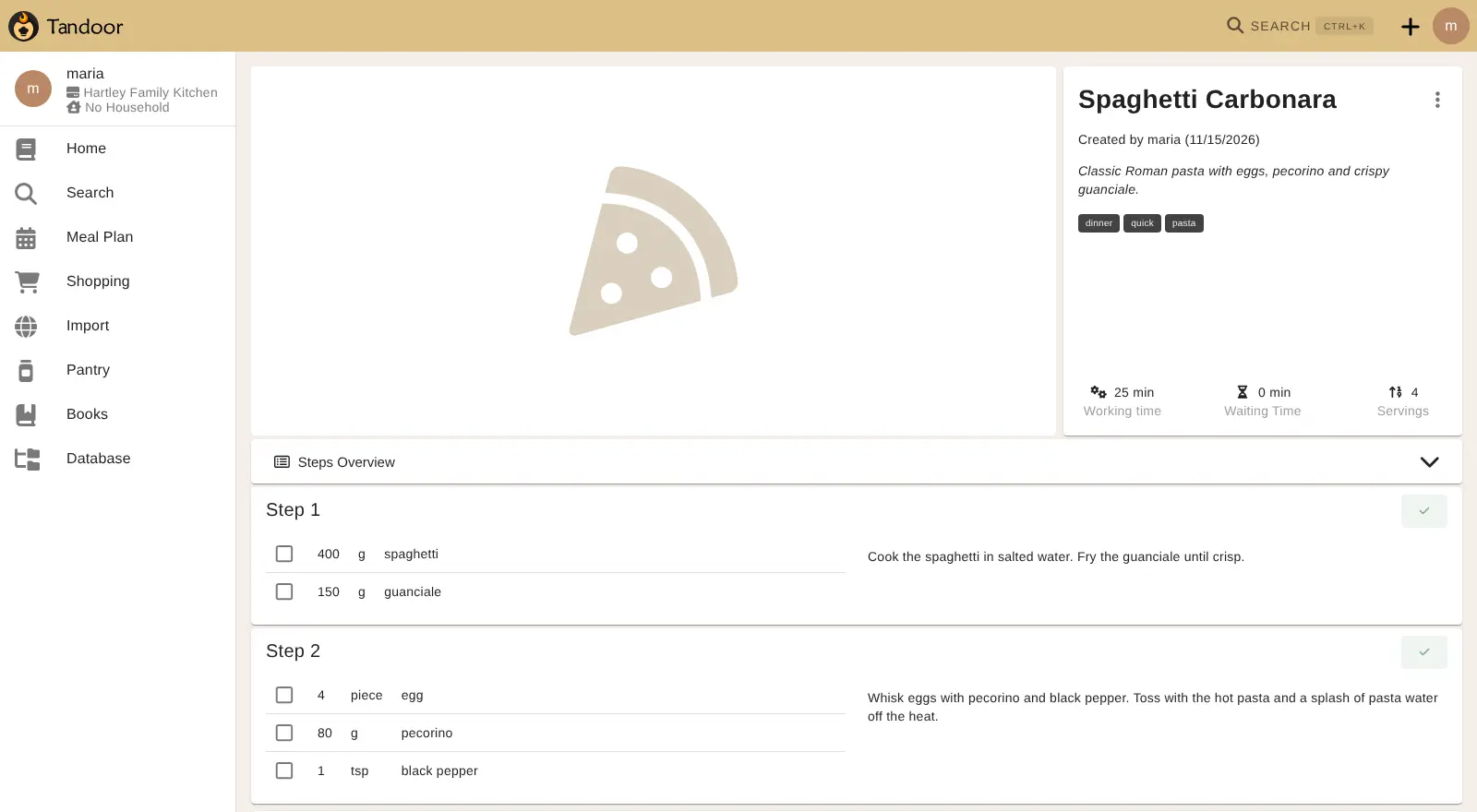
Tandoor Recipes is a self-hosted recipe manager and meal planner for people with large recipe collections, and a no-fee alternative to paid apps such as Paprika or Plan to Eat. It keeps your recipes, meal plan and shopping list in one shared space for family or friends, with more detail than most recipe apps: each step lists its own ingredients, and Tandoor can total nutrition or cost from what goes in.
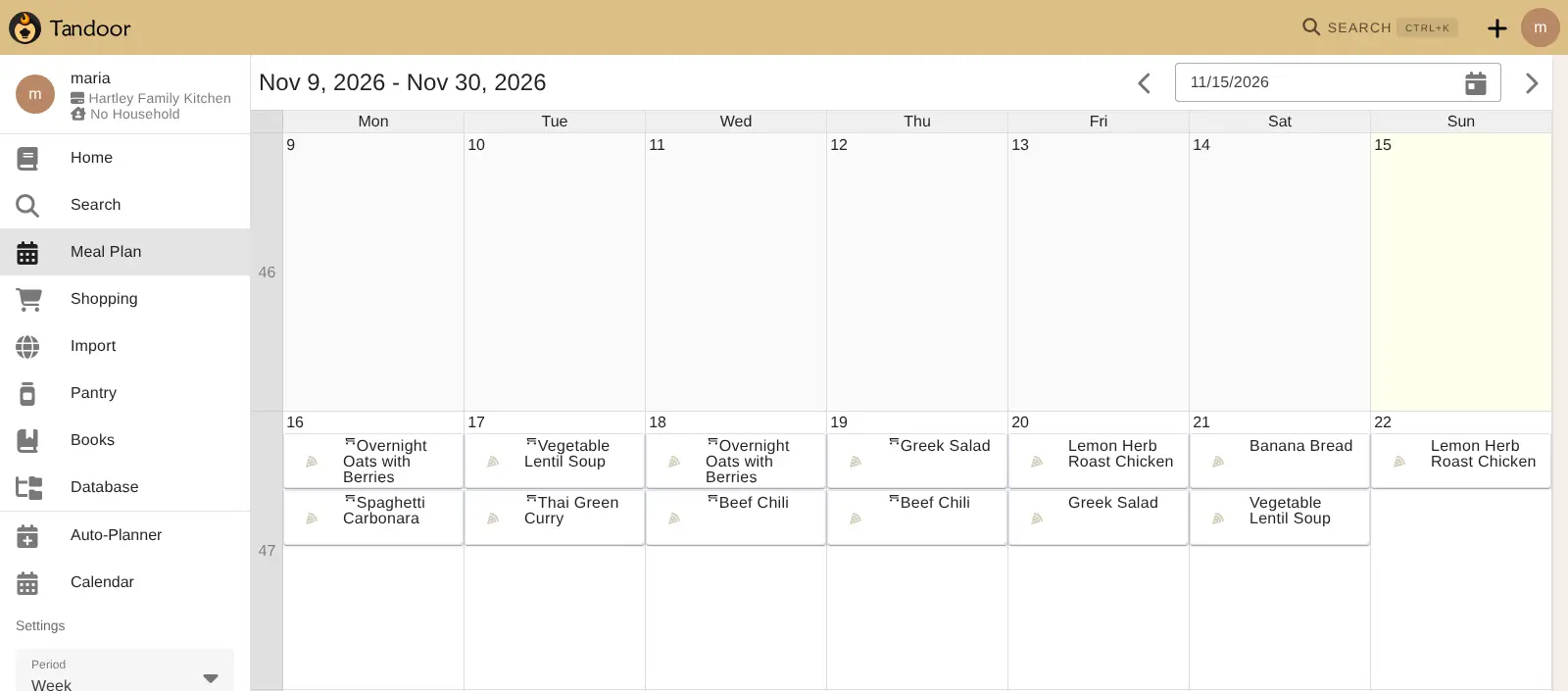
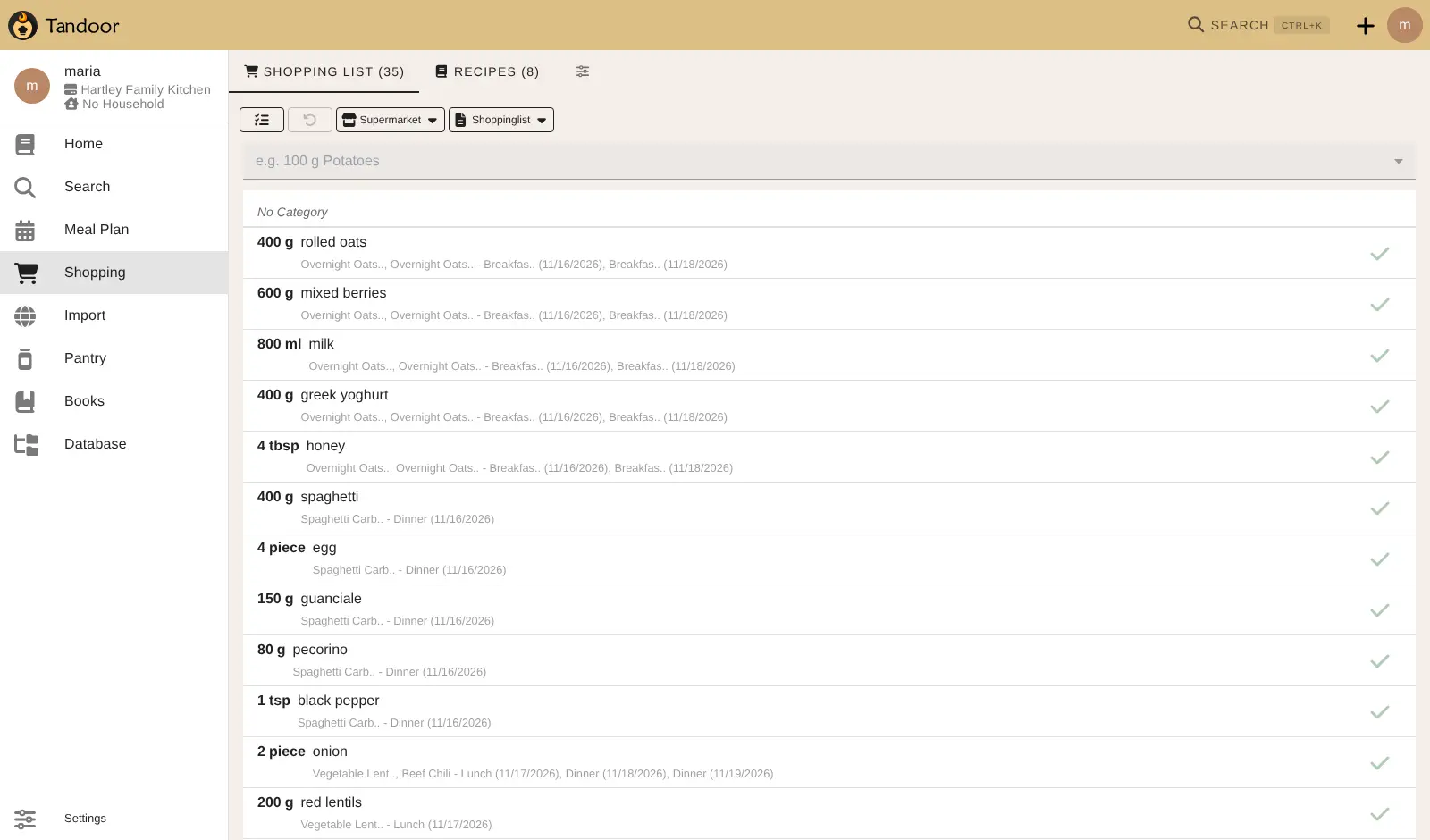
Save recipes from websites by their address and sort them with tags and cookbooks. A family that cooks from a few hundred recipes, for example, could import its old Paprika collection, plan the week's dinners on the calendar, and send the ingredients to one list sorted by their supermarket that everyone ticks off live.
Tandoor runs in any browser and can be added to a phone's home screen; there is no app in the app stores. It imports from Paprika, Plan to Eat, Mealie and many other apps, and can use an AI provider you connect to read recipes from photos or PDFs. It is source-available and free to use on your own server.
Cloudgate installs Tandoor on a server Cloudgate provides or one you connect, and gives it a secure web address. Open that address right after setup to create your admin account, then invite your household.
What you can do with Tandoor Recipes
- Save recipes from websites Paste a recipe's web address and Tandoor copies the ingredients, steps and times, or write your own recipes in a step-by-step editor.
- Give every step its own ingredients Each step lists just the ingredients it needs, and servings scale up or down with fractions or decimals.
- Find a recipe fast Search by words even when they're misspelled, filter by tags, or look for what you can make with what's in the fridge.
- Work out nutrition and cost Add properties such as calories or price to your ingredients, and Tandoor totals them for each recipe.
- Plan meals on a calendar Fill the week with breakfasts, lunches and dinners by hand or with the auto-planner, and add the plan to your own calendar.
- Shop from one shared list Turn recipes or the meal plan into a shopping list sorted by supermarket, which updates live for everyone shopping.
- Bring your collection with you Import from Paprika, Plan to Eat, Mealie, Nextcloud Cookbook, Copy Me That, Mela, Recipe Keeper and many other apps.
- Use AI with your own key Connect your own AI provider to turn photos, PDFs or pasted text into recipes, with a monthly spending limit you set.
Replaces Paprika and Plan to Eat
Tandoor Recipes does the same job as Paprika and Plan to Eat. Here is what changes when you switch.
- No fee for the app and no paid-only features on your own server
- One shared collection for the whole household, in any browser
- Nutrition, cost and step-by-step ingredients that recipe apps rarely offer
- Your recipes and meal plans stay on your own server
- No app in the App Store or Google Play; you add it to your home screen from the browser
- Only recently opened recipes work offline, while Paprika works fully offline
- More settings and detail to learn than simpler recipe apps
- Meal plans and shopping lists from your old app don't come across, only recipes
What happens when you click Deploy?
You do not need a server or any technical knowledge. Four steps, and Tandoor Recipes is running at its own web address.
- Step 1 Click Deploy and create your account
Deploy takes you to Cloudgate. Create an account, or log in if you have one. Tandoor Recipes itself is free.
- Step 2 Choose a server
No server? Get one from Cloudgate: pick a size and a country, and Cloudgate gets it ready. Already have one? Connect it instead.
- Step 3 Cloudgate sets up Tandoor Recipes
It prepares the server, makes the passwords the app needs and starts it. There is nothing to install and nothing to write down.
- Step 4 Open your app and sign in
Your app gets a free web address to start, without https. Add your own domain, like app.yourshop.com, and Cloudgate secures it with https for you.
New to Cloudgate? See what Cloudgate is
Run Cloudgate yourself? Deploy from your own console
In your Cloudgate console, open Templates and choose Tandoor Recipes.
Questions
Is Tandoor Recipes free?
Yes, Tandoor Recipes is free to self-host, and every feature is in the version you run yourself. Its code is public under the AGPL-3.0 licence with the Commons Clause, which makes it source-available rather than open source, and forbids selling it as a hosted service. You pay only for your server, plus an AI provider if you turn on AI.
Is Tandoor a good alternative to Paprika?
Yes, if you want one detailed recipe collection your whole household shares, on your own server and with no fee. Paprika has store apps that work fully offline, with a free plan limited to 50 recipes; Tandoor runs in the browser, can be added to a phone's home screen, and keeps only recently opened recipes offline.
What's the difference between Tandoor and Mealie?
Tandoor Recipes is the more detailed of the two, with ingredients for each step, nutrition and cost from ingredient properties, misspelling-tolerant search and more importers, including one for Mealie. Mealie is simpler to learn and is open source, while Tandoor is source-available.
How do I sign in to Tandoor the first time?
Open your Tandoor address straight after setup. The first visitor creates the admin username and password and the first space, so do it before you share the address; a welcome guide then walks you through the space settings and invites.
Can I import my recipes from Paprika or Plan to Eat?
Yes, Tandoor imports Paprika and Plan to Eat exports with their images, along with Mealie, Nextcloud Cookbook, Copy Me That, Mela, Recipe Keeper, RecipeSage, Pepperplate and others. Only recipes come across, not meal plans or shopping lists.
Is there a Tandoor app for iPhone or Android?
No, Tandoor has no app in the App Store or Google Play. Open your Tandoor address in the phone's browser and add it to the home screen; it opens like an app and keeps recently viewed recipes for offline use.
Does Tandoor need an AI subscription?
No, Tandoor works fully without AI. The optional AI features, such as importing recipes from photos or PDFs, use your own key from a provider such as OpenAI, Gemini or OpenRouter, and you pay that provider for what you use.
Do I need technical skills to run Tandoor Recipes?
No. Click Deploy, create your Cloudgate account and choose a server, and Cloudgate sets up Tandoor Recipes and gives it a web address. You use it in your browser like any other online tool.
Do I need my own server for Tandoor Recipes?
No. When you deploy Tandoor Recipes, hosted Cloudgate can provide a server. If you already rent one, you can connect it instead.
Related apps

A self-hosted recipe manager, meal planner and shopping list.

Recipes, meal plans and a live grocery list your whole home shares.

A self-hosted shared grocery list, recipe book and meal planner.

A self-hosted family planner for calendar, chores, meals and money.