
Gitea
Host your team's code and reviews on your own server.
No server needed to start: Cloudgate can provide one. What happens when you click Deploy
What is Gitea?
Self-hosted Gitea: an open-source GitHub alternative for private code hosting, code reviews, issue tracking and automatic builds, for small software teams.
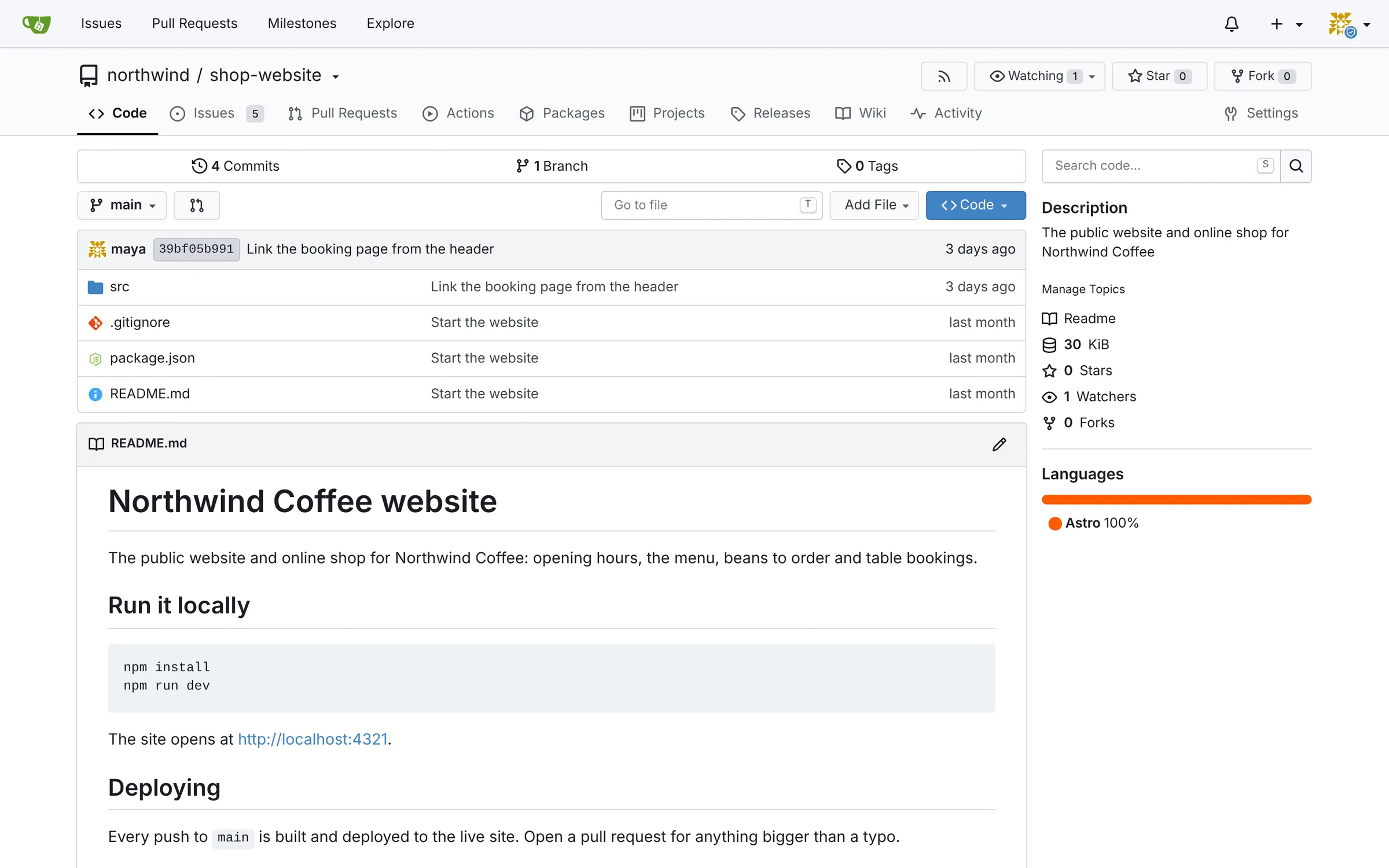
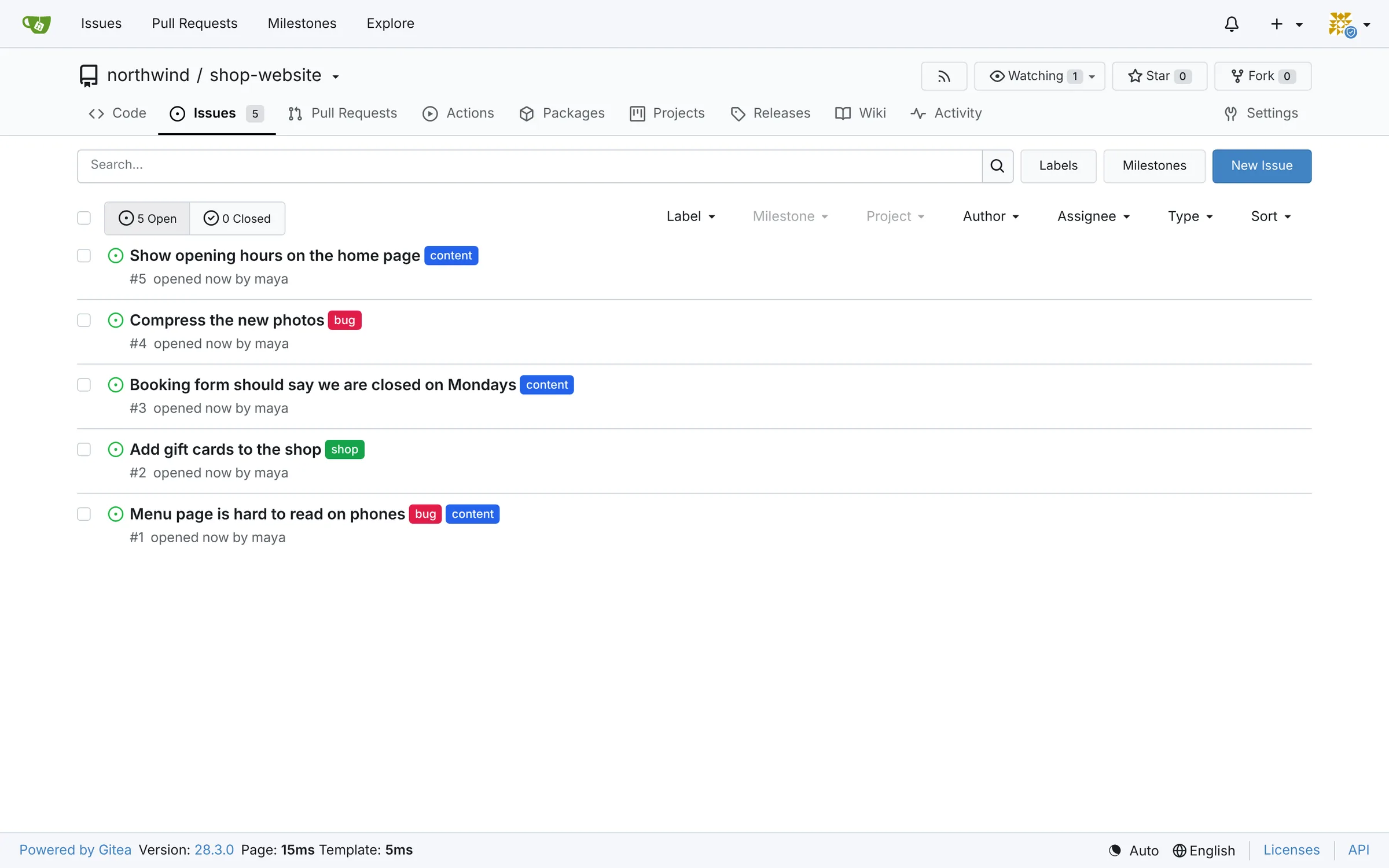
Gitea is an open-source, self-hosted Git server that gives your team private code hosting, code reviews, issue tracking and automatic builds on your own server, much like GitHub or Bitbucket. It stores your code with the full history of every change and gives your team one place to review changes, track bugs and plan work. If your developers have used GitHub, they will find their way around in minutes.
It suits agencies, internal IT teams and small software companies that want their code on a server they control, without paying for every person who needs access. A web agency, for example, can keep each client's website in its own private project, review every change before it goes live, and give the client read access to their own project only.
Gitea works with the Git tools developers already use, from the command line to code editors such as Visual Studio Code. Its automatic builds use the same file format as GitHub Actions, so existing build files often work unchanged, although they need a separate build machine connected to Gitea. Projects can be copied from GitHub, GitLab and Bitbucket with their history.
Cloudgate installs Gitea with its database on a server Cloudgate provides or one you connect and gives it a secure web address. The first person to register becomes the admin. After that, turn off open sign-up so only the admin can add people. Gitea is light: a small server is enough for most small teams.
What you can do with Gitea
- Keep code in one place Private and public projects, each with the full history of every change.
- Review changes together Discuss, comment on and approve changes before they go live.
- Track work Issues, labels, milestones and project boards for bugs and planned features.
- Run automatic builds Test and build your code on every change, using the same file format as GitHub Actions.
- Manage who sees what Group people into organisations and teams, and decide who can read or change each project.
- Bring your projects across Copy a project from GitHub or GitLab with its issues, reviews and history, or any Git project with its code.
Replaces GitHub and Bitbucket
Gitea does the same job as GitHub and Bitbucket. Here is what changes when you switch.
- No price per user, however big the team gets
- Your code never leaves your server
- Fast even on a small server
- Automatic builds use the same format as GitHub Actions
- Fewer add-ons and integrations than GitHub
- Automatic builds need a separate build machine connected to it
- Developers push and pull over HTTPS; this setup does not offer Git over SSH
- Sign-in uses Gitea's own accounts unless you connect a single sign-on service
What happens when you click Deploy?
You do not need a server or any technical knowledge. Four steps, and Gitea is running at its own web address.
- Step 1 Click Deploy and create your account
Deploy takes you to Cloudgate. Create an account, or log in if you have one. Gitea itself is free.
- Step 2 Choose a server
No server? Get one from Cloudgate: pick a size and a country, and Cloudgate gets it ready. Already have one? Connect it instead.
- Step 3 Cloudgate sets up Gitea
It prepares the server, makes the passwords the app needs and starts it. There is nothing to install and nothing to write down.
- Step 4 Open your app and sign in
Your app gets a free web address to start, without https. Add your own domain, like app.yourshop.com, and Cloudgate secures it with https for you.
New to Cloudgate? See what Cloudgate is
Run Cloudgate yourself? Deploy from your own console
In your Cloudgate console, open Templates and choose Gitea.
Questions
Is Gitea free?
Yes. Gitea is free, open-source software under the MIT licence, and you pay only for hosting. Its company also sells a hosted and an enterprise edition, which you do not need to self-host it.
Is Gitea a good alternative to GitHub?
Yes, for teams that want private code hosting on their own server. It covers the everyday GitHub work of code, reviews, issues, wikis and automatic builds; it has fewer integrations and none of GitHub's public community.
How do I self-host Gitea?
The easiest way is to set up this template on Cloudgate. Cloudgate installs Gitea with its database on your server and gives it a secure web address; the first person to register becomes the admin.
Can we move our projects from GitHub, GitLab or Bitbucket?
Yes. Gitea's built-in migration copies a project's code and history, and from GitHub and GitLab also its issues, reviews, labels, milestones, releases and wiki.
Do my developers need to change how they work?
Very little. They use the same Git tools and commands as with GitHub or Bitbucket, with a different web address. In this setup they connect over HTTPS, signing in with a password or an access token, not over SSH.
Is our code private with Gitea?
Yes. Your code is stored on your own server, and a private project is visible only to the people and teams you choose.
How do I stop strangers from signing up?
Register your own account first; it becomes the admin. Then set the "Turn off open sign-up" variable to true in Cloudgate and redeploy, and add new people from Gitea's site administration page.
Do I need my own server?
No. When you deploy Gitea, hosted Cloudgate can provide a server. If you already rent one, you can connect it instead.