Open-source alternative to Google Classroom

Kolibri is a free, open-source Google Classroom alternative for schools and learning centres with poor or no internet: coaches assign lessons and quizzes from a ready-made library and follow each learner’s progress, on a server of their own. Google Classroom needs a steady internet connection and Google accounts; Kolibri’s Android app and school devices keep working offline and sync later, though learners cannot hand in files and essays cannot be graded.

Free app Code: Open source Import from Google Classroom: No Some setup

Why look for an alternative to Google Classroom?

Google Classroom is Google's online classroom for schools: teachers post assignments and materials, learners hand in work, and teachers grade it, all tied to Google accounts and Google Drive. It is free for schools, with paid Google Workspace for Education tiers that add more.

Schools, libraries and learning centres look for an alternative when their internet connection is slow, costly or missing, or when they would rather keep learners' names and progress on their own server than in Google's. A self-hosted Kolibri brings a ready-made library of lessons that works offline, with classes, lessons, quizzes and progress reports; in return, it has no file hand-in or grading of written work.

How Kolibri compares

Offline-first learning platform with lessons, quizzes and progress.

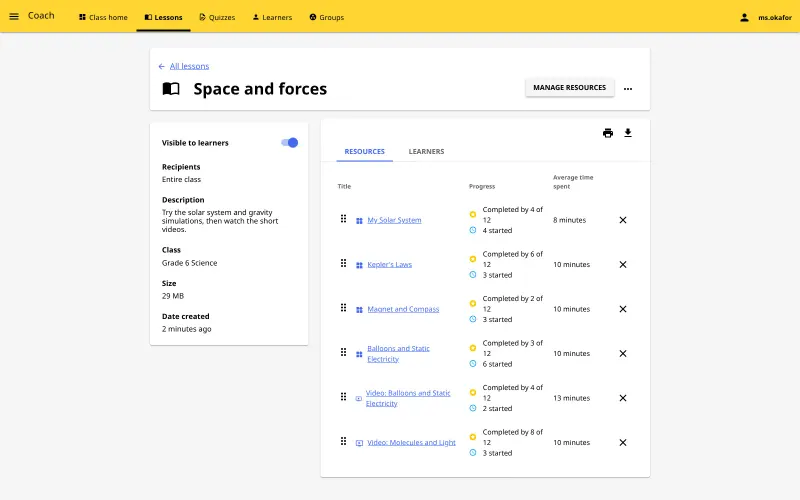
Covers the assign-and-follow part of Google Classroom: coaches build lessons from a library of ready-made videos, exercises, simulations and books, assign them to a class or group, build quizzes and follow each learner's progress and scores. Learners can keep working offline in the Kolibri Android app, and a Kolibri computer at a school can copy channels from your server and sync progress back. It is not a full replacement: learners cannot hand in files, essays cannot be graded, and it has no Google Docs or Drive link and no video calls.

What you gain
  • Learners can keep working offline in the Android app and sync later
  • A free library of ready-made lessons in many languages comes with it
  • Learner names and progress stay on your own server
What is different
  • The library starts empty; you download the channels you want first, and videos take a lot of disk space
  • Learners do not hand in files or essays for marking as they do in Google Classroom
  • Your own material goes in through Kolibri Studio, Learning Equality's online channel builder, not by uploading loose files
Some setup Open source

Moving from Google Classroom

Nothing imports from Google Classroom, so set up your classes in Kolibri. Open the new web address and go through the setup wizard, choosing group learning, then create the super admin account and keep its password safe, because it cannot be recovered. Import the content channels you need, such as Khan Academy, CK-12, PhET or TED-Ed, over the internet or from a USB drive; videos take a lot of disk space, so import only the topics you teach. Then create your classes, add coaches and learners, by hand or from a CSV file, and build your first lessons and quizzes from the library.

Questions

What is the best open-source alternative to Google Classroom?

Kolibri is the free, open-source alternative to Google Classroom for assigning lessons and following learners’ progress in the catalogue today. Covers the assign-and-follow part of Google Classroom: coaches build lessons from a library of ready-made videos, exercises, simulations and books, assign them to a class or group, build quizzes and follow each learner's progress and scores. Learners can keep working offline in the Kolibri Android app, and a Kolibri computer at a school can copy channels from your server and sync progress back. It is not a full replacement: learners cannot hand in files, essays cannot be graded, and it has no Google Docs or Drive link and no video calls.

Does Kolibri work without internet?

Kolibri itself can run on a local network with no internet at all. When Cloudgate runs it on an online server, learners reach it over the internet, and the Kolibri Android app or a Kolibri computer at a school can copy channels from it, work offline and sync progress back later.

Can learners hand in assignments in Kolibri?

No. Kolibri tracks progress on lessons, exercises and quizzes from its library, but learners cannot upload files and essays cannot be graded. Keep another tool for written work.

Can I use my own teaching materials?

Yes, through Kolibri Studio, Learning Equality's online tool, where you build a channel aligned to your curriculum and then import it into Kolibri. Kolibri cannot import loose files directly.

Is the content free?

The Kolibri Library's channels are free and openly licensed, but each channel has its own licence; Khan Academy's content, for example, is for non-commercial use.

Is Kolibri really free compared with Google Classroom?

Yes, Kolibri is free. To run them you need Cloudgate and a server. Use hosted Cloudgate, which can also provide the server, or install Cloudgate on a server of your own for free. Cloudgate's plans and prices are at cloudgate.octabyte.io/pricing. One server can run several apps.

Do I need a developer to replace Google Classroom?

No. Cloudgate installs Kolibri on your server and gives it a secure web address, and you use it in your browser instead of Google Classroom.